Using The Bushealth Function
Input Connections and Tested Signals
6
77
Profibus DP/RS-485
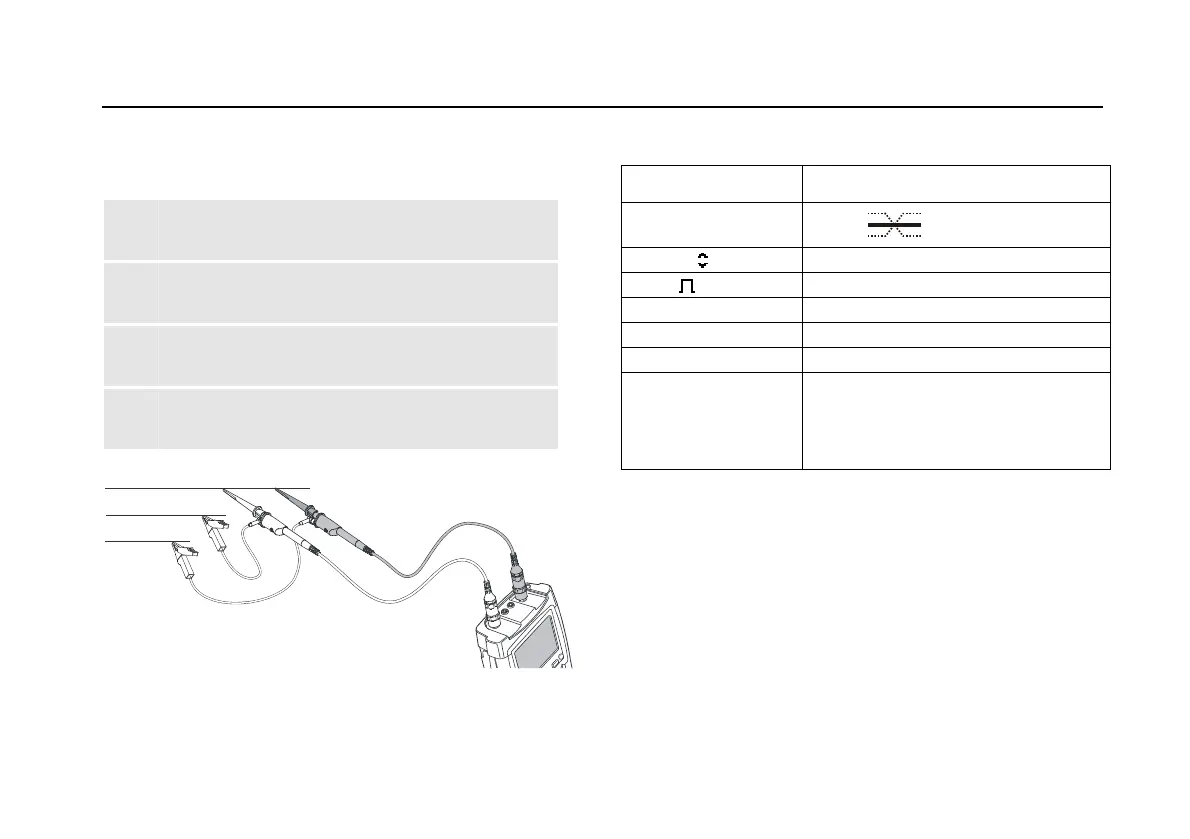
Default probe setting 10:1. Use the Fluke 10:1 probes.
1 Connect the red probe to the test tool input A
and the grey probe to input B.
2 Connect the ground lead of the input A probe to
the DP bus RxD/TxD N (-)
3 Connect the ground lead of the input B probe to
the DP bus cable shield.
4 Connect the probe tip of both probes to the DP
bus RxD/TxD P (+)
DATA +
DATA -
DATA GND
Figure 43. Profibus DP Measurement Connections
Table 9. Profibus DP Tested Signal Properties
Signal Description
V-Offset
V offset
V-Level Peak-peak voltage
Data Bit width
Rise Rise time as % of bit width
Fall Fall time as % of bit width
Jitter Jitter distortion
Signal Dist.
Overshoot
Signal distortion (Manchester
decoding, default setting)
Overshoot (NRZ decoding, can be
selected via limit setup)
Note
The bus normally has continuous data traffic.






 To Next Page