Fluke 19xC-2x5C
Users Manual
84
Saving Screens with Associated Setups
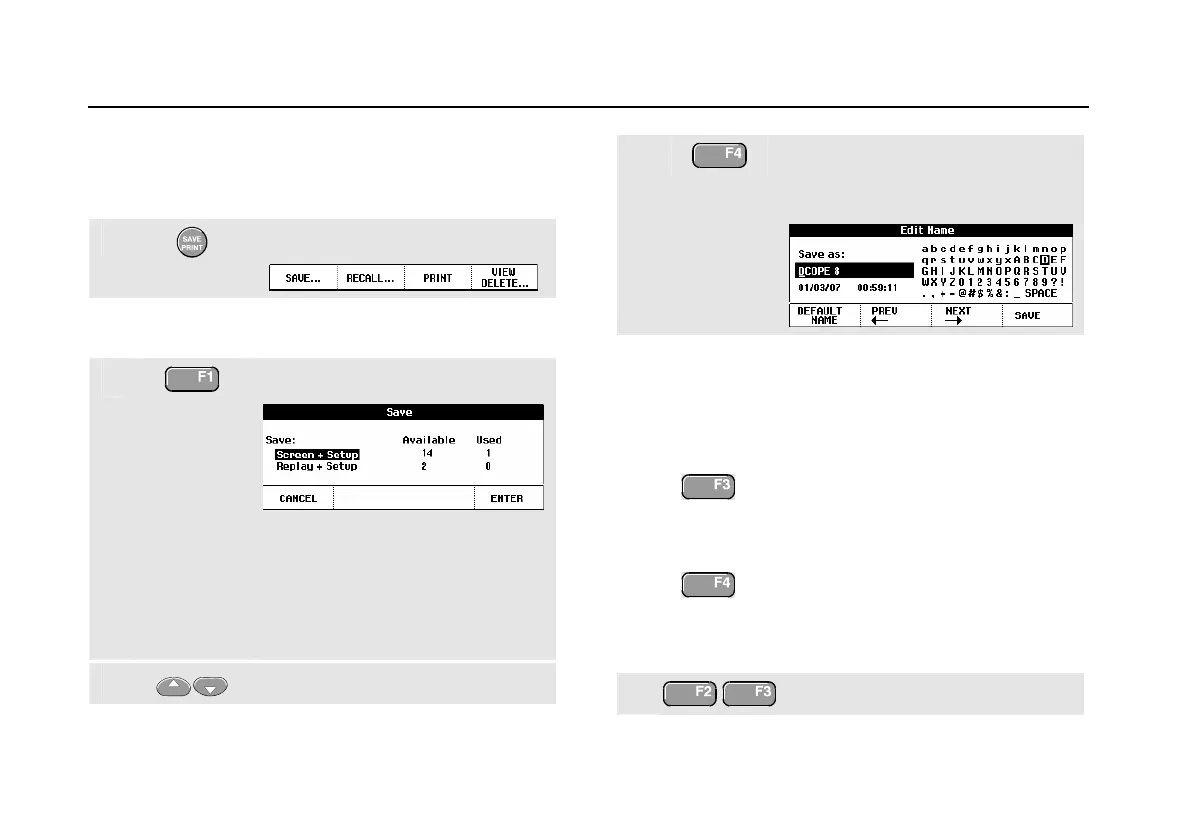
To save for example a screen+setup in Scope mode, do
the following:
1
Display the SAVE/PRINT key labels.
From this point the screen is frozen until you hide the
SAVE/PRINT key labels again.
2
Open the Save menu.
Observe the number of available
and used memory locations.
In METER mode the Edit Name
menu will be shown now as only a
setup+screen can be saved.
3
Highlight Screen+Setup .
4
Open the Edit Name menu. This
menu enables you to name the
saved screen+setup (Save as: )
If no free memory locations are available a message pops
up that proposes to you to overwrite the oldest data set.
Do one of the following:
If you don’t want to overwrite the oldest data set,
- press , then delete one or more memory
locations, and save again.
If you want to overwrite the oldest data set,
- press and continue at step 4.
To name the screen+setup according to your own
preferences, do the following:
5
Skip to a new character position.






 To Next Page