Using Memory, PC and Printer
Saving and Recalling
7
87
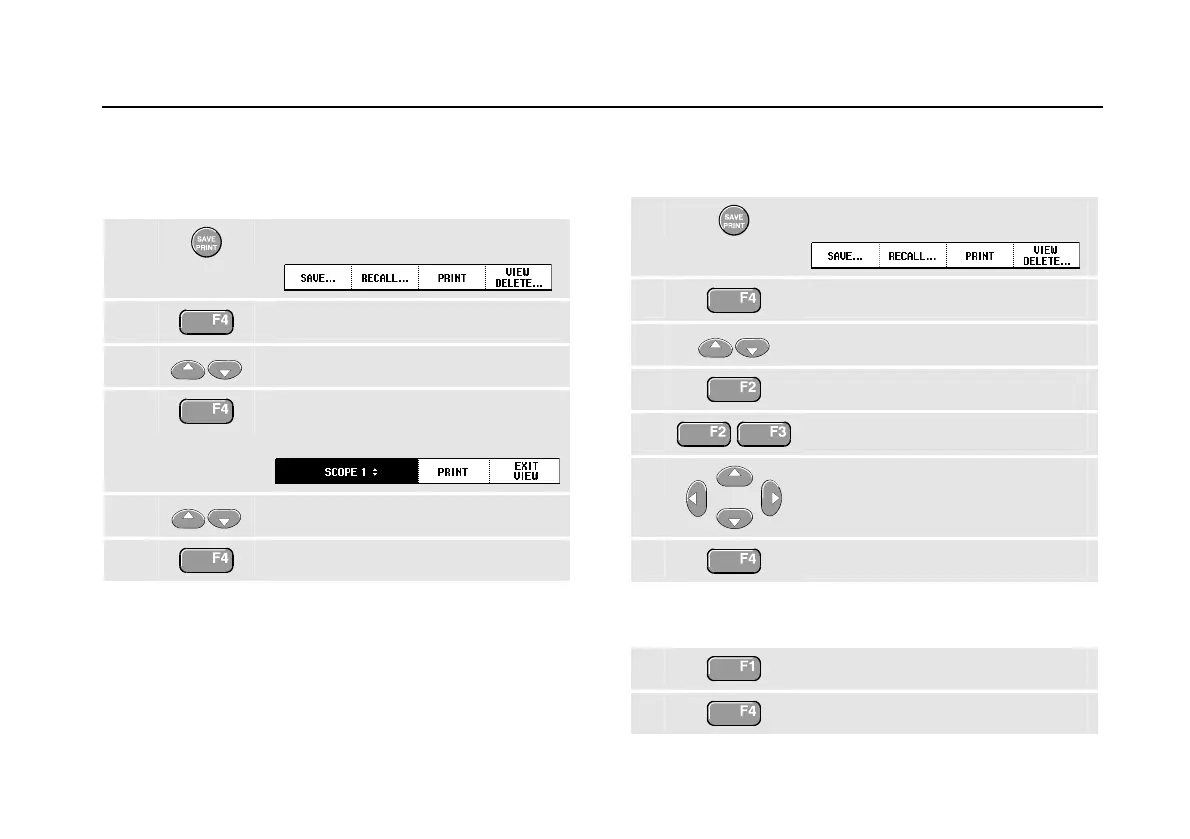
Viewing Stored Screens
To scroll through the memories while looking at the stored
screens, do the following:
1
Display the SAVE/PRINT key labels.
2
Open the View/Delete menu.
3
Highlight a screen+setup location..
4
View the screen, and open the
viewer.
5
Scroll through all stored screens.
6
Exit the View mode.
Note:
The replay stores (max. 2) cannot be viewed!
Renaming Stored Screens
To modify the name of stored screens, do the following:
1
Display the SAVE/PRINT key labels.
2
Open the View/Delete menu.
3
Highlight a screen+setup location.
4
Open the Rename menu.
5
Skip to a new character position.
6 Select another character.
Repeat 5 and 6 until done.
7
Save the new name.
To select a default name generated by the test tool,
continue from step 4 as follows:
5
Generate the default name.
6
Save the new name.







 To Next Page