7008
Users Guide
10-2
10.1.1 Wiring
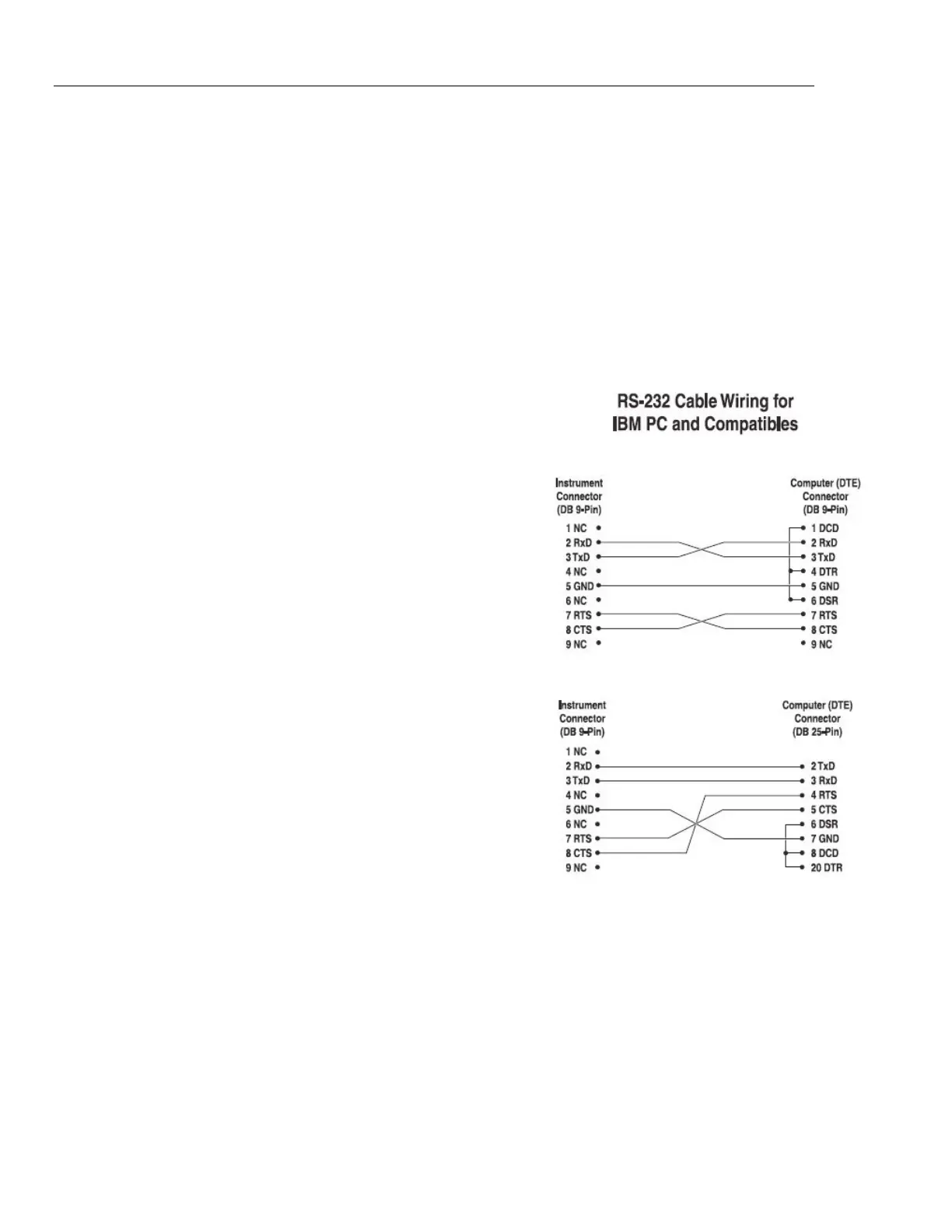
The serial communications cable attaches to the bath through the DB-9
connector at the back of the instrument. Figure shows the pin-out of this
connector and suggested cable wiring. To eliminate noise, the serial cable should
be shielded with low resistance between the connector (DB-9) and the shield.
10.1.2 Setup
Before operation the serial interface of the
bath must first be set up by programming
the baud rate and other configuration
parameters. These parameters are
programmed within the serial interface
menu.
To enter the serial parameter programming
mode first press “EXIT” while pressing
“SET” and release to enter the secondary
menu. Press “SET” repeatedly until the
display reads “ProbE”. This is the menu
selection. Press “UP” repeatedly until the
serial interface menu is indicated with
“SErIAL”. Finally press “SET” to enter the
serial parameter menu. In the serial
interface parameters menu are the baud
rate, the sample rate, the duplex mode,
and the linefeed parameter.
10.1.2.1 Baud Rate
The baud rate is the first parameter in the
menu. The display will prompt with the
baud rate parameter by showing “BAUd”.
Press “SET” to choose to set the baud
rate. The current baud rate
value will then be displayed. The baud rate
of the 7008 serial communications may be
programmed to 300, 600, 1200, or 2400
baud. The baud rate is pre-programmed to
1200 baud. Use “UP” or “DOWN “to
change the baud rate value. Press “SET”
to set the baud rate to the new value or
“EXIT” to abort the operation and skip to
the next parameter in the menu.
Figure 9. Serial cable wiring



 To Next Page