Quick Start
- FS-T1001 Media Recorder
4
Quick Start
Physical Description and Controls
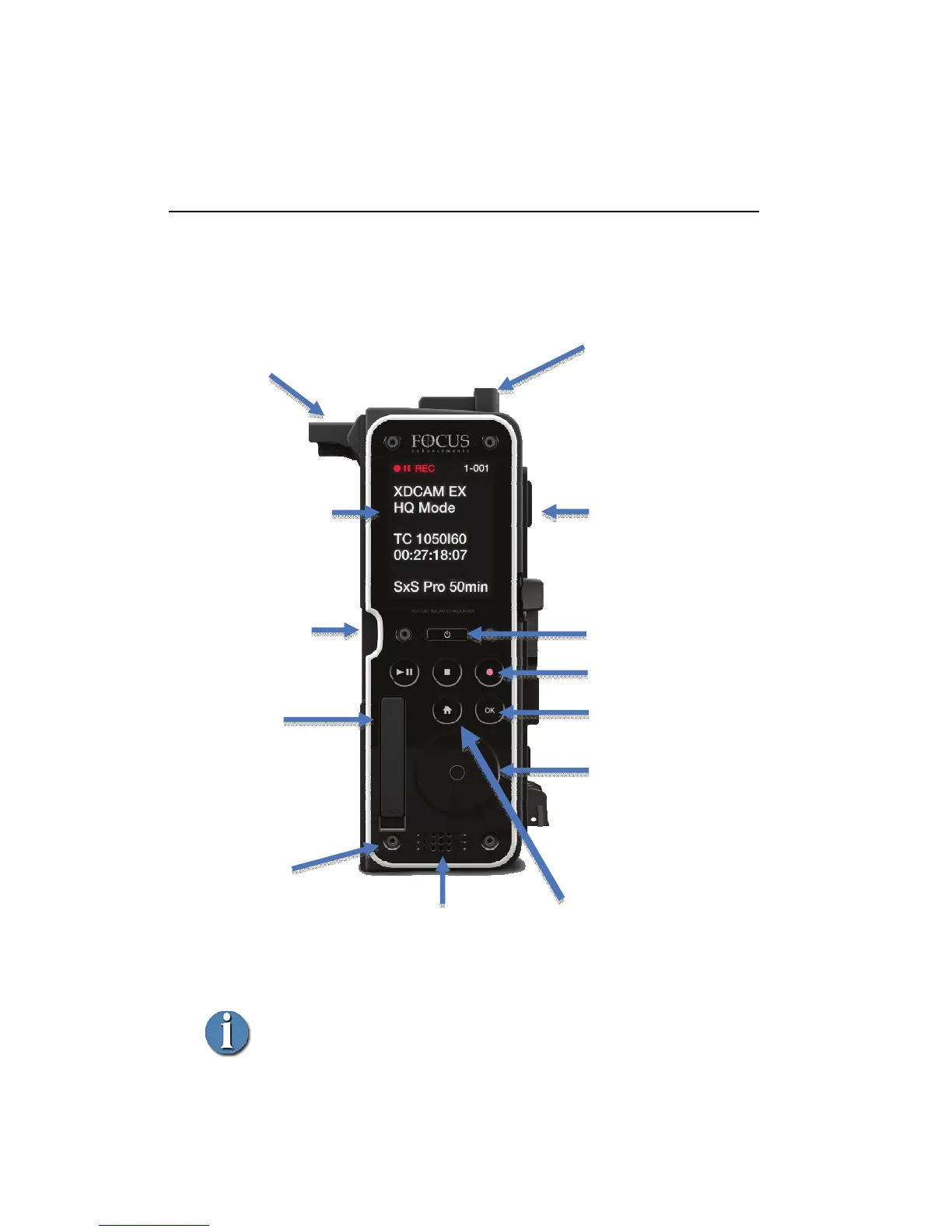
Front View – Controls
Control Types
Tactile – provides physical feedback when pressed: Power button.
Capacitive Touch – does not provide physical feedback (optional audible
feedback only):
Rec / Play Control and Menu buttons, and Scroll-pad and Select button.
Dock Mount attach
point for secure
accessory mounting.
Control Buttons
(Play/Pause, Stop, Rec)
Menu Buttons
Home and OK
Sony V-Lock
battery mounting hardware
Power Button
Scroll-pad
Touch buttons are located at
the 12, 3, 6 and 9 o'clock
positions.
To enter the FS-T1001 Menu,
tap the 3 or 9 o'clock positions.
Speaker
Provides warning sound and
feedback during menu navigation.
ExpressCard
Slot Cover.
To remove, lift from lip
at the base of slot.
To reinsert, push
cover into place until
flush.
Sony V-Lock
For camera attachment.
ExpressCard
34 Slot
For use with SxS media.
Color OLED Display
2.5", 240x320
Menu, Status, and
Clip Thumbnail
Dock Mount
For secure
attachment to
cameras.
Thumb screws
are not shown.
TIPS:
- To safely eject an SxS card, press
the HOME key for 3 sec
- Press the OK button during record to
view different TC/UB modes



 To Next Page