16 REFVAC4P, REFVAC5P Undercounter Refrigerators
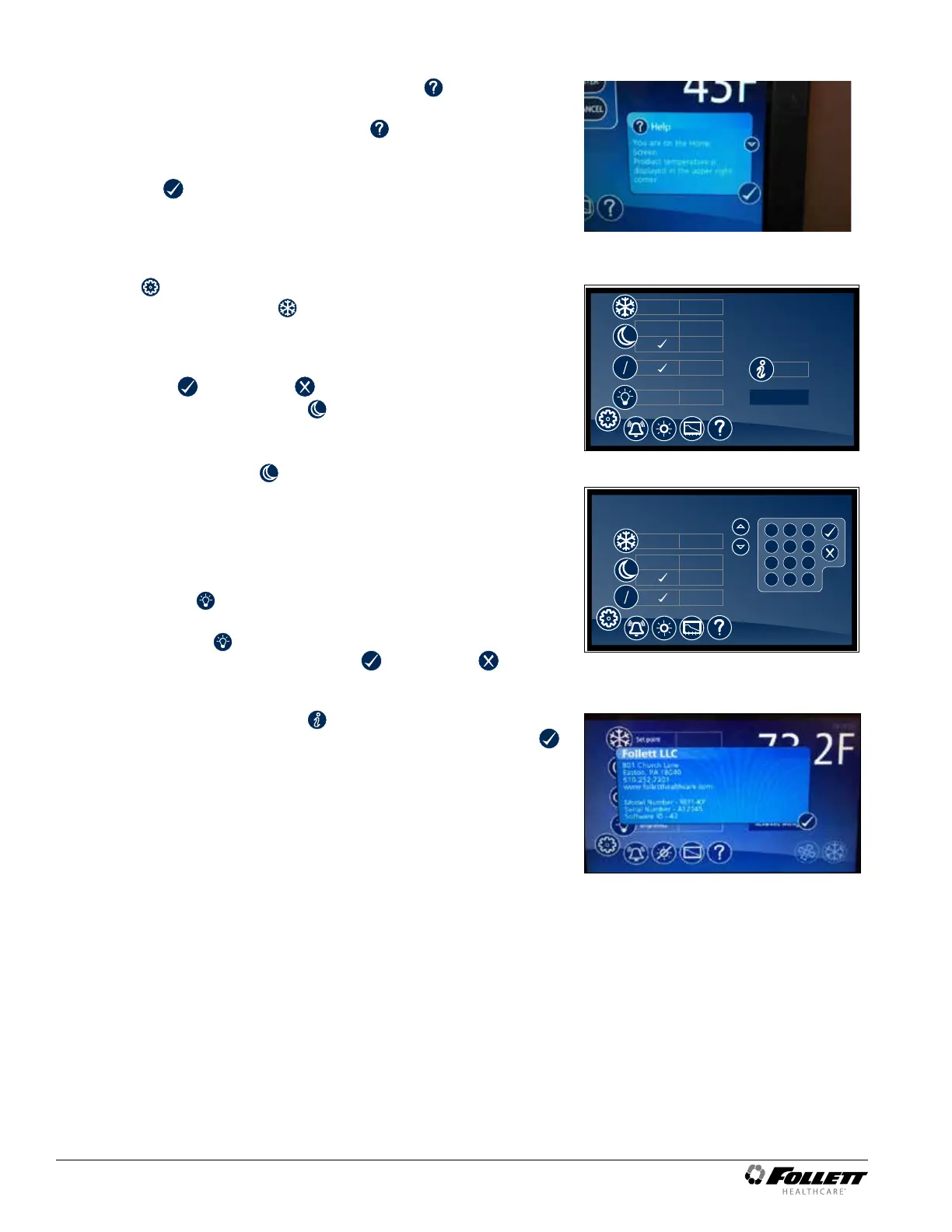
Help
§ Help is available at any time by touching the icon at the bottom
of the screen.
§ Help is screen-specic; touching the
icon will display an
explanation of the functionality and use of the screen you are
currently viewing.
§ Touch
to exit help screen.
Fig. 20
Settings
§ Refrigeration Set Point
– Touch the number displayed in the box to the right of the Set
point label and use the keypad or UP and DOWN arrows to
select product temperature between 1 C (36 F) and 10 C (50 F).
Press to accept or to cancel.
§ Sleep Temperature Display
– Toggle ON to hide the temperature reading immediately on the
home screen.
§ Set the Sleep Delay
– To automatically hide the temperature after 0-600 seconds of
inactivity, touch the box to the right of the delay (0-600) box. Use
keypad or UP and DOWN arrows to select from 0-600.
§ Temperature
– Toggle between F and C to select Fahrenheit or Celsius.
§ Brightness
– Touch the number displayed in the box to the right of the
Brightness
icon and use the keypad or UP and DOWN
arrows to select from 1-10. Press to accept or to cancel.
Fig. 21
38.4 F40 F
Advanced Settings
F
C
F
C
Set point 38.0 F
System Info
Brightness
delay (0 - 300)
ON
3 seconds
OFF
5
Fig. 22
Advanced Settings
delay (0 - 300)
ON
3 seconds
OFF
F C
F
C
Set point 38.0 F
2
5
8
0
1
4
7
3
6
9
#
*
System Information
§ Touch the System Info icon to display the model number, unit
serial number and software version. Touch the checkbox icon
in the lower right corner of the box to clear.
Fig. 23




 To Next Page