18 REFVAC4P, REFVAC5P Undercounter Refrigerators
Start-up alarm delay
The Performance Plus unit has a 120 minute time delay between when
the unit is energized to when the temperature alarms become active.
This delay can be changed in parameters in the controller under Alarm
Startup Delay.
Setting Alarms
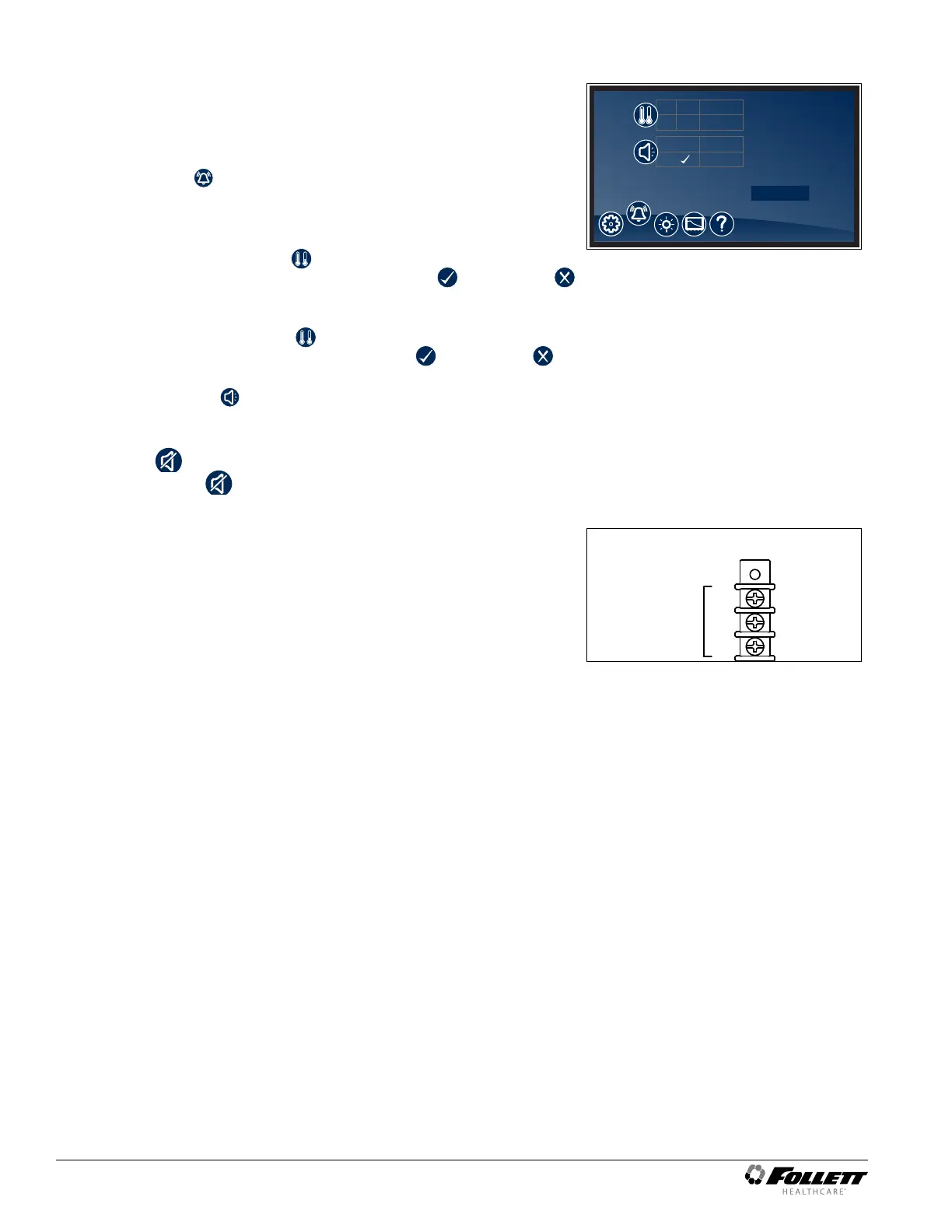
§ Alarming Settings control the conditions and timing of event and
alarm conditions that result in audible and/or visual alerts.
§ To change the high alarm set point, touch the number displayed in
the box to the right of the
icon and use the keypad or UP and
DOWN arrows to select an alarm value. Press to accept or
to cancel.
§ To change the low alarm set point, touch the number displayed in
the box to the right of the
icon and use the keypad or UP and
DOWN arrows to select alarm value. Press to accept or to
cancel.
§ Audible Alarm
– Toggle between ON and OFF to engage and disengage the
audible alarm function.
§ Mute
– Touch the
icon to mute audible alarm for 15 minutes.
Fig. 25
HIGH
LOW
41.5 F
35.1 F
(1 - 10)
ON
3
OFF
Advanced Settings
Alarming Contacts
This unit is equipped with dry contacts that may be connected to a
3rd party monitoring system. The contacts are located on the back of
the unit. Performance Plus touchscreen units utilize Alarm 1 set. Each
set of dry contacts has a Common, a Normally Open and a Normally
Closed connection point. By default, Alarm Relay 1 is set to activate
with any of the following alarms: Alarm 1 High temp, Alarm 1 Low
temp, Door Open Alarm, and Power Loss Alarm.
Probe calibration
§ NSF 456 requires the temperature display probe to be replaced or
recalibrated. Follett recommends replacement/recalibration 12 months
from the original date of calibration on the Certicate of Traceability
supplied with your equipment at the time of purchase. Recalibration
or purchasing a new calibrated probe is not covered by the original
equipment warranty. To purchase a new Probe with Certicate of
Traceability, please contact our Parts Department @ 1-877-612-5086 or
partsales@follettice.com
Screen saver
The screen saver will replace the home screen and display a blank
screen, time and date, or the temperature. When the screen is touched
or the unit has an alarm or event, it will return to the home screen. The
screen saver can be changed in the advanced setting.
Screen saver function: blank, time and date, or temperature.
Screen saver time (sec): 0—600 seconds between the last touch of
the screen to the activation of the screen saver.
Fig. 26
COM
N.O.
N.C.
ALARM 1
REAR PANEL CONNECTIONS
1A/30VDC




 To Next Page