5100ex Calibration Manual
Calibrating Axle Pulses By Distance
29
Calibrating Axle Pulses By Distance
The 5100ex can automatically set the Calibration → Speed → Axle Pulses value by recording the
number of pulses traveled in a mile.
Before calibrating the Axle Pulses by distance:
1. Set the Calibration → Speed → Speedo Type setting.
2. Set the Calibration → Speed → Low Trip Point setting.
3. Set the Calibration → Speed → High Trip Point setting.
If the settings above are not configured properly, the axle pulses may be recorded incorrectly.
To calibrate the Axle Pulses by distance:
Calibrating axle pulses can be completed using either English or Metric units. The steps below
will walk you through calibrating the axle pulses using English units.
STEP 1: Enter the Calibration Menu. See Entering the Calibration Menu on page 2.
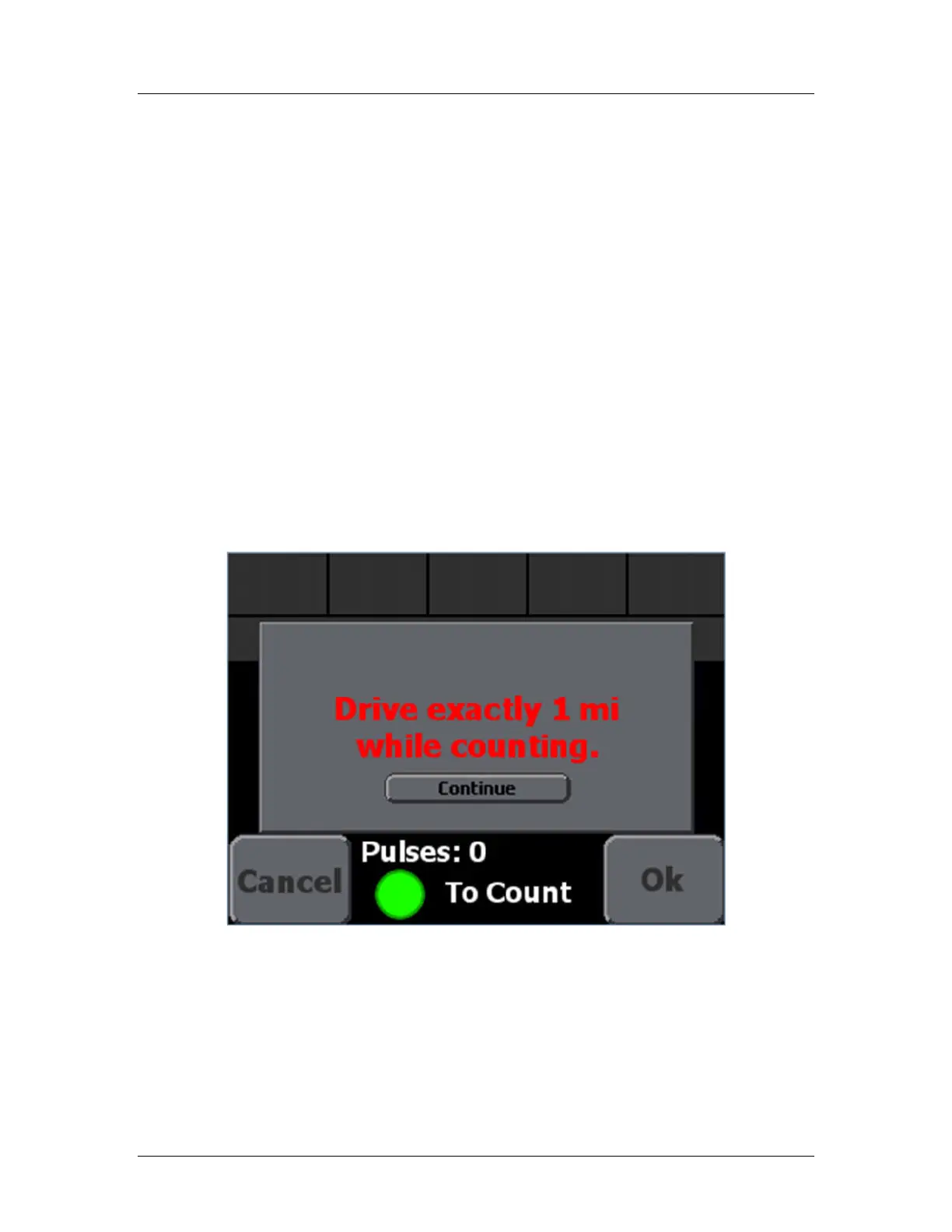
STEP 2: Navigate to the Calibration → Speed → Cal By Distance setting. Figure 2 will
appear, as shown below.
Figure 2: Cal By Distance Screen
STEP 3: Press the Continue button.
STEP 4: Drive the vehicle to a landmark from which you can measure exactly one mile
such as an Interstate Highway mile marker.
STEP 5: Press the green, Standby knob to begin counting axle pulses. The status should
change to “Counting”.
STEP 6: Drive exactly one mile.


 To Next Page