5100ex Calibration Manual
Exporting Calibration Settings
50
Exporting Calibration Settings
If you wish to view the calibration settings from a 5100ex or copy settings from one vehicle to
another because their hydraulic systems are similar, you may copy them to a USB flash drive
using the Export Calibration Settings option. Both a human-readable text file (.TXT) and a secure
5100ex configuration file (.CALEX) will be saved to the USB flash drive during this process.
To Export 5100ex Calibration Settings:
STEP 1: Enter the Calibration Menu. See Entering the Calibration Menu on page 2.
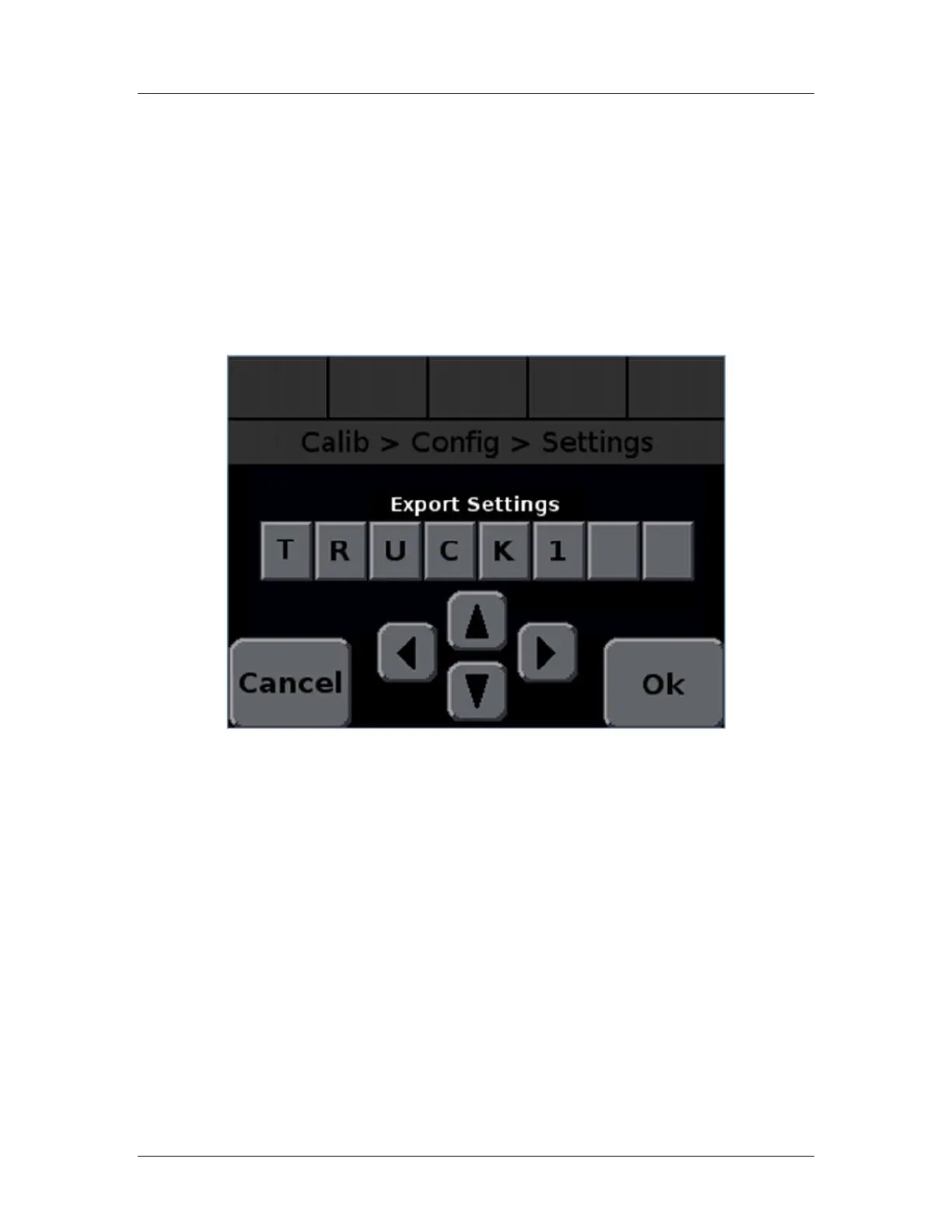
STEP 2: Navigate to the Calibration → Config → Settings → Export Settings screen.
Figure 17 will appear, as shown below.
Figure 17: Export Settings File Name Screen
STEP 3: Use the arrow buttons to name the file. The letter can be changed using the up
and down arrow keys. The letter to change can be selected using the left and
right arrows or pressing the letter to highlight it. The default file name is the value
of the Calibration → Config → Truck Name menu item.
STEP 4: Press OK to begin exporting the file. Figure 18 should appear.


 To Next Page