5100ex Calibration Manual
Upgrading Firmware
47
Upgrading Firmware
FORCE America may release firmware upgrades which add features or resolve issues with the
5100ex Spreader Control. Your 5100ex may be upgraded using a USB flash drive.
Before upgrading the 5100ex firmware:
1. Save a copy of the 5100ex firmware upgrade in the main folder of your flash drive.
Firmware upgrades placed inside subfolders will not be detected by the 5100ex.
To Upgrade the 5100ex Firmware:
STEP 1: Enter the Calibration Menu. See Entering the Calibration Menu on page 2.
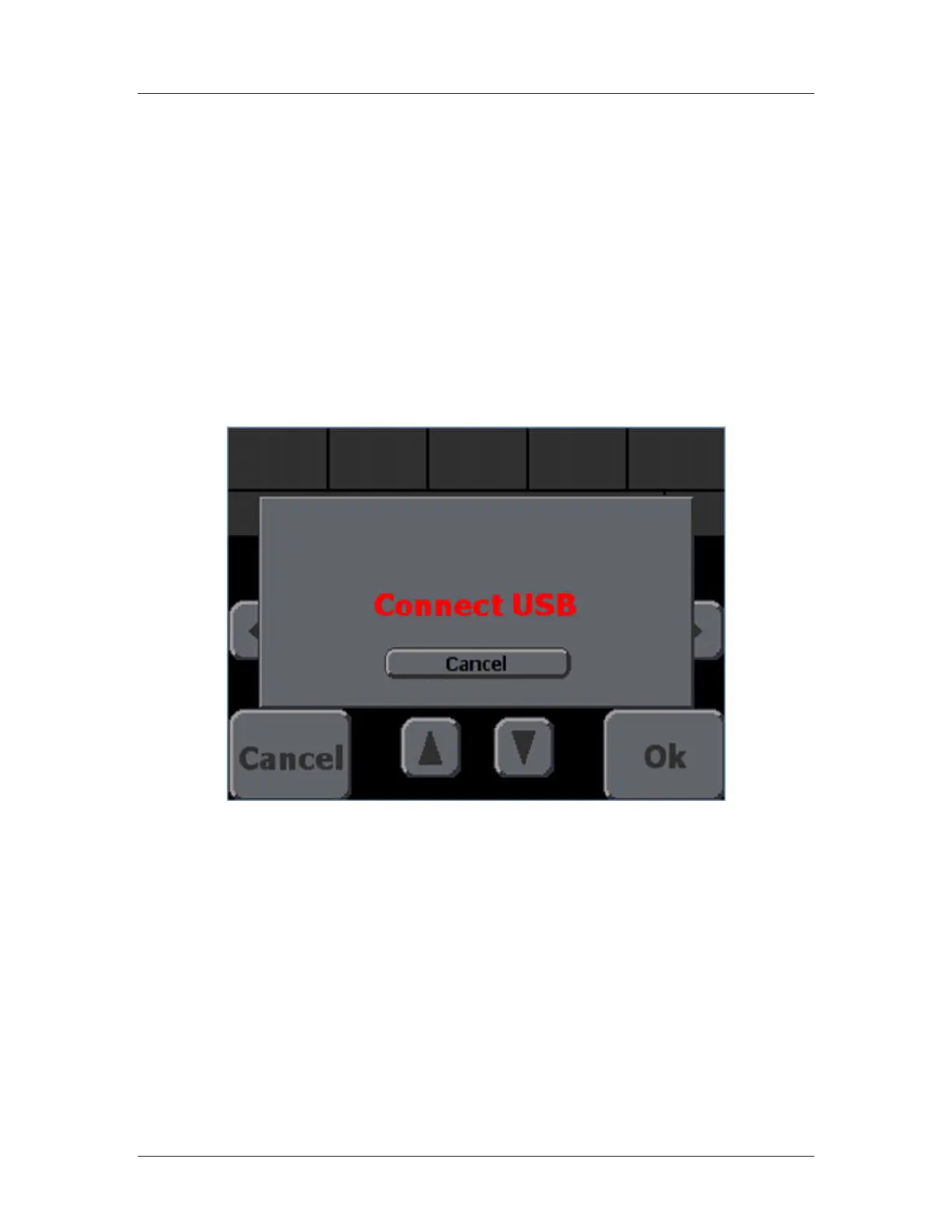
STEP 2: Navigate to the Calibration → Config → Upgrade Firmware screen. Figure 13 will
appear, as shown below.
Figure 13: Upgrade Firmware screen with “Connect USB” message
STEP 3: Connect the USB drive containing the firmware upgrade to the USB port on the
left-hand side of the 5100ex.
STEP 4: Once the 5100ex has found the upgrade files, an upgrade file selection menu will
appear, as shown in Figure 14.


 To Next Page