Forma Scientific, Inc.__________________________________________________Operation
4-5
CO
2
Control Module
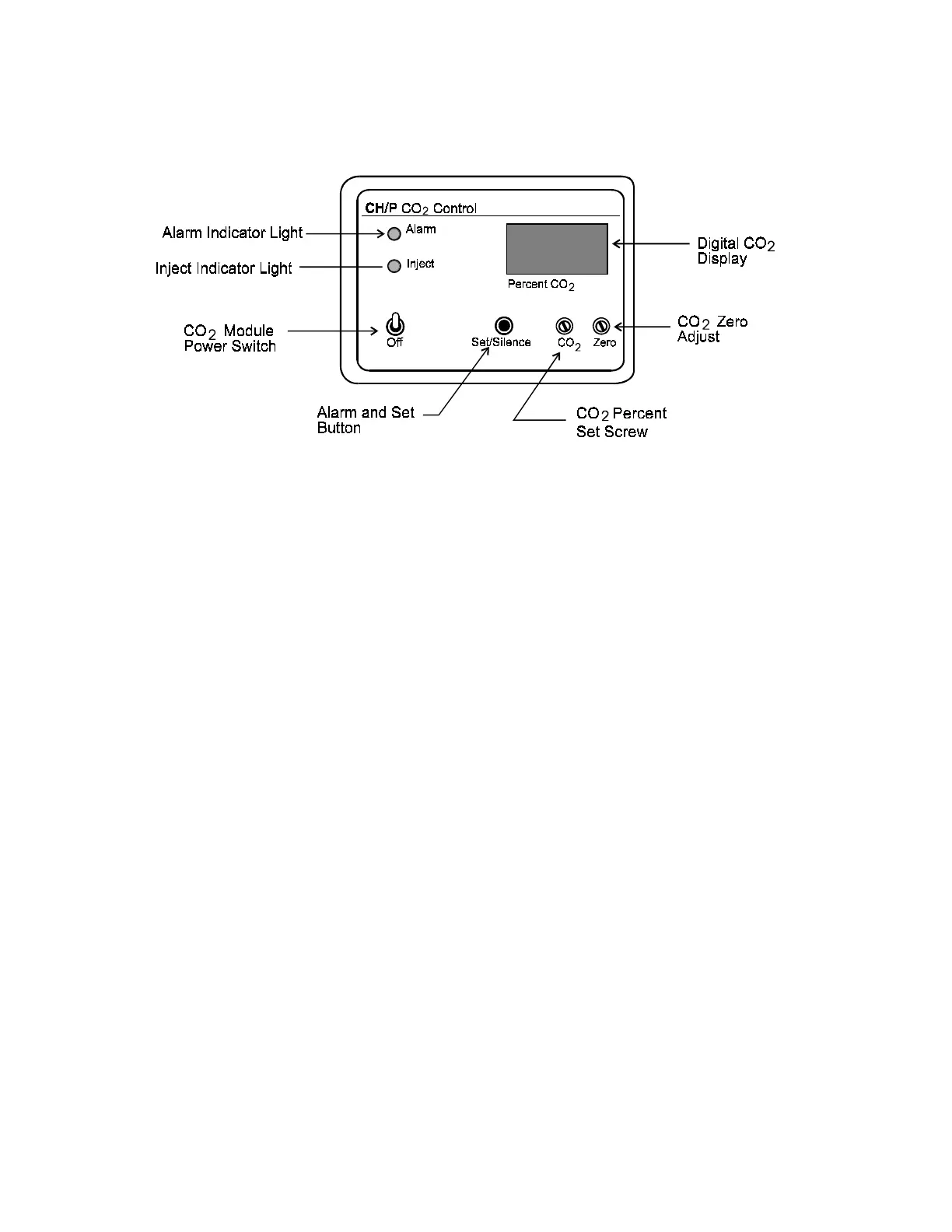
Figure 4-3
Audible CO
2
Alarm and Pilot Light
The audible CO
2
alarm and pilot light are activated when the percent CO
2
deviates
from setpoint by plus or minus 1% (nominal) for longer than approximately four minutes.
Set/Silence Push Button
When pushed, the SET/SILENCE button will silence the CO
2
alarm and de-energize
the alarm light. The alarm will remain deactivated until another alarm condition occurs.
This button must be pushed to set or display the CO
2
setpoint.
Alarm Disable Switch
Note: It is necessary to pull the CO
2
module out slightly to gain access to the alarm
disable switch. Grasp the black plastic button on the bottom of the control
module, directly beneath the Set/Silence push button. Pull on the button
until the circuit board releases from its internal connector strip. The Alarm
Disable Switch is located on the side of the module and is clearly marked.
(See Figure 4-4.) To replace the module, push firmly until the connector
strip is seated. Press the black plastic button until it snaps into place.
When the alarm switch is in the DISABLE position, the CO
2
alarm is completely
disabled. When the switch is set to the NORMAL position, the alarm system is operative
and can be silenced by pressing the SET/SILENCE button.


 To Next Page