Forma Scientific, Inc.__________________________________________________Operation
4-10
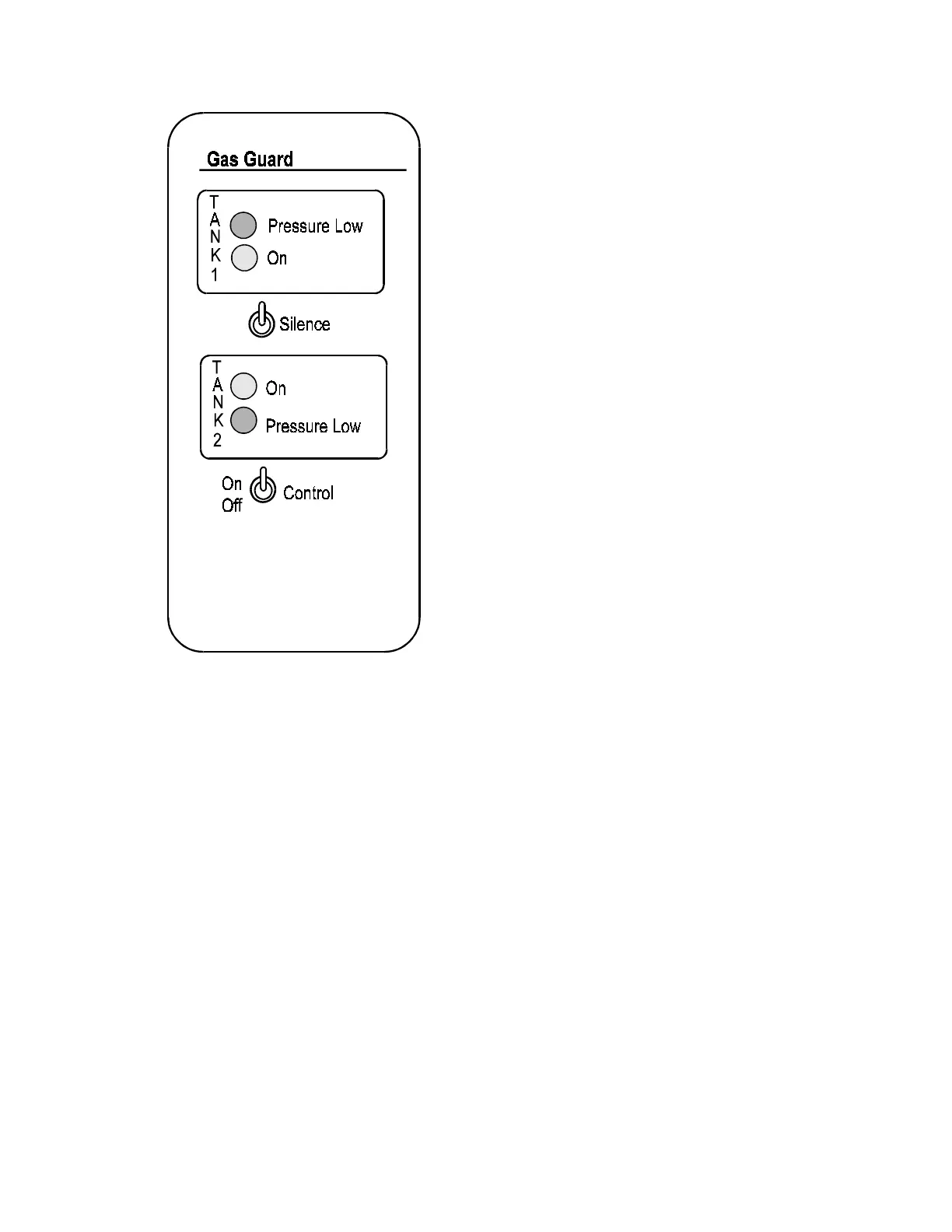
Figure 4-9
Built-in Gas Guard
(Factory Installed Option)
Control Switch
The CONTROL switch controls power to the
gas guard control circuit board. The yellow LEDs
on the front panel designate which tank is active
and indicate the unit is receiving power.
Silence Switch
The SILENCE switch silences the alarm and
selects the alternate tank. If the SILENCE switch
fails to silence the alarm, it is an indication that
both gas tanks are depleted or incapable of
producing 15 PSIG.
Note: During initial start-up, the incubator should
not be injecting gas.
Gas Depletion Alarm
The gas depletion alarm sounds automatically
when the active supply tank becomes empty. The
other tank becomes active with the sounding of
the alarm.
Note: Should both supply tanks become depleted,
the only way to silence the alarm is to turn the
CONTROL switch Off.
Active Tank Indicating Lights
The two yellow indicating lights, labeled TANK1 On and TANK2 On, located on the
front of the control panel indicate which of the gas tanks is active.
Pressure Low Indicating Lights
The two red indicating lights, labeled Pressure Low, indicate when a supply tank is
depleted. If both tanks are depleted both red indicating lights will be lit.
Start-Up Procedure
Turn the CONTROL switch on.
Select the active tank using the SILENCE switch.


 To Next Page