16
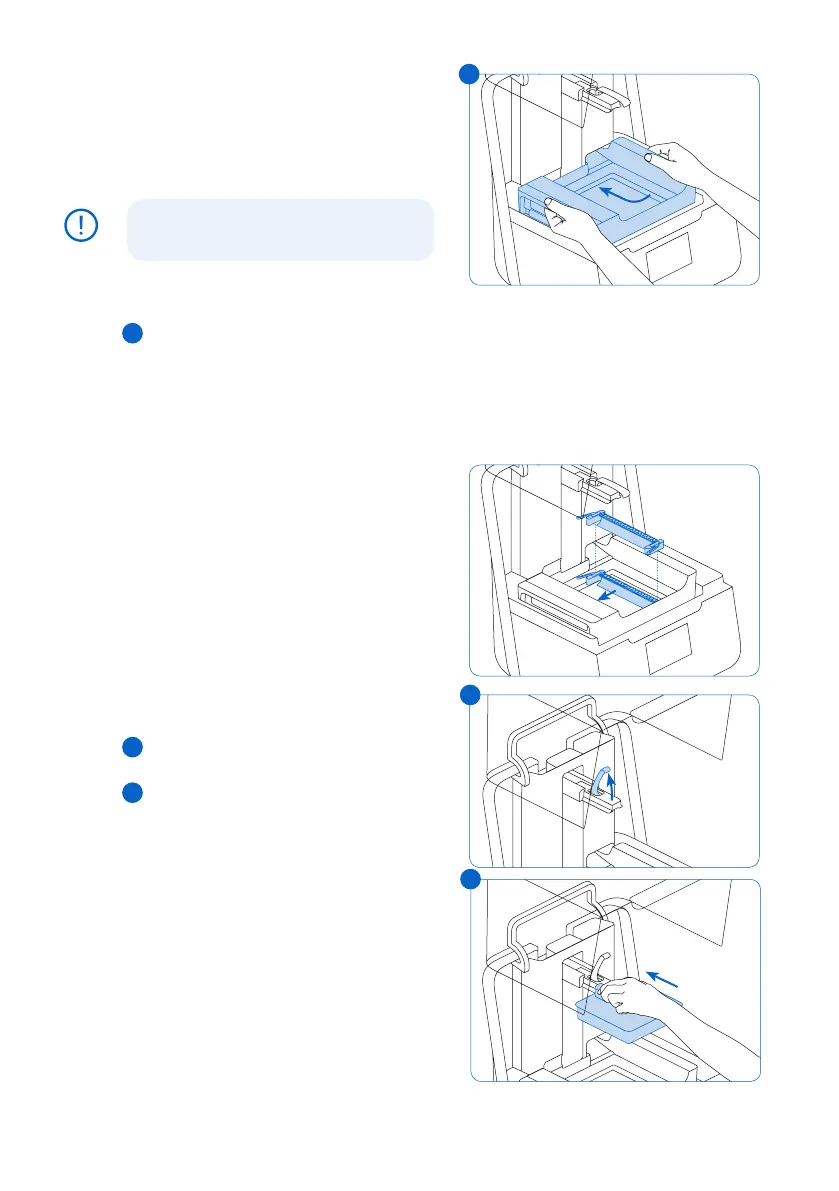
To install the resin tank:
1. Open the printer cover.
2. Remove the lid of the tank case.
3.
Remove packaging materials from the tank.
4.
Lift the resin tank with one hand on each side.
Avoid contaminating the underside of the
resin tank with fingerprints or liquid resin.
5. Align the resin tank side walls with the left
and right tank carrier rails.
6. Push the side handles - toward the back of
the printer and downward - until the side
walls lock into the rails. The resin tank
clicks into place and sits firmly. A sensor
detects the resin tank, and the status
light illuminates.
To insert the mixer:
1.
Orient the mixer with the flexure arms
facing upward and toward the mixer case.
2.
Slide the mixer to the left, into the mixer
case. The flexure arms on each end click
into place.
4.3.4 Insert the Build Platform
To insert the build platform:
1. Raise the platform lock.
2.
Align the build platform with the platform carrier.
3. Push the build platform onto the platform
carrier. A sensor detects the build platform,
and the status light illuminates.
4. Lower the platform lock to secure
the build platform.
NOTICE
6
1
3
6
1
3



 To Next Page