Preparation and Set Up | 15
4.3 Installing the Form 3
4.3.1 Connect the Cables
Connect the power cable to the printer and the power supply.
Files can be uploaded via USB, Wi-Fi, or Ethernet. For USB, connect the printer to a nearby
computer. For Ethernet, connect the printer to an Ethernet port.
4.3.2 Level the Printer
It is important that the printer sits level so resin does not overflow from the tank during
printing. All four feet must rest on a solid surface to ensure optimal print accuracy.
The Form 3 must be completely level before printing can begin. If prompted, use the leveling
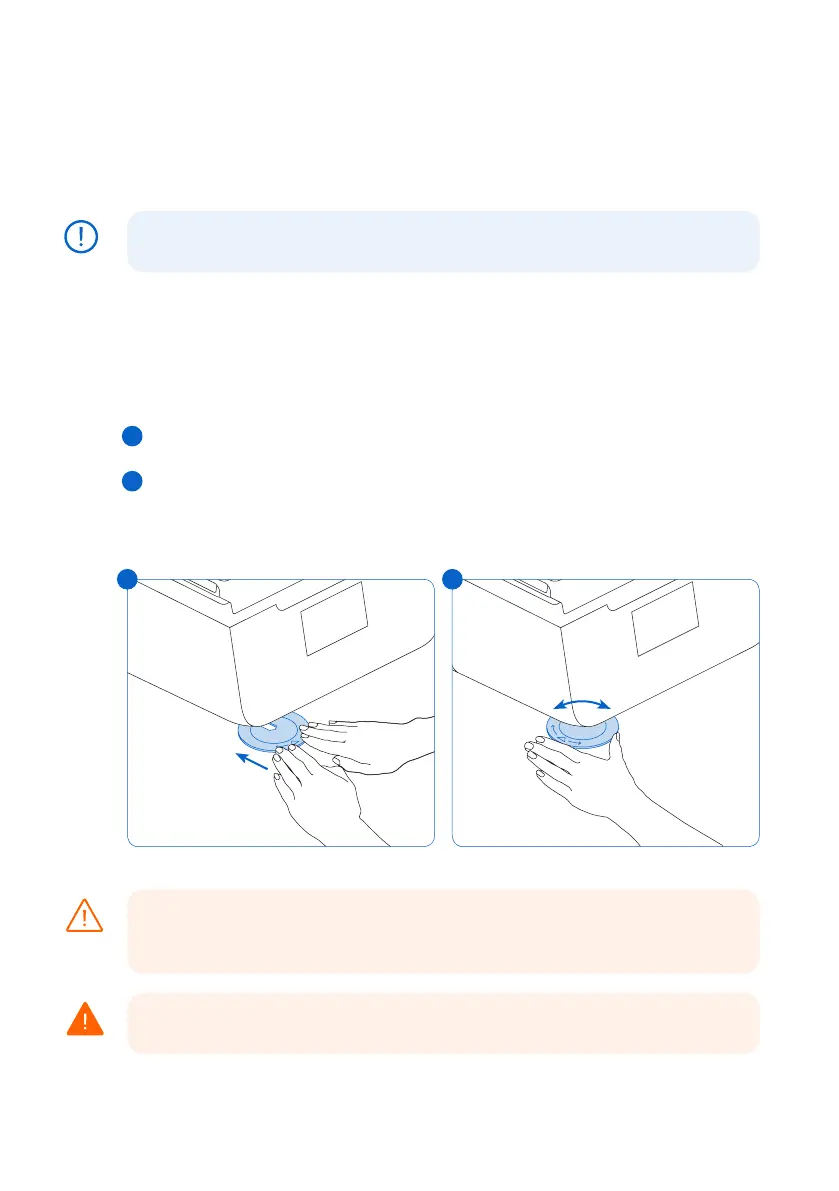
disc to raise or lower each foot of your printer.
To level the Form 3:
1.
Connect the printer to power. If necessary, the touchscreen prompts use of the leveling disc.
a. The initial printer setup sequence includes the leveling procedure.
2. Follow the on-screen instructions to adjust the feet under the printer.
3.
Insert the round leveling disc under the designated corner. Push until the leveling disc
clicks onto the foot.
4. Rotate the tool clockwise to raise and counter-clockwise to lower the height of the printer.
a. The printer ships with each foot fully retracted. The height of the feet can only be raised
during the initial printer setup.
5. Adjust the feet until the touchscreen indicates the printer is level.
4.3.3 Insert the Resin Tank and Mixer
Spill hazard. Resin may spill over the tank walls if the resin tank tilts more than 5-10°.
Hold the resin tank level with two hands. To inspect and clean the underside of the
tank, empty the resin tank and/or take care to avoid spilling resin outside the tank.
Resin may cause skin irritation or an allergic skin reaction. Wear gloves when handling
liquid resin or resin-coated surfaces. Wash skin with plenty of soap and water.
NOTICE
CAUTION
WARNING
3 4
3
4



 To Next Page