Preparation and Set Up | 19
To package the Form 3:
1.
If the printer’s outer cardboard carton has been collapsed, start by reassembling and
securely taping the box’s bottom opening.
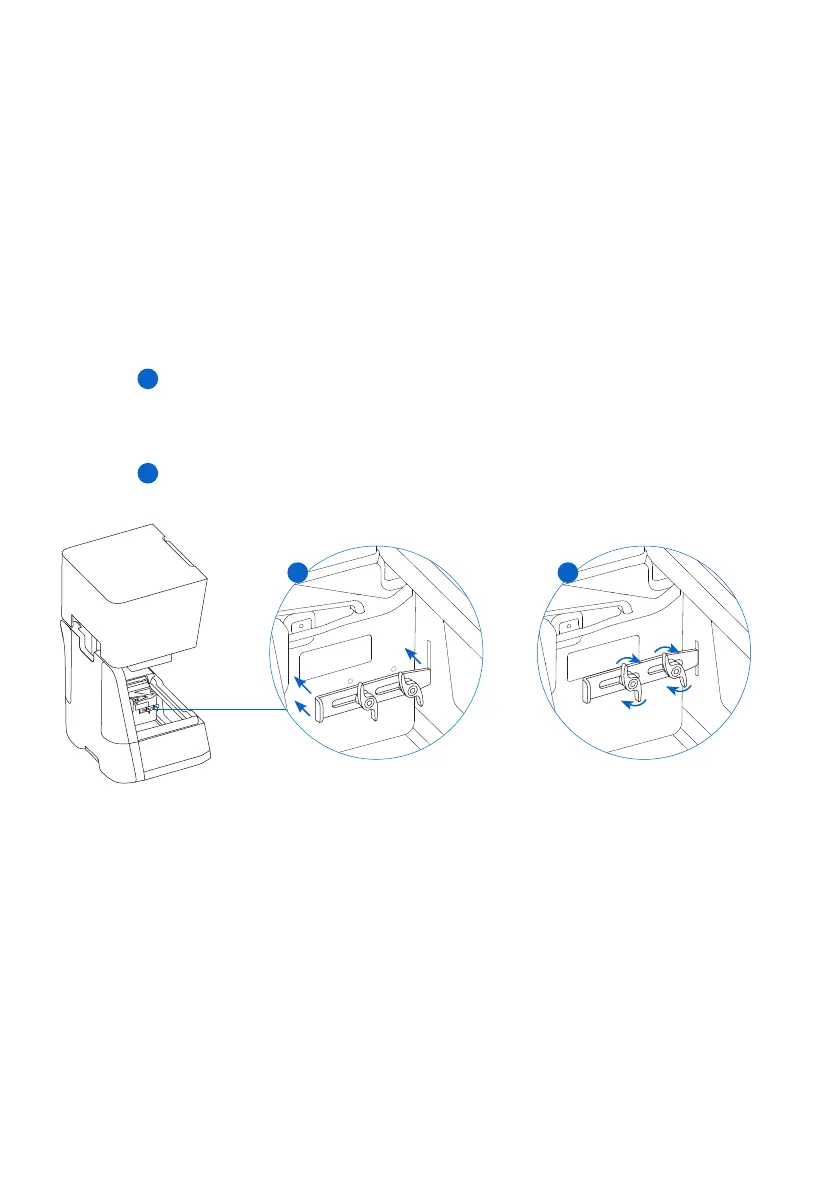
2. To secure the LPU housing for shipping:
a. Tap the wrench icon on the touchscreen to open the Settings menu. Find and select the
shipping option to prepare the printer for shipping.
b. Disconnect the power cable.
c. Open the cover and locate the shipping latch mounting points on the left side of the LPU
housing. The LPU housing is in the LPU garage on the right side of the printer.
d. Align the two slots in the latch with the two screw holes in the side of the LPU housing.
The short side of the latch should be oriented away from the front of the printer and point
outwards from the LPU housing.
e. Loosely thread the two thumb screws through the slots and into the LPU housing.
f. Slide the latch toward the front of the printer so that it engages with the inside of the
printer shell. If necessary, adjust the position of the LPU by manually turning the lead
screw at the back of the printer cavity. The shipping latch should lay flat against the LPU
housing when it engages with the slot in the printer shell.
g.
Tighten both thumb screws to secure the latch. The latch does not move when both
thumb screws are tightened.
3. Close the printer cover.
4.
Securely wrap the seam between the printer’s top cover and lower shell to maintain
alignment in transit. Wrap with plastic wrap multiple times horizontally and vertically so the
entire printer is covered and the cover is firmly stabilized.
5. Set the bottom foam insert in the cardboard lift tray.
6. Lift the printer to rest on the bottom foam insert.
7. Gently slide the printer into the outer carton.
8. Install the front foam insert to cover the left, right, and front of the printer.
9. Install the upper foam insert. The foam fits exactly around the top of the printer’s cover.
10. Seal each edge of the side opening with adhesive packing tape.
f
g
f
g



 To Next Page