Introduction | 11
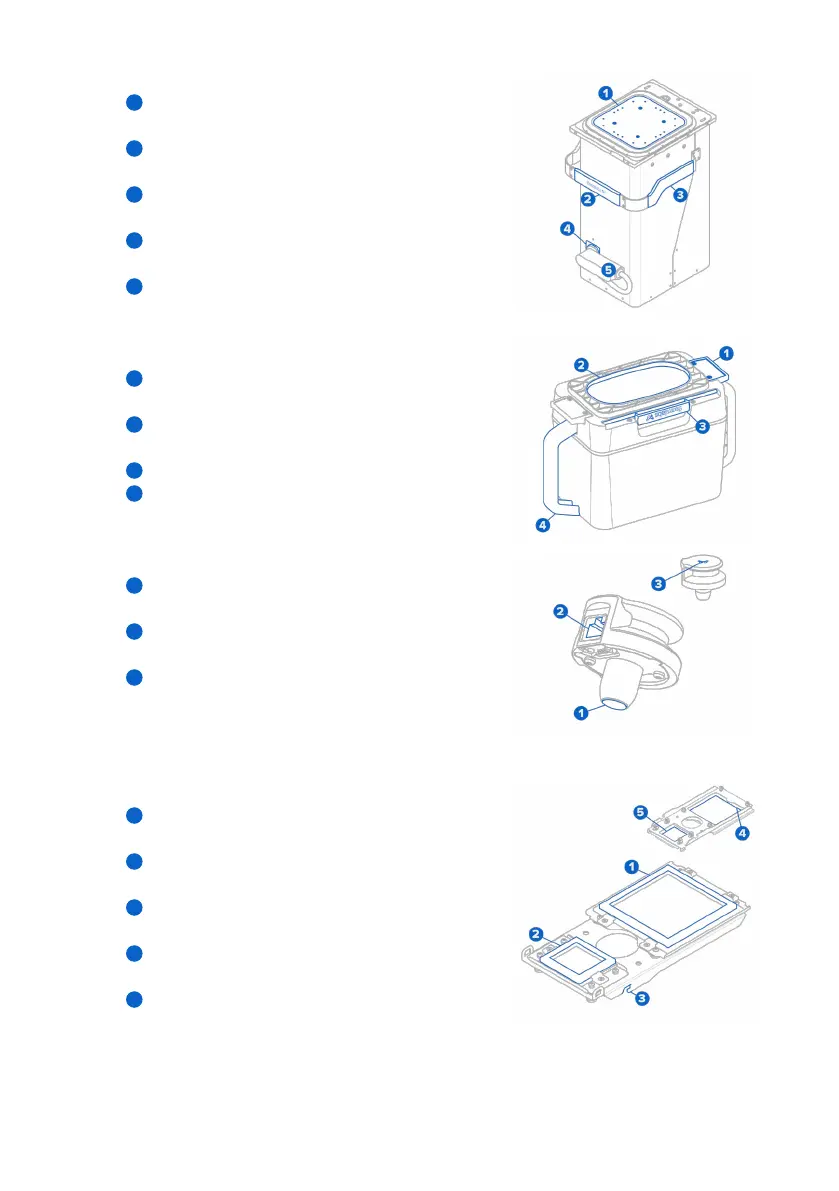
2.3.2 Build chamber
Print bed: The moving surface (Z-axis) on which
powder is deposited and sintered.
Front handle: Silicone handle for loading and
unloading the build chamber.
Side handles: Silicone handles on each side for
moving the build chamber.
Plug holster: A retainer to keep the plug secure
when moving or storing the build chamber.
Build chamber plug: Main connector for the build
chamber’s heaters and temperature sensors.
2.3.3 Powder cartridge
Cartridge wings: Two brackets for locking the
cartridge to the mixer.
Cartridge valve: The primary opening for filling and
depositing powder.
Valve knife: Used to close and open the cartridge valve.
Handles: For holding and lifting the cartridge.
2.3.4 IR sensor
Sensor window: The exposed surface that allows
infrared radiation to enter the sensor.
Ethernet socket: Used to connect the sensor to the
printer and disconnect for cleaning.
Status light: Indicates if the sensor is seated
correctly (green) or incorrectly (yellow).
2.3.5 Optical cassette
Laser window gasket: Seals the top of the laser
window from the print enclosure.
Camera window gasket: Seals the camera window
from the print enclosure.
Tray catch: Two hooks that align the optical cassette
to the cassette tray.
Laser window: Protects the laser during printing.
This side requires cleaning after each print.
Camera window: Protects the camera lens during
printing. This side requires cleaning after each print.
1
2
3
4
5
1
2
3
4
1
2
3
1
2
3
4
5



 To Next Page