Maintenance | 41
6.3.1 Cleaning the optical cassette
Inspect the Fuse 1’s optical cassette after every print. If the optical cassette is contaminated
or dirty, clean it before using it again. Required supplies:
Standard cleaning
• Ethanol
• Non-reactive nitrile gloves
• PEC*PADs
Full cleaning
• Alconox
• Distilled water
• Ethanol
• Non-reactive nitrile gloves
• PEC*PADs
Do not use compressed air or an air gun to clean the print enclosure, build chamber,
or any other component. Mobilizing loose powder increases the risk of unintentional
inhalation or ingestion.
If you completed the procedure and there are visible streaks, fogging, or deposits on
the glass, or sections look foggy, carefully repeat the procedure. Small blemishes or
color dierences do not aect print success or quality.
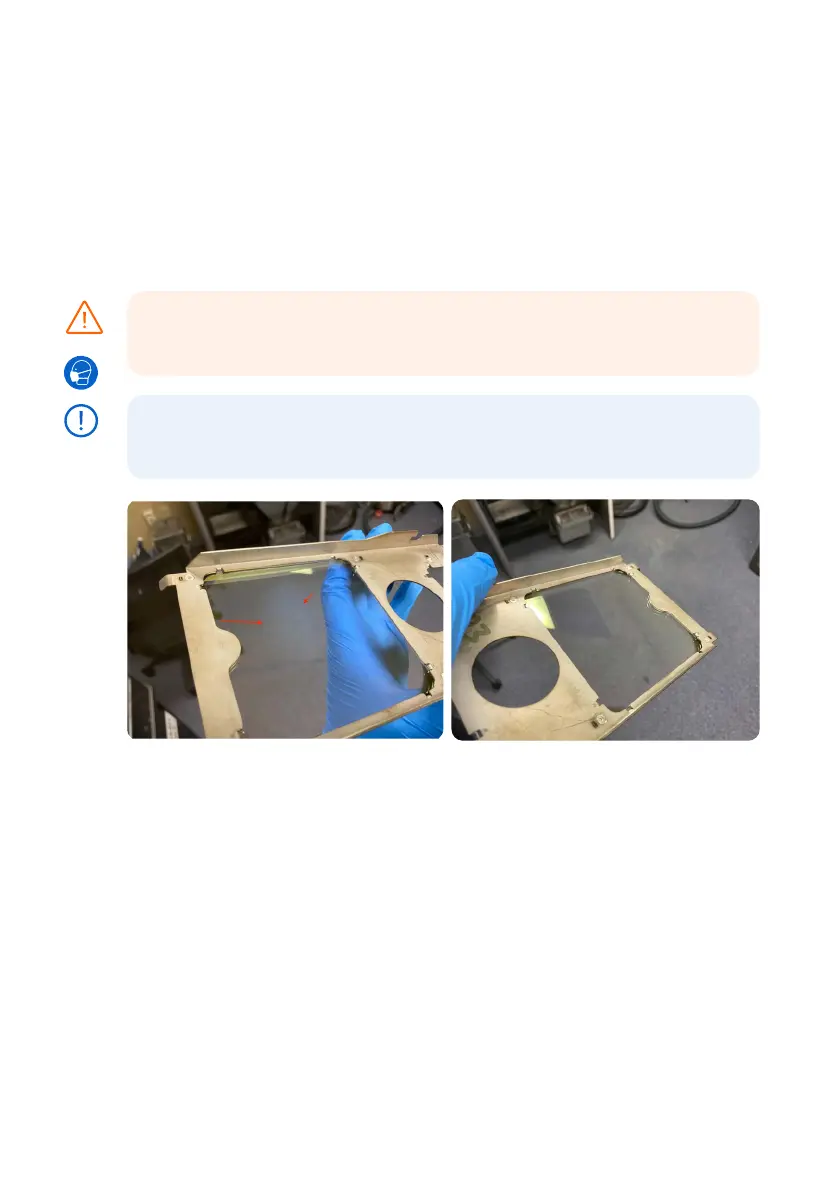
Before cleaning: An optical cassette removed
from the Fuse 1 after a print job. The optical
cassette shows defined streaking and clouding.
After cleaning: An optical cassette after cleaning
with Alconox, distilled water, and ethanol to
remove the contamination.
To inspect the optical cassette:
1. Remove the optical cassette from the printer.
2.
Inspect the optical cassette for signs of loose powder, dust, condensed outgassed
compounds, or other contaminants. Look for:
°
Discrete specks of dust or powder
°
Small smudges or fingerprints
°
Cloudiness or reduced clarity
3. If you see that the optical cassette has been contaminated, clean it following the standard
optical cassette cleaning procedure below. Expect to need to clean the optical cassette
after 5–10 prints.
CAUTION
NOTICE



 To Next Page