9. Taking out of Service and Disposal
9 Taking out of Service and Disposal
9.1 Taking out of Service
Safety
u
Observe the safety instructions. See Safety, page 8.
Taking out of Service
Taking the fos4Strain expert out of service:
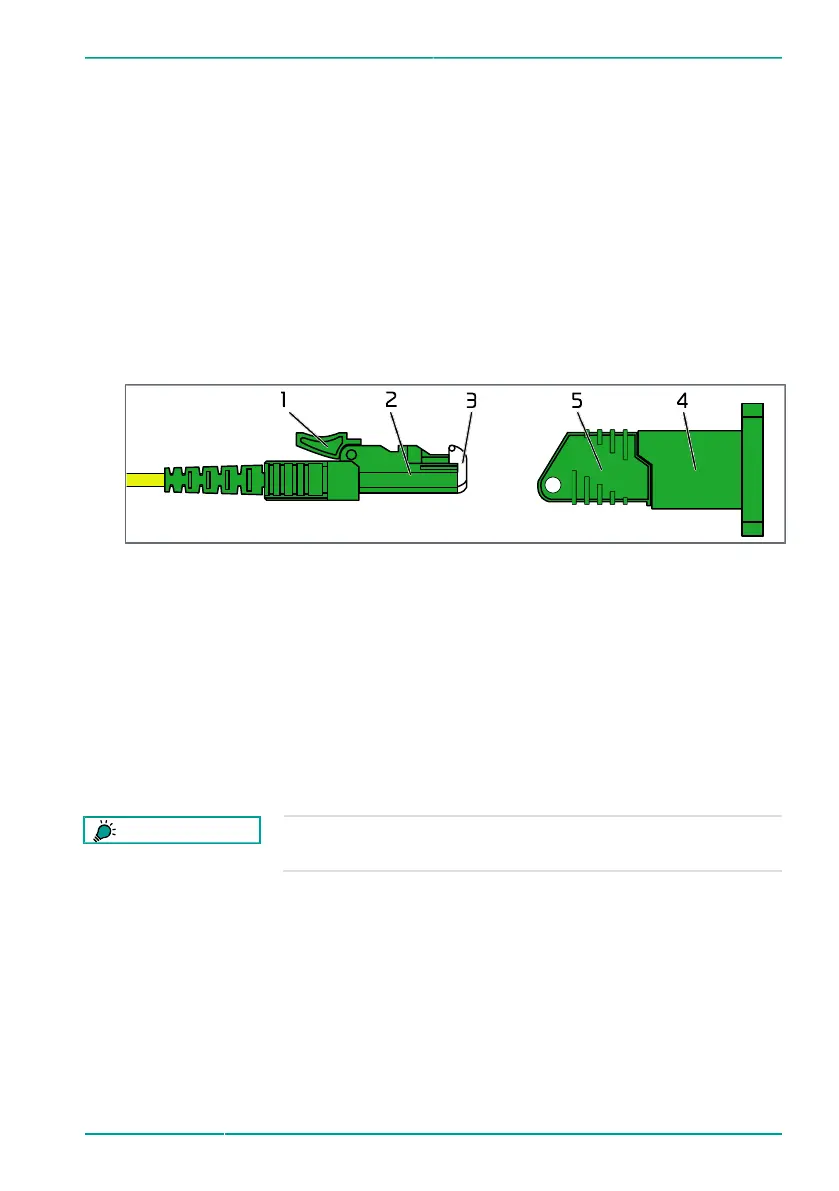
Figure 11: E-2000/APC connector and socket
1
Locking mechanism
2
Connector
3
Protective cover
4
Socket
5
Dust cap
1. Disconnect the optical connections:
a) Release the locking mechanism (1) of the connector (2).
b) Remove the connector (2) from the socket (4).
c) Attach a dust cap (5) on the socket (4).
TIP
The fos4Strain expert is permanently bonded to the substrate
and cannot be removed.
2. Attach or cut off the cable of the fos4Strain expert.
3. If the cable is cut off:
a) Remove the cable from the substrate.
b) Dispose of the cable in accordance with applicable regulations.
© fos4X 2019 4-10_1.3.x_4.0_fos4Strain expert-en-us 39 / 42


 To Next Page