WWW.FOSCAM.COM FI8908/FI8908W User Manual
3.8 UPnP Settings
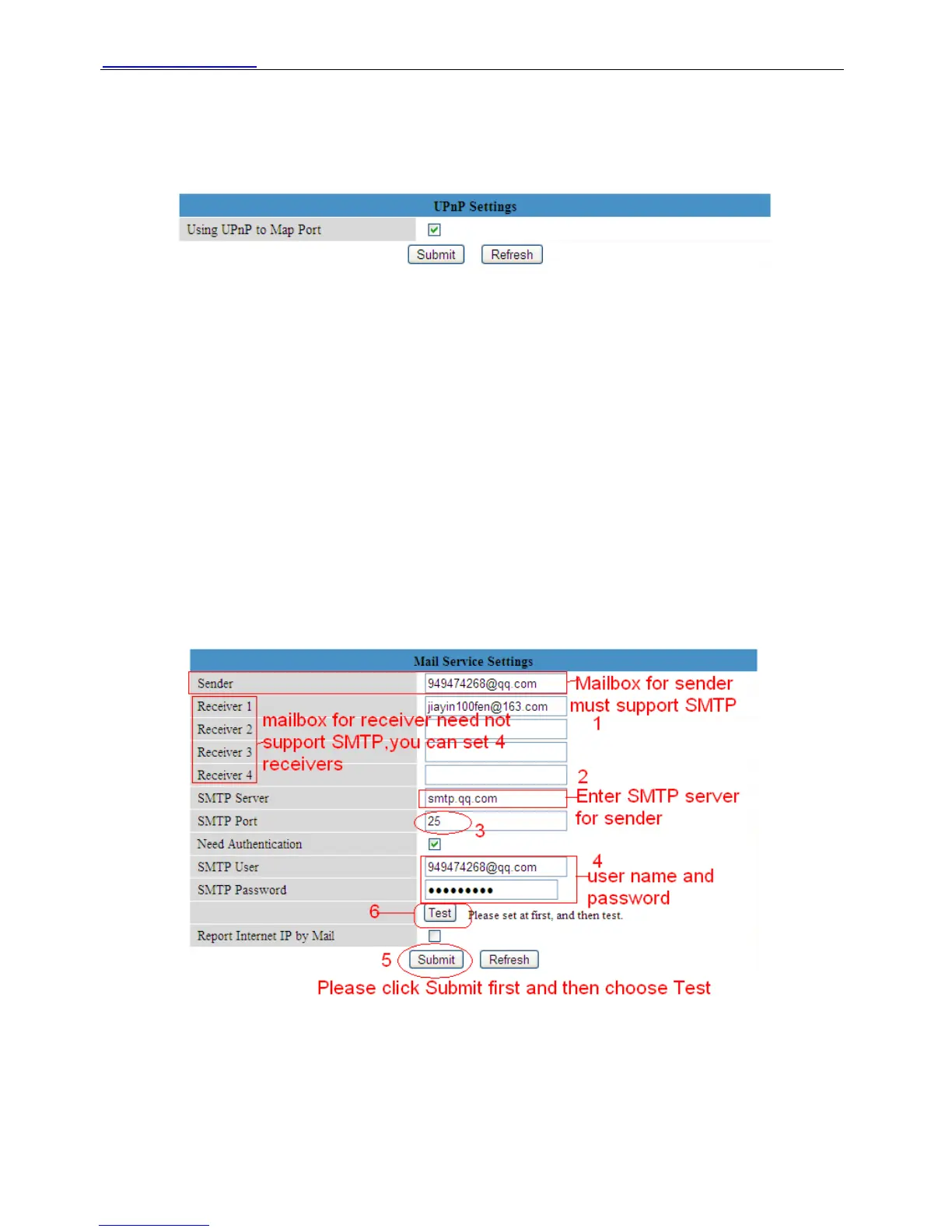
Choose Using UPnP to MAP Port and then click Submit.
Figure 3.17
Here the software inside the camera for UPnP only contains port forwarding now. It also has
much relation with security settings of your router, sometimes, it may show error information. So
we recommend you do port forwarding manually in your router.
3.9 DDNS Service Settings
Please view the detail information in Quick Installation Guide about How to set DDNS Service
Settings.
3.10 Mail Service Settings
If you want the camera send emails when motion trigger. You need set Mail Service Settings.
Please set these settings as the following picture. (Figure 3.18)
Figure 3.18
Make sure your mailbox for sender support SMTP. The mailbox should not enable SSL or TSL
encryption too.
Here you can fill in four receivers to receive images. SMTP port usually is 25, some SMTP
server have its own port, such as 587 or 80.
ShenZhen Foscam Intelligent Technology Co., Ltd
Tel: 86 755 2674 5668 Fax: 86 755 2674 5168
28



 To Next Page