WWW.FOSCAM.COM FI8908/FI8908W User Manual
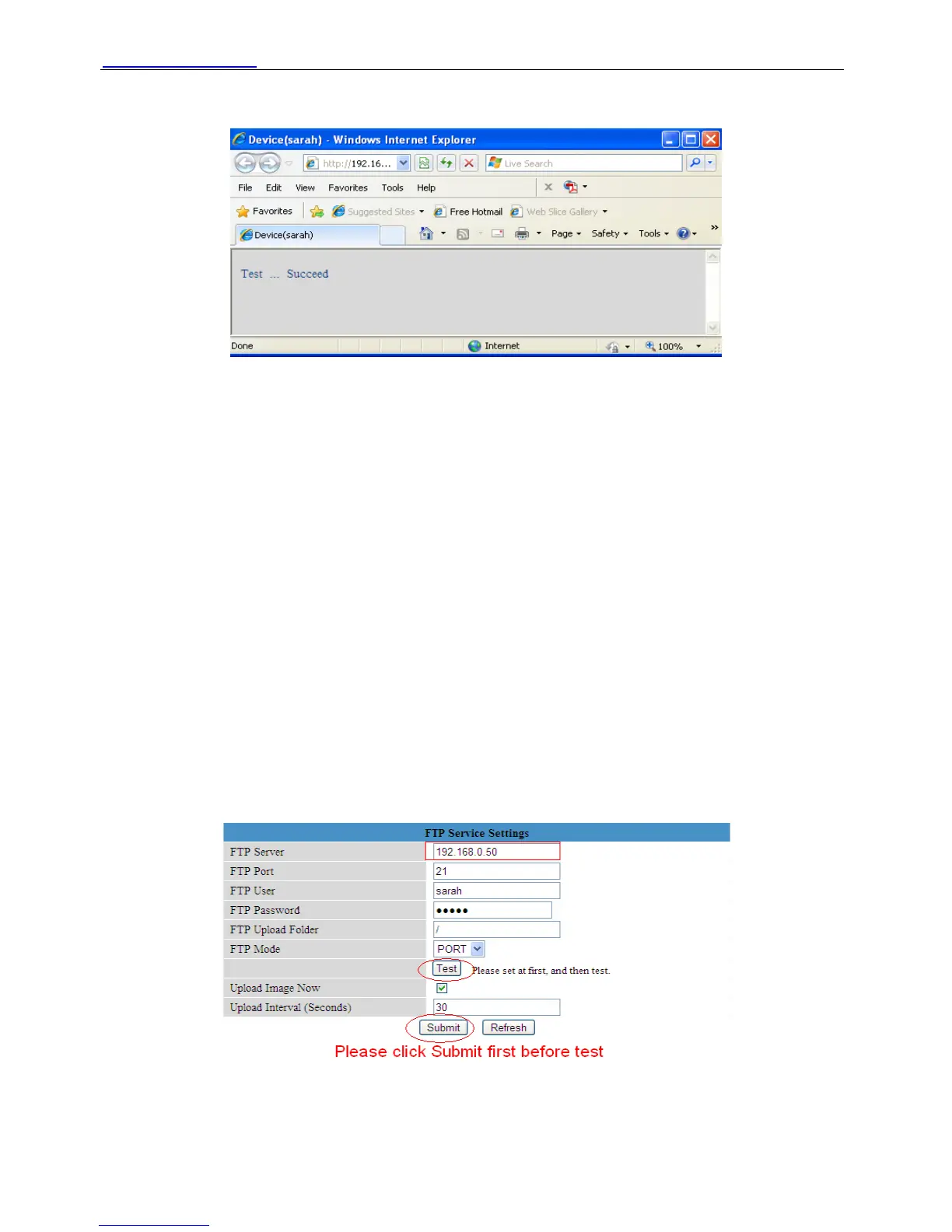
NOTE: Please click Submit first before choose Test.
You will see the test result after click Test.
Figure 3.19
If it prompts these following errors when you click Test. Please check whether the information
you filled in are incorrect. Make sure all of them are correct and try it again.
1) Can not connect to the server
2) Network Error. Please try later
3) Server Error
4) Incorrect user or password
5) The sender is denied by the server. Maybe the server need to authenticate the user, please
check it and try again
6) The receiver is denied by the server. Maybe because of the anti-spam privacy of the server
7) The message is denied by the server. Maybe because of the anti-spam privacy of the server
8) The server does not support the authentication mode used by the device
Report Internet IP by Mail—If choose it, you will receive emails which contain internet IP. When
camera power on or Internet IP changed, it will send the internet IP by mail. (For example:
IPCAM's urls is http://119.123.207.96:8068). Make sure the port is map to the router correctly.
3.11 FTP Service Settings
If you want upload images to your FTP server. You can set FTP Service Settings.
Figure 3.20
ShenZhen Foscam Intelligent Technology Co., Ltd
Tel: 86 755 2674 5668 Fax: 86 755 2674 5168
29



 To Next Page