28
w
w
w
w
w
w
w
w
w
w
w
w
w
w
w
w
ww.foscam.
ww.foscam.
ww.foscam.
ww.foscam.
ww.foscam.
ww.foscam.
ww.foscam.
ww.foscam.
us
us
us
us
us
us
us
us
Foscam
Foscam
Foscam
Foscam Digital
Digital
Digital
Digital Technologies
Technologies
Technologies
Technologies LLC
LLC
LLC
LLC
Telephone:
Telephone:
Telephone:
Telephone: 1-800-930-0949
1-800-930-0949
1-800-930-0949
1-800-930-0949
28
28
28
28
Another
Another
Another
Another way
way
way
way to
to
to
to change
change
change
change the
the
the
the camera
camera
camera
camera ’
’
’
’ s
s
s
s LAN
LAN
LAN
LAN IP
IP
IP
IP and
and
and
and HTTP
HTTP
HTTP
HTTP Port
Port
Port
Port no.
no.
no.
no.
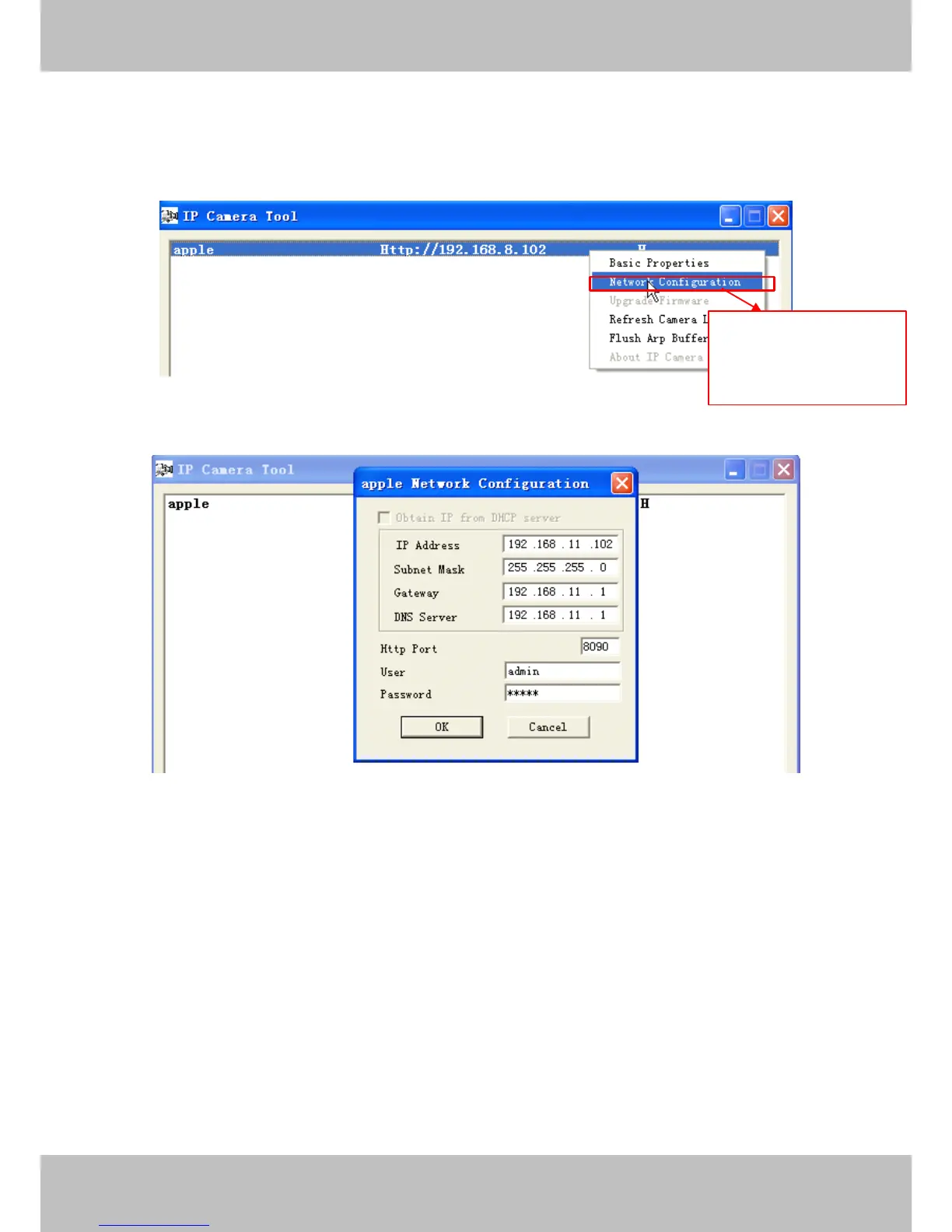
O pen the IP Camera Tool, select the camera you want to change the port no , right click on the IP
address link, and goes to Option ” Network Configuration ” , it pops up another dialogue showed as
the following screen
Figure 3.17
Figure 3.18
IP
IP
IP
IP A
A
A
A ddress:
ddress:
ddress:
ddress: Fill in the IP address assigned and make sure it is in the same subnet as your
computer or router . (I.e. the first three sections are the same)
Subnet
Subnet
Subnet
Subnet Mask:
Mask:
Mask:
Mask: The default subnet mask of the equipment in our LAN is: 255.255.255.0 .You can
find the subnet mask in the basic information of your router or the locally-attached of your PC.
Gateway:
Gateway:
Gateway:
Gateway: Make sure it is in the same subnet with PC ’ s IP address. The gateway is your router ’ s
LAN IP.
DNS
DNS
DNS
DNS Server
Server
Server
Server :
:
:
: IP address of your I SP network provider. Y o u can find the DNS server in your
router or check the locally-attached address of your computer. Your PC contains your PC ’ s IP
address, gateway and DNS server. Normally, there are two DNS servers. Here you can also set
the DNS server the same with gateway.
S
S
S
S elect
elect
elect
elect the
the
the
the camera
camera
camera
camera you
you
you
you
want
want
want
want to
to
to
to change
change
change
change the
the
the
the LAN
LAN
LAN
LAN
IP
IP
IP
IP or
or
or
or port
port
port
port no
no
no
no ,
,
,
, right
right
right
right click
click
click
click



 To Next Page