EasyManua.ls Logo

Foscam FI8916W - Page 28

Foscam FI8916W
79 pages
Print Icon
To Next Page IconTo Next Page
To Previous Page IconTo Previous Page
Loading...
27
w
w
w
w
w
w
w
w
w
w
w
w
w
w
w
w
ww.foscam.
ww.foscam.
ww.foscam.
ww.foscam.
ww.foscam.
ww.foscam.
ww.foscam.
ww.foscam.
us
us
us
us
us
us
us
us
Foscam
Foscam
Foscam
Foscam Digital
Digital
Digital
Digital Technologies
Technologies
Technologies
Technologies LLC
LLC
LLC
LLC
Telephone:
Telephone:
Telephone:
Telephone: 1-800-930-0949
1-800-930-0949
1-800-930-0949
1-800-930-0949
27
27
27
27
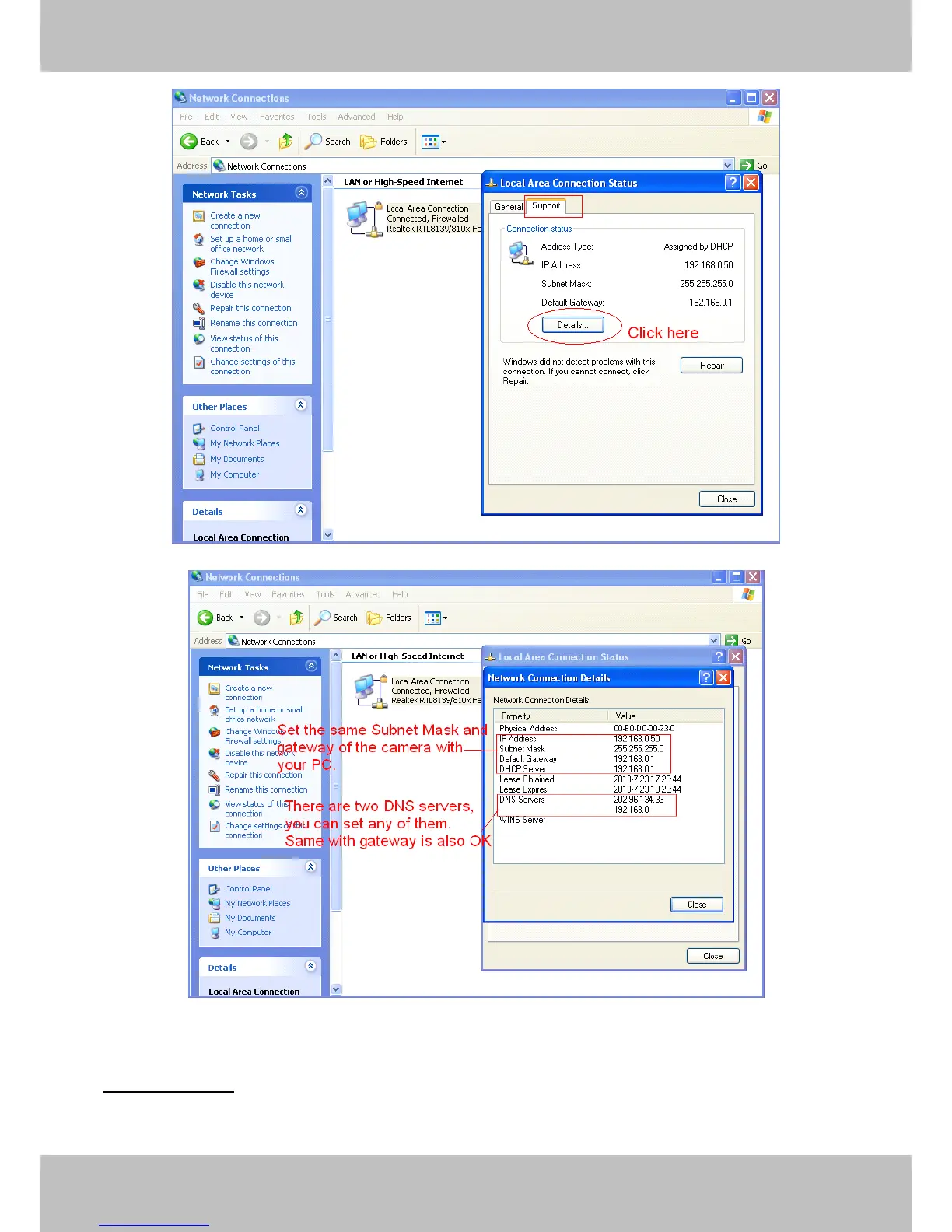
Figure 3.15
Figure 3.16
If you don t know the DNS server, you can use the same settings as the Default Gateway .
Network
Network
Network
Network lamp:
lamp:
lamp:
lamp: There is a network lamp on the back of the camera, select it and when the
network connection are working, the lamp will turn on and blink.

Other manuals for Foscam FI8916W

Related product manuals