48
w
w
w
w
w
w
w
w
w
w
w
w
w
w
w
w
ww.foscam.
ww.foscam.
ww.foscam.
ww.foscam.
ww.foscam.
ww.foscam.
ww.foscam.
ww.foscam.
us
us
us
us
us
us
us
us
Foscam
Foscam
Foscam
Foscam Digital
Digital
Digital
Digital Technologies
Technologies
Technologies
Technologies LLC
LLC
LLC
LLC
Telephone:
Telephone:
Telephone:
Telephone: 1-800-930-0949
1-800-930-0949
1-800-930-0949
1-800-930-0949
48
48
48
48
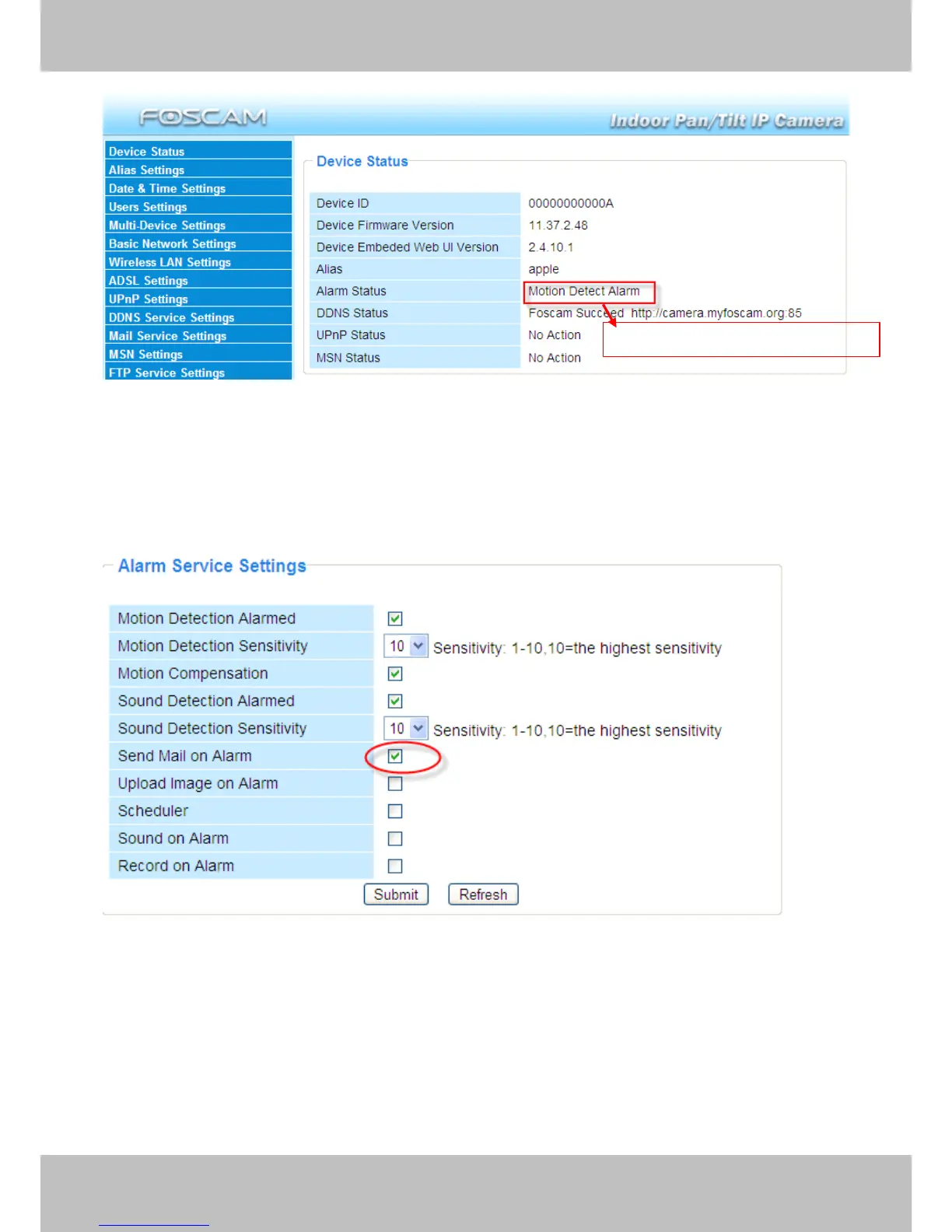
Figure 3.40
There are four alarm indicators:
1)
1)
1)
1) Camera
Camera
Camera
Camera will
will
will
will send
send
send
send emails
emails
emails
emails when
when
when
when motion
motion
motion
motion /sound
/sound
/sound
/sound is
is
is
is activated.
activated.
activated.
activated.
If you want to receive images when motion is detected, you must set Mail
Mail
Mail
Mail Service
Service
Service
Service Settings
Settings
Settings
Settings first.
(Figure 3.31) Then set motion alarm as follows :
Figure 3.41
2)
2)
2)
2) Upload
Upload
Upload
Upload images
images
images
images via
via
via
via FTP
FTP
FTP
FTP server
server
server
server when
when
when
when motion/sound
motion/sound
motion/sound
motion/sound trigger.
trigger.
trigger.
trigger.
To upload images to an FTP server when motion/sound is detected, you must set FTP
FTP
FTP
FTP Service
Service
Service
Service
Settings
Settings
Settings
Settings (Figure 3. 36/3.37 ) first and t hen set motion /sound alarm as pictured below
Here
Here
Here
Here you
you
you
you can
can
can
can see
see
see
see the
the
the
the alarm
alarm
alarm
alarm status
status
status
status



 To Next Page