64
w
w
w
w
w
w
w
w
w
w
w
w
w
w
w
w
ww.foscam.
ww.foscam.
ww.foscam.
ww.foscam.
ww.foscam.
ww.foscam.
ww.foscam.
ww.foscam.
us
us
us
us
us
us
us
us
Foscam
Foscam
Foscam
Foscam Digital
Digital
Digital
Digital Technologies
Technologies
Technologies
Technologies LLC
LLC
LLC
LLC
Telephone:
Telephone:
Telephone:
Telephone: 1-800-930-0949
1-800-930-0949
1-800-930-0949
1-800-930-0949
64
64
64
64
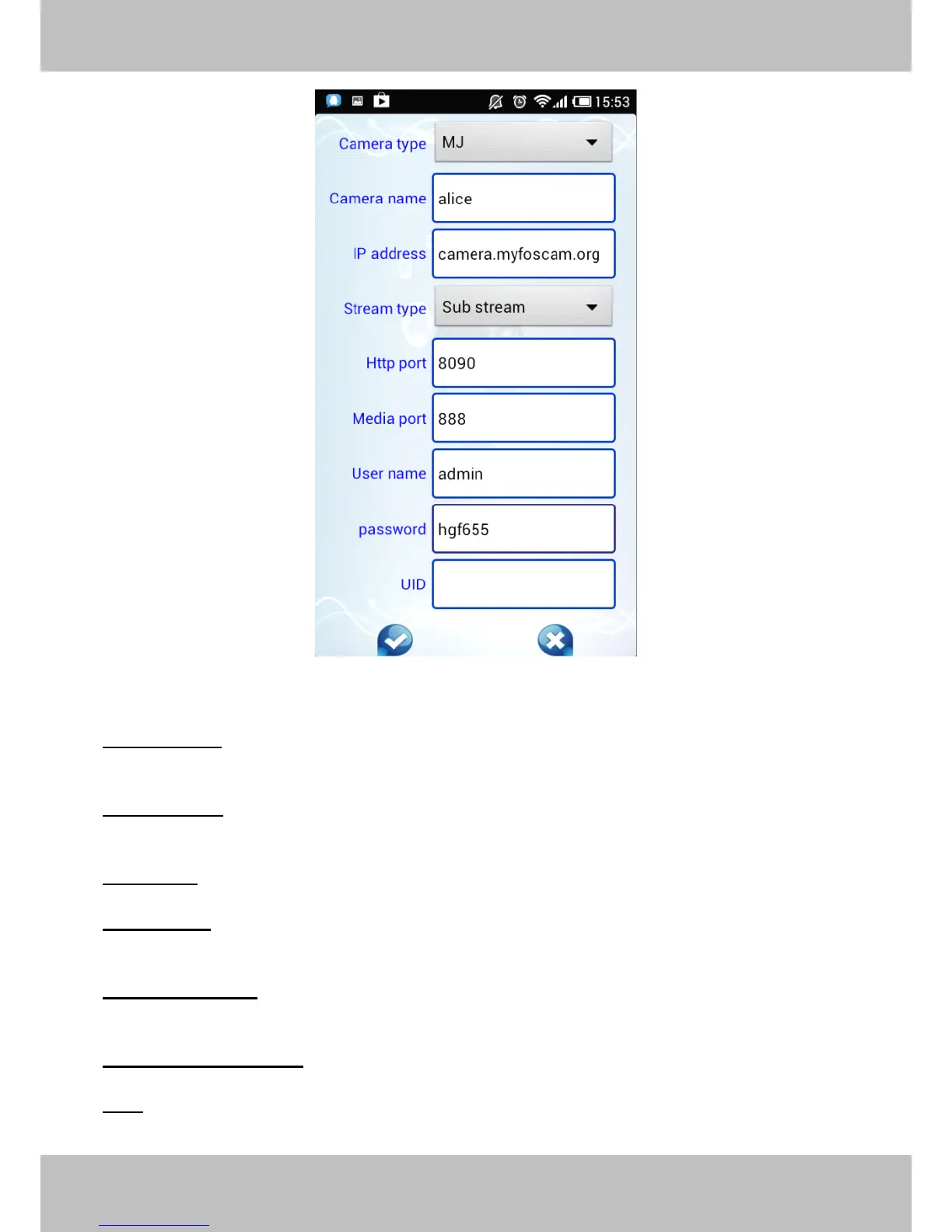
Figure 4.7
Camera
Camera
Camera
Camera Type:
Type:
Type:
Type: Our Company produces two series cameras: MJ and H.264. Here select the
camera type that you want to add.
Camera
Camera
Camera
Camera name:
name:
name:
name: The Camera n ame is a unique name that you can give to your device to help you
identify it.
IP
IP
IP
IP address:
address:
address:
address: Fill in the camera ’ s DDNS host or WAN IP not LAN IP .
Stream
Stream
Stream
Stream type:
type:
type:
type: It has two types: Main stream and Sub stream. For cell phones, we recommend
you to select Sub stream to get more fluent video.
Http
Http
Http
Http /
/
/
/ Media
Media
Media
Media port:
port:
port:
port: For H.264 cameras, the Http and Media port must be different. For MJ
cameras, here share the same port.
User
User
User
User name
name
name
name &Password:
&Password:
&Password:
&Password: The camera ’ s user name and password.
UID:
UID:
UID:
UID: If your camera supports UID, here you may fill in the UID no.. Now FOSCAM camera does
not support UID.



 To Next Page