6
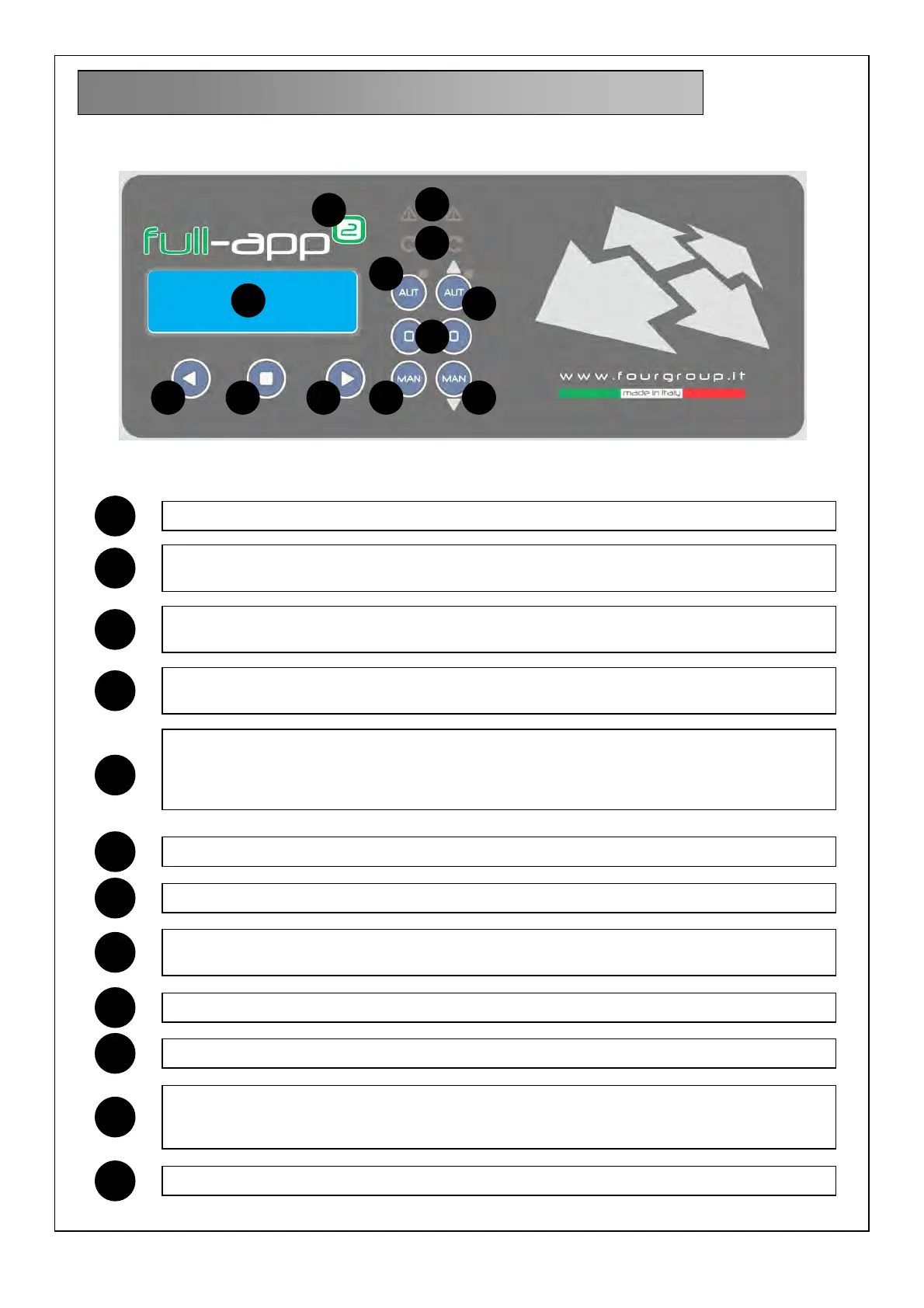
6. LIGHT INDICATIONS AND BUTTONS
3
DISPLAY backlit blue to display the parameters of the system
AUT button to activate the automatic mode of operation; when the green led is on it
indicates the automatic functional mode is active
START green led to indicate the pump is currently working. the flashing led indicates it’s
waiting for the start timer to expire
ALARM red led to indicate an alarm is active; when the red led is on it indicates the
presence of an alarm and that made the pump stopped
AUT+UP button with dual functionality:
- button to activate the automatic functional mode; when the green led is on it indicates
the automatic functional mode is active
- button to move upward in the program menu selection
ON blue led to indicate the voltage is on and the panel is turned on by mains supply
< button to move toward left in the program menu selection
ENTER button to activate/save the menu setting; change display of the menu parameter
settings
> button to move toward right in the program menu selection
MAN button to activate the manual mode of operation
MAN+DOWN button with dual functionality:
- button to activate the manual mode of operation;
- button to move downward in the program menu selection
0 button to stop the pumps and reset related alarms
4
5
10 11
2
8 9
6
7
12
1
1
2
3
4
5
6
7
8
9
10
11
12



 To Next Page