8
2
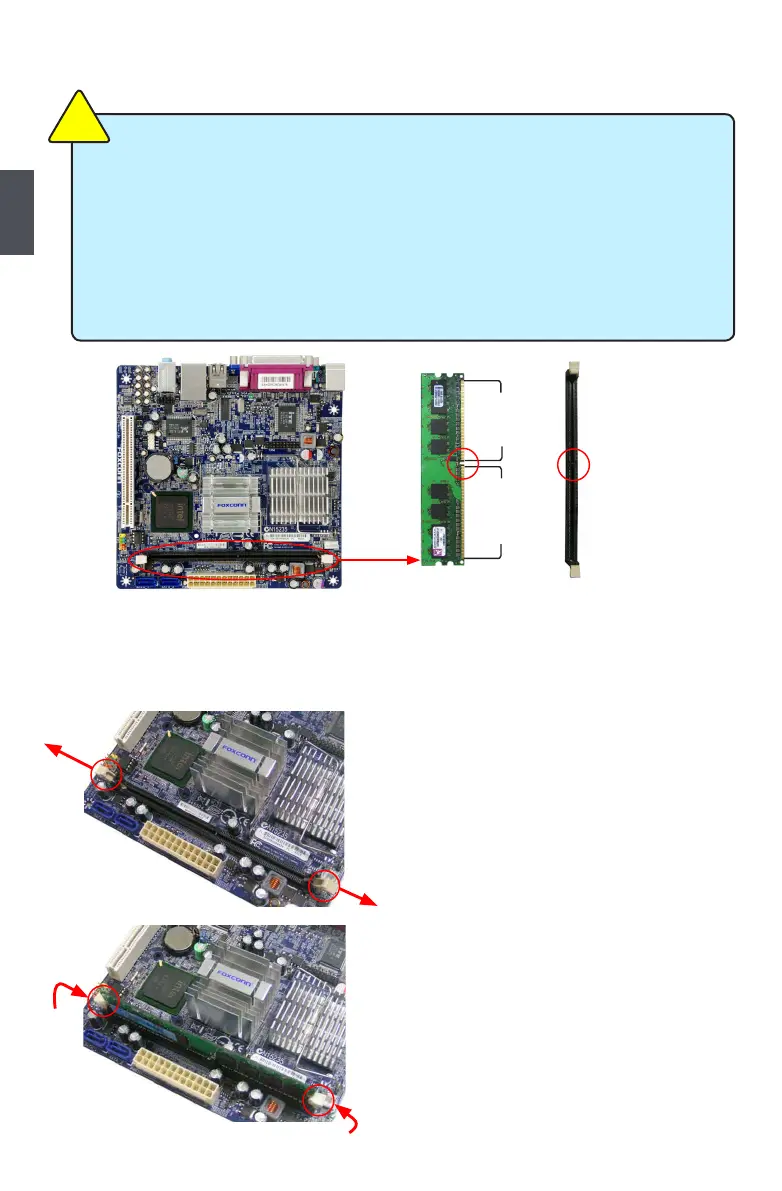
2-1 Install the Memory
If you take a look at front side of memory module, it has asymmetric pin counts on both sides
correctly install your memory modules into the sockets.
Step 1:
Spread the clips at both ends of the memory
socket. Place the memory module onto the socket,
memory socket.
Step 2:
The clips at both ends of the socket will snap
into place when the memory module is securely
inserted.
Notch
112-Pin128-Pin
Read the following guidelines before you begin to install the memory :
of the same capacity, brand, speed, and chips be used.
installing the memory to prevent hardware damage.
one direction. If you are unable to insert the memory, switch the direction.
Be sure to install DDR2 DIMMs on this motherboard.
C
A
U
T
I
O
N
!












 To Next Page