Foxtech DA16 Radio Control System User Manual
©
2018 FOXTECH All Rights Reserved
23
TrimSet
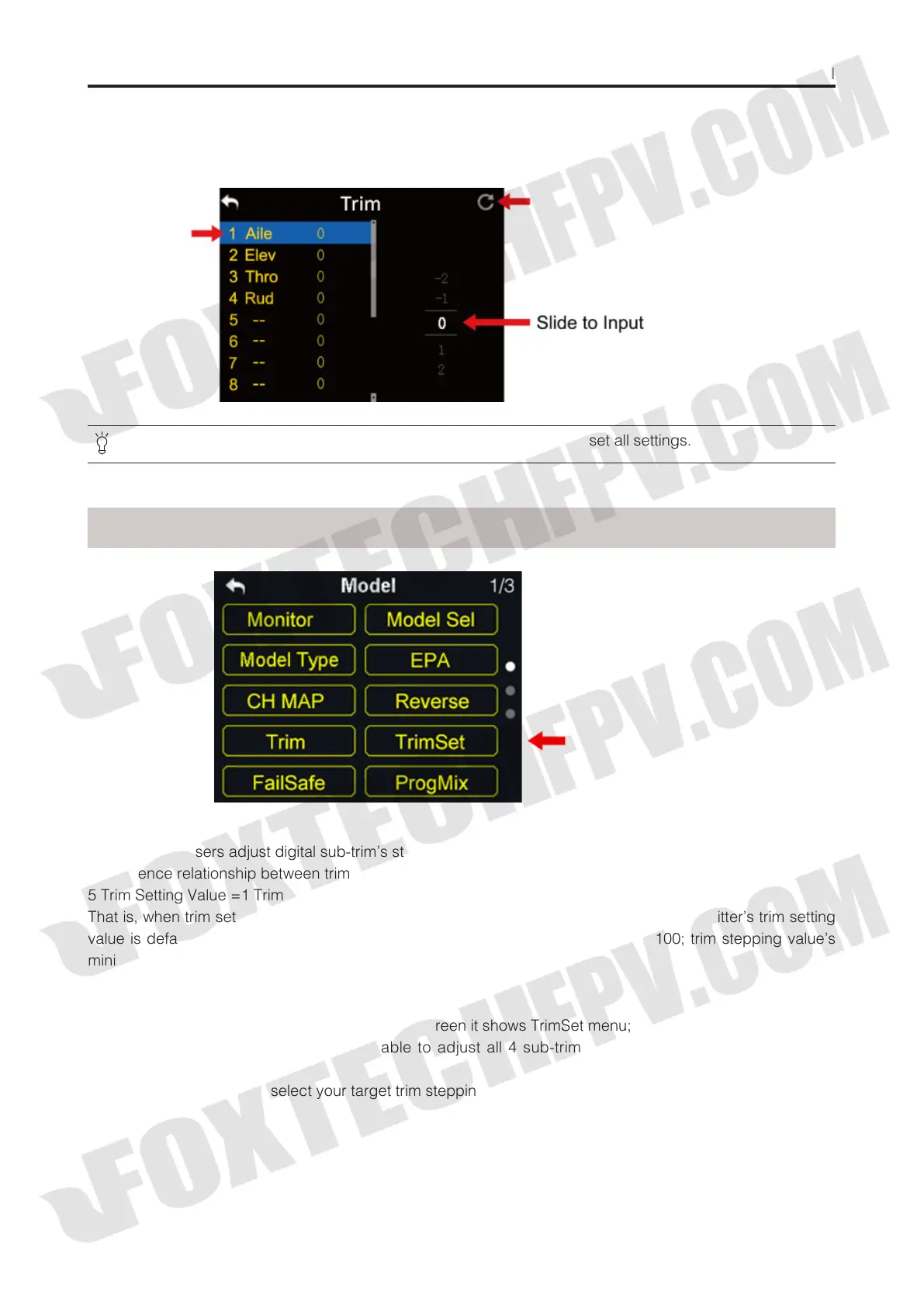
Steps to Adjust Trim
(1) In model select menu, tap on “Trim”, in screen it shows Trim menu;
(2) Tap on your requiring channel; use turntable to select a target middle value;
(3) Repeat step 2 if you need to adjust other channels.
In Trim menu, tap on “Reset” on upper right corner in screen to reset all settings.
TrimSet helps users adjust digital sub-trim’s stepping value.
Equivalence relationship between trim setting value and trim stepping value are,
5 Trim Setting Value =1 Trim Stepping Value
That is, when trim setting value changes in 5, trim stepping value changes in DA16 transmitter’s trim setting
value is default to be 5, trim setting value’s minimum limit is 0, maximum limit is 100; trim stepping value’s
minimum limit is 0, maximum limit is 20.
Steps to Adjust TrimSet
(1) In model settings menu, tap on “TrimSet”, in screen it shows TrimSet menu;
(2) Through TrimSet function, users are able to adjust all 4 sub-trim channels; tap on your requiring to
change its trim stepping value;
(3) Use virtual turntable to select your target trim stepping value, adjustable range is from 0 to 100;



 To Next Page