Foxtech DA16 Radio Control System User Manual
©
2018 FOXTECH All Rights Reserved
24
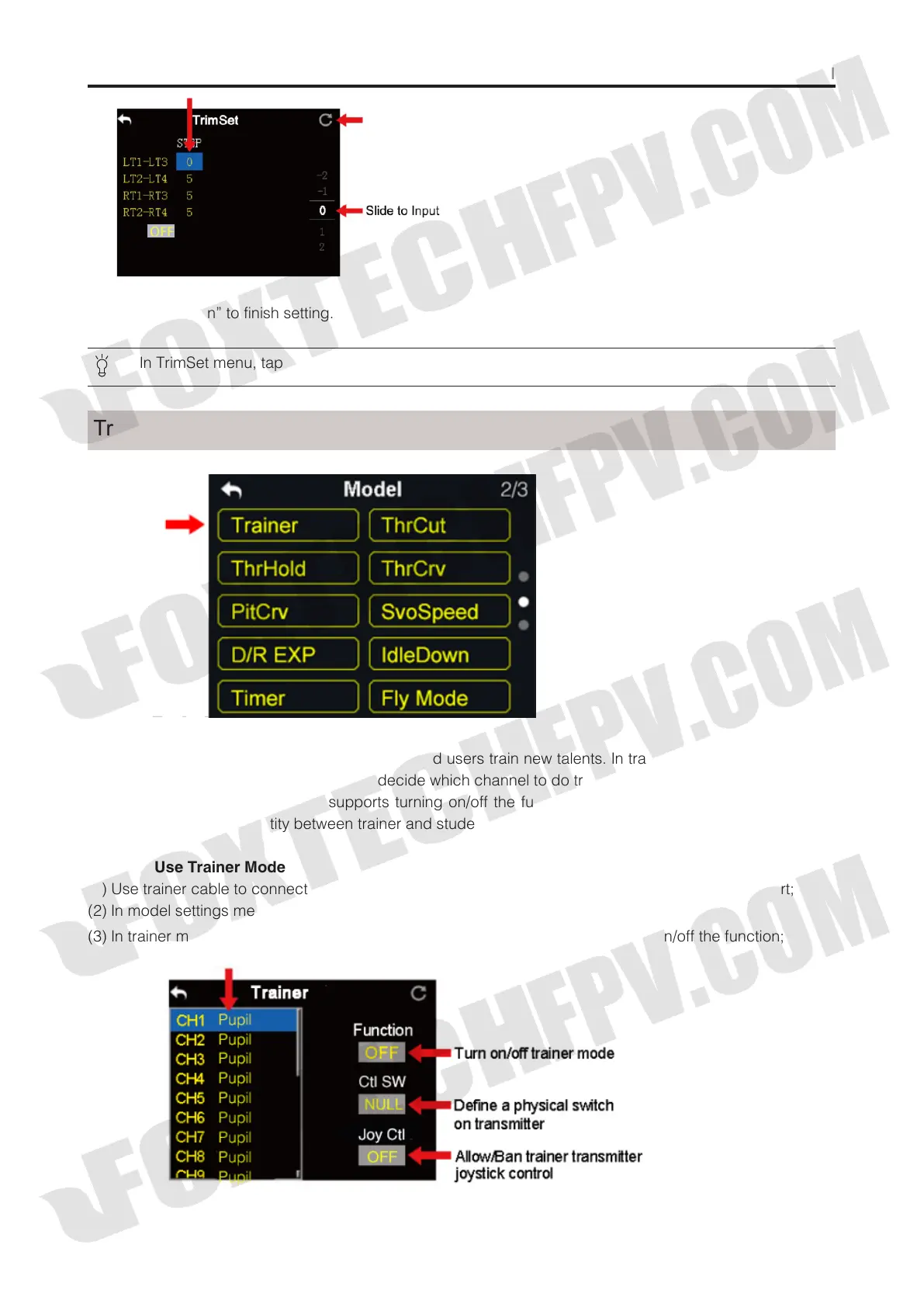
(4) Tap on “Return” to finish setting.
In TrimSet menu, tap on “Reset” on upper right corner in screen to reset all settings.
DA16 transmitter’s trainer mode helps experienced users train new talents. In trainer mode, two transmitters
are connected with a trainer cable. Users decide which channel to do training.
In trainer mode, DA16 transmitter supports turning on/off the function through a physical switch or button.
And users can switch identity between trainer and student.
Steps to Use Trainer Mode
(1) Use trainer cable to connect trainer transmitter’s DATA1 port with student transmitter’s DATA1 port;
(2) In model settings menu, tap on “Trainer”, in screen it shows trainer mode menu;
Trainer
(3) In trainer mode menu it showsa list of all 16 channels; tap on “ON/OFF” to turn on/off the function;



 To Next Page