Foxtech DA16 Radio Control System User Manual
©
2018 FOXTECH All Rights Reserved
22
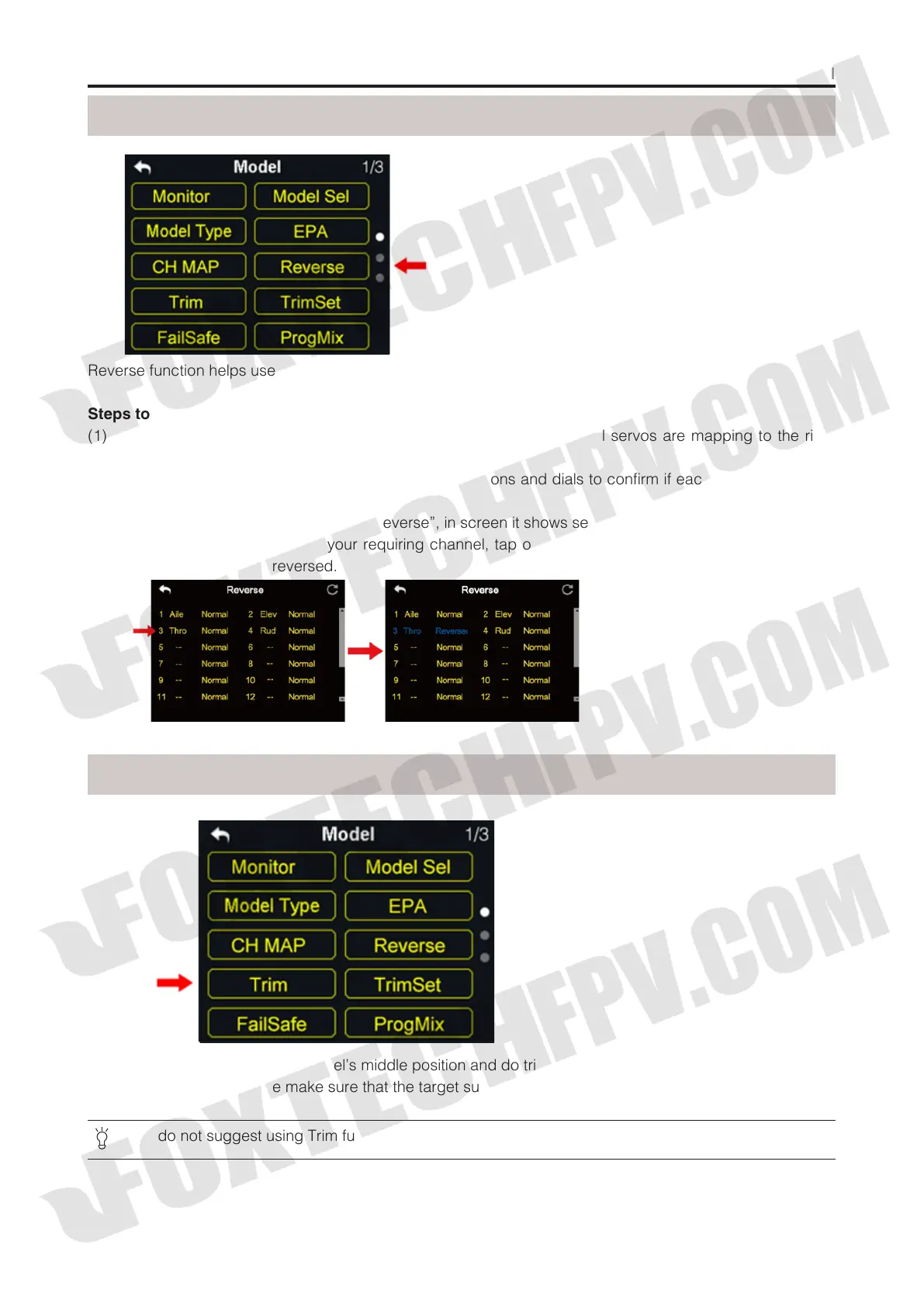
Reverse function helps users reverse a channel’s direction.
Steps to Set Servo Reverse
(1) When DA16 transmitter is linked to a new model, please confirm if all servos are mapping to the right
channels first;
(2) Try to manipulate transmitter’s joysticks, switches, buttons and dials to confirm if each channel direction
is normal or reverse;
(3) In model setting menu, tap on “Servo Reverse”, in screen it shows servo reverse menu;
(4) In servo reverse menu, select your requiring channel, tap on “Normal” to turn it to “Reverse”, it means
that the channel has been reversed.
Reverse
Trim
Trim function helps users set channel’s middle position and do trim adjustment to aircraft’s flight attitude.
Before Trim settings, please make sure that the target sub-trim channel is in middle position.
We do not suggest using Trim function when you are flying agricultural drones.



 To Next Page