Getting Set Up
11
Getting Set Up
Rear Panel
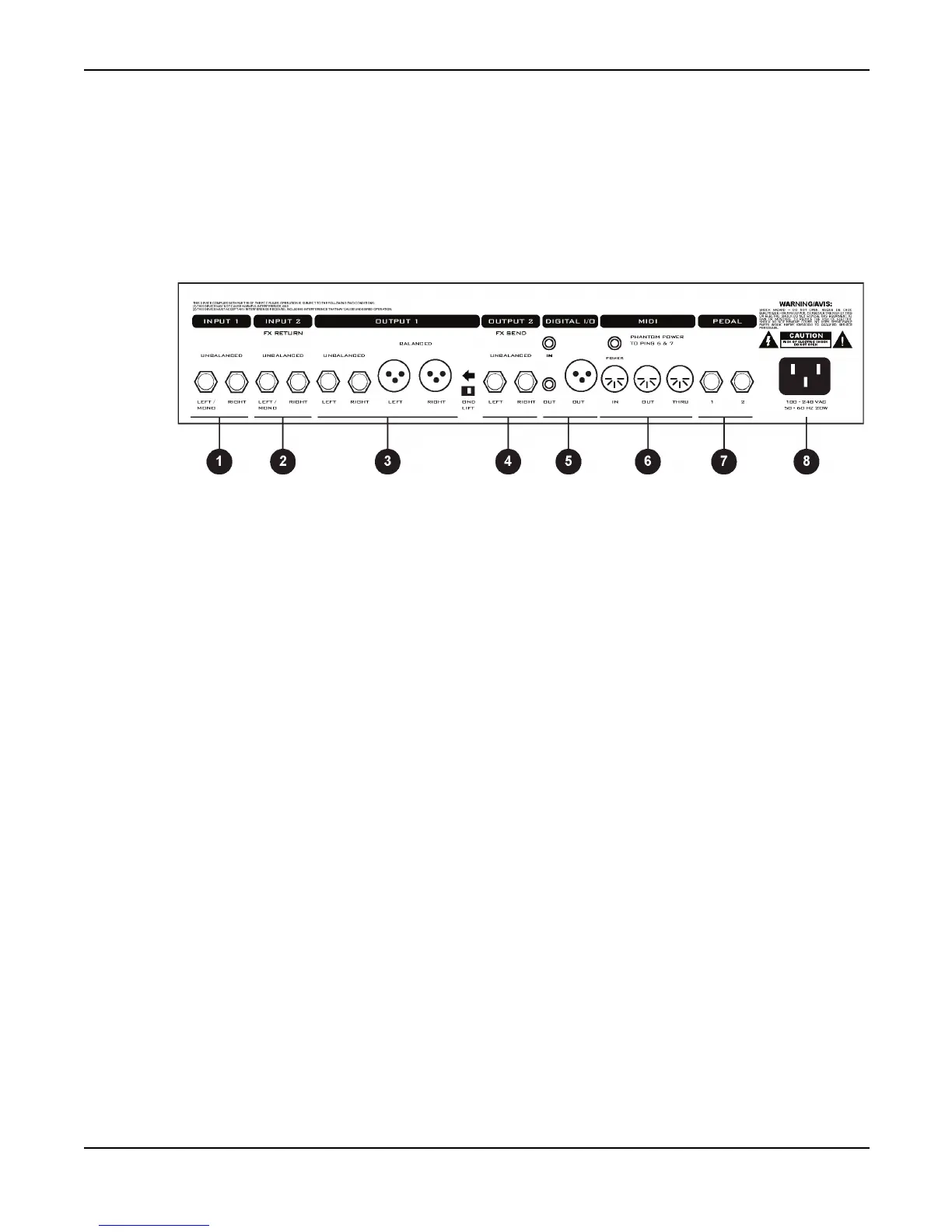
Figure 4. shows the rear panel of the Axe-Fx.
Figure 4. Rear Panel
1. Input1 -
Connect line-level input sources to these jacks. If using the Axe-Fx as an effects processor
use these jacks and be sure to set the
INPUT SOURCE
to
ANALOG REAR
in the
I/O
menu.
NOTE: The front panel
INSTR
input is defeated whenever a plug is inserted into this input.
2. Input2 / Eff. Return -
If using the effects loop the output of the effect(s) in the loop are connected
here. You can also use this as a generic input by placing the effects loop block in the grid but not
connecting anything to the block’s input.
3. Output1 -
Main outputs. There are two sets of outputs, unbalanced and balanced. The balanced
outputs are intended for use with a mixing board and balanced cables (mic cables). The unbalanced
outputs are intended for connecting to a power amp or other unbalanced equipment. The
GND
LIFT
switch lifts the shield ground on the balanced outputs. If you get hum using the balanced
outputs flip this switch to isolate the ground.
4. Output2 / Eff. Send -
Connect this to the input of the effect(s) in your effects loop. You can also
use this as an auxiliary output for on-stage monitoring or other uses.
5. Digital I/O -
The
IN
connector provides 24-bit / 48 kHz digital input to the Axe-Fx. When
configured to use the digital input,
INPUT1
is defeated and the effects loop is not active (see I/O
Configuration). The
OUT
connectors provide a digital version of the audio from
OUTPUT1
. The
format is 24-bit / 48 kHz.
Digital audio output is provided on both RCA and XLR connectors. Digital in is provided on an
RCA connector. You can connect and AES digital source (XLR connector) to the RCA digital input
jack using commonly available AES to SPDIF adaptor cables.



 To Next Page