Getting Set Up
16
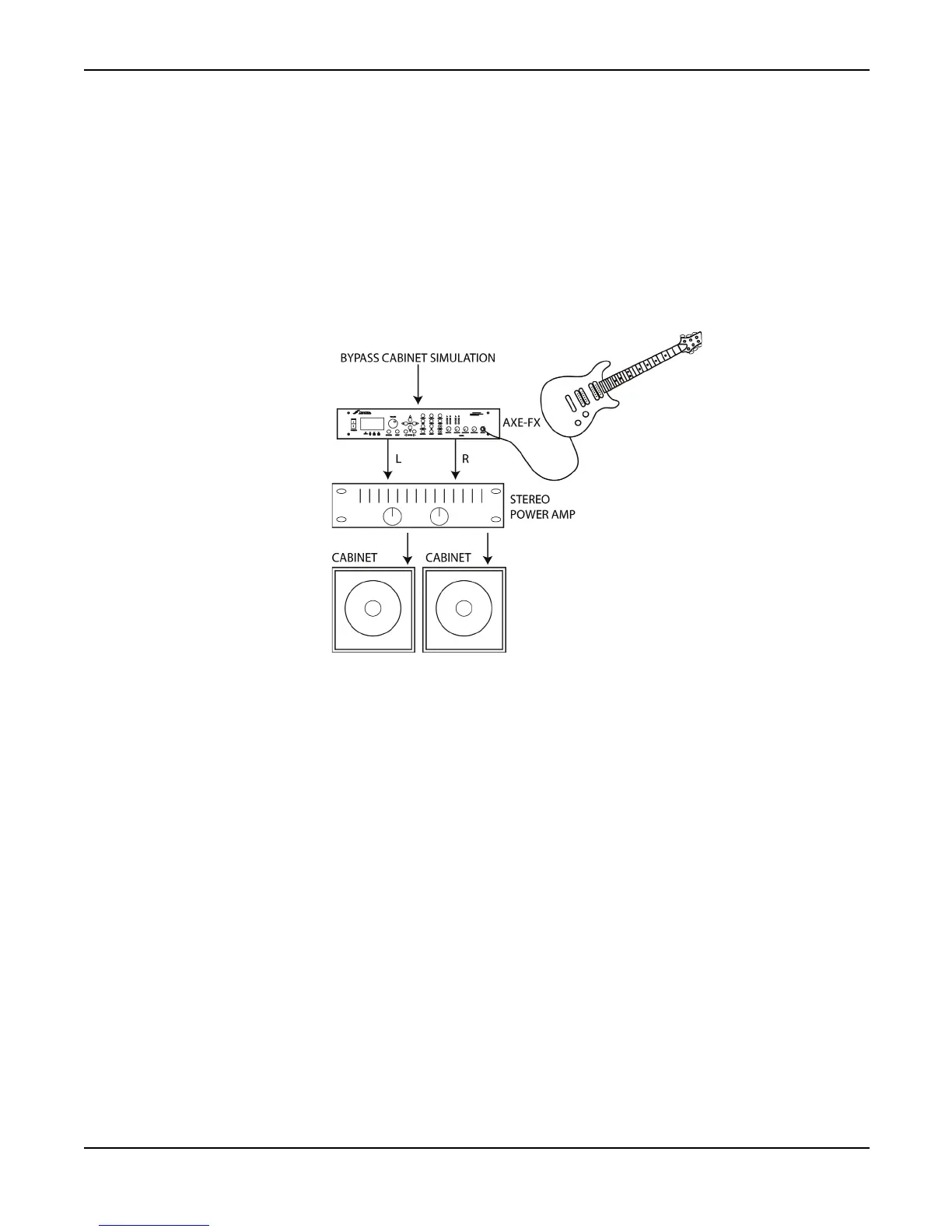
As a Preamp / Processor Into a Power Amp and Guitar Cabinet(s)
In this configuration the Axe-Fx is providing all distortion and tone-shaping. The output of the Axe-
Fx is connected to a power amp and cabinets equipped with guitar speakers. Since the cabinets are
not full-range, the cabinet simulation in the Axe-Fx should be defeated. This can be done globally
via the
GLOBAL
menu, or per-preset by bypassing the cabinet block or removing it from the signal
chain. If the power amp is a tube amp you may want to bypass the Axe-Fx power amp simulations
as well. This can be done via the
GLOBAL
menu, or per-preset by turning the SAG control fully
counter-clockwise.
As a Preamp / Processor Into a Full-Range System
In this configuration the Axe-Fx is providing all distortion and tone-shaping. The output of the Axe-
Fx is connected to a full-range sound reinforcement system. Since the system is full-range the Axe-
Fx’s cabinet simulation should be active.
The configuration shown would be typical of using the Axe-Fx straight into a FOH mixer. Your
sound man would then send you your sound back into your stage monitor(s).
You can also use this configuration without the mixer as a stage rig. Simply connect the Axe-Fx
into a power amp and full-range speakers for the ultimate in tonal flexibility.



 To Next Page