12
FACTORY PRESET PROGRAMS
There are 24 preset programs from P1-P24 for this machine.
In initial situation, repeatedly pressing “PROGRAM” button will display P1-P24 in the speed window.
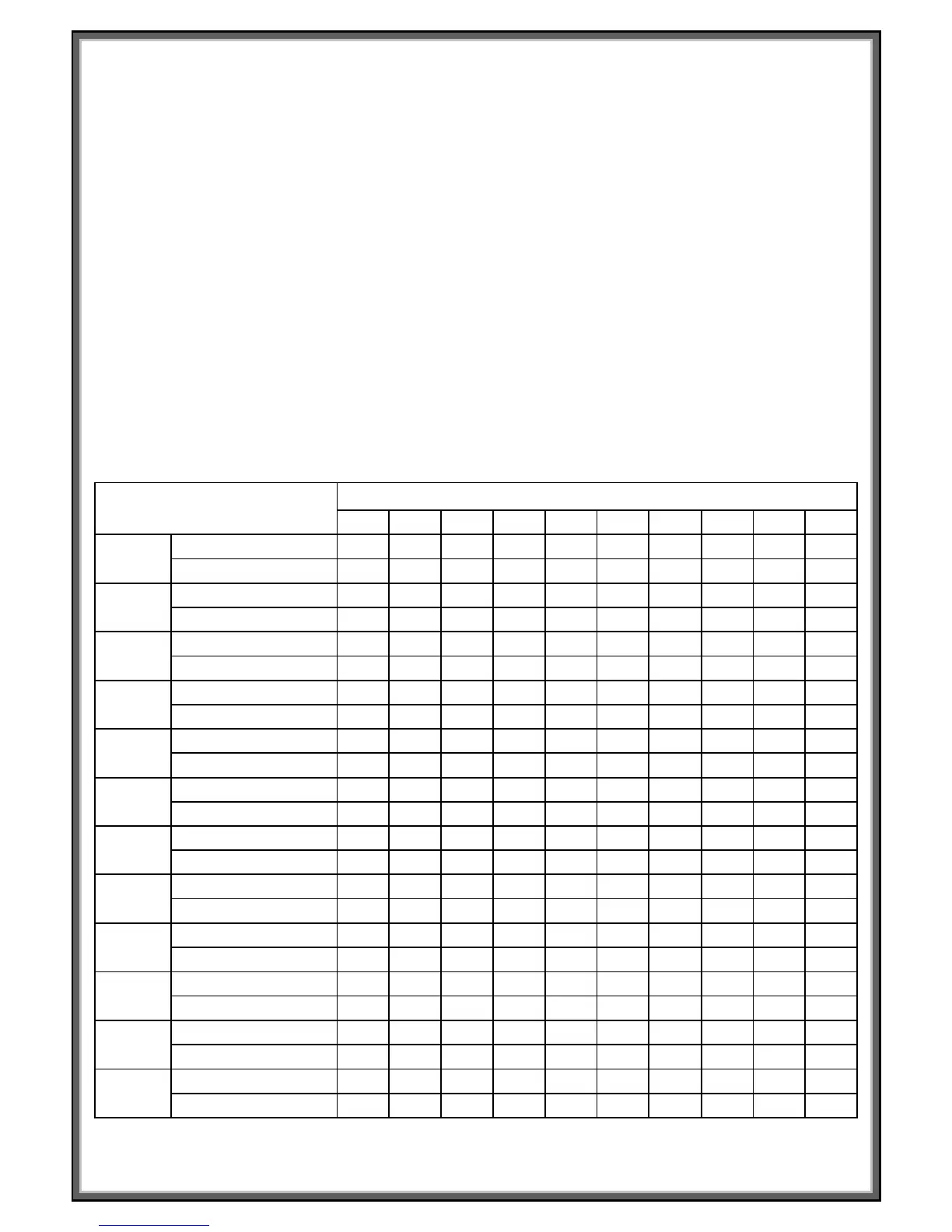
The profile for the program is represented on the DOT matrix display; the following chart shows the preset
incline and speed values for each program. Choose your desired program, the TIME window start blinking.
Adjust the time using “SPEED+”, “SPEED-”, “INCLINE^” or “INCLINE” to your desired workout length the
program which is split into 10 steps will be divided evenly across the chosen time. Press “START” button to
start the program you have set. During operation of each step, you can change the SPEED and INCLINE, but
be aware the next step in the program will jump back to the preset values set at the factory.
Once the program is complete the console will beep 3 times, the treadmill will slow and then stop.
PROGRAM EXERCISE CHART
TIME INTERVAL=SETTING TIME/10
1 2 3 4 5 6 7 8 9 10
P1
SPEED 2 4 3 4 3 5 4 2 5 3
INCLINE 1 2 3 3 1 2 2 3 2 2
P2
SPEED 2 5 4 6 4 6 4 2 4 2
INCLINE 1 2 3 3 2 2 3 4 2 2
P3
SPEED 2 5 4 5 4 5 4 2 3 2
INCLINE 1 2 2 3 1 2 2 2 2 1
P4
SPEED 3 6 7 5 8 5 9 6 4 3
INCLINE 2 2 3 3 2 2 4 6 2 2
P5
SPEED 3 6 7 5 8 6 7 6 4 3
INCLINE 1 2 4 3 2 2 4 5 2 1
P6
SPEED 2 8 6 4 5 9 7 5 4 3
INCLINE 2 2 6 2 3 4 2 2 2 1
P7
SPEED 2 6 7 4 4 7 4 2 4 2
INCLINE 4 5 6 6 9 9 10 12 6 3
P8
SPEED 2 4 6 8 7 8 6 2 3 2
INCLINE 3 5 4 4 3 4 4 3 3 2
P9
SPEED 2 4 5 5 6 5 6 3 3 2
INCLINE 3 5 3 4 2 3 4 2 3 2
P10
SPEED 2 3 5 3 3 5 3 6 3 3
INCLINE 4 4 3 6 7 8 8 6 3 3
P11
SPEED 2 5 8 10 6 9 5 3 2 2
INCLINE 1 3 5 8 10 7 6 3 2 3
P12
SPEED 2 5 5 4 4 6 4 2 3 4
INCLINE 3 5 6 7 12 9 11 11 6 3


 To Next Page