18
MAINTENANCE INSTRUCTIONS
WALKING BELT CENTERING AND TENSION ADJUSTMENT
DO NOT OVERTIGHTEN the walking belt. This may cause reduced motor performance and excessive roller
bearing wear.
TO CENTER WALKING BELT:
● Place treadmill on a level surface
● Run treadmill at approximately 4km/hr
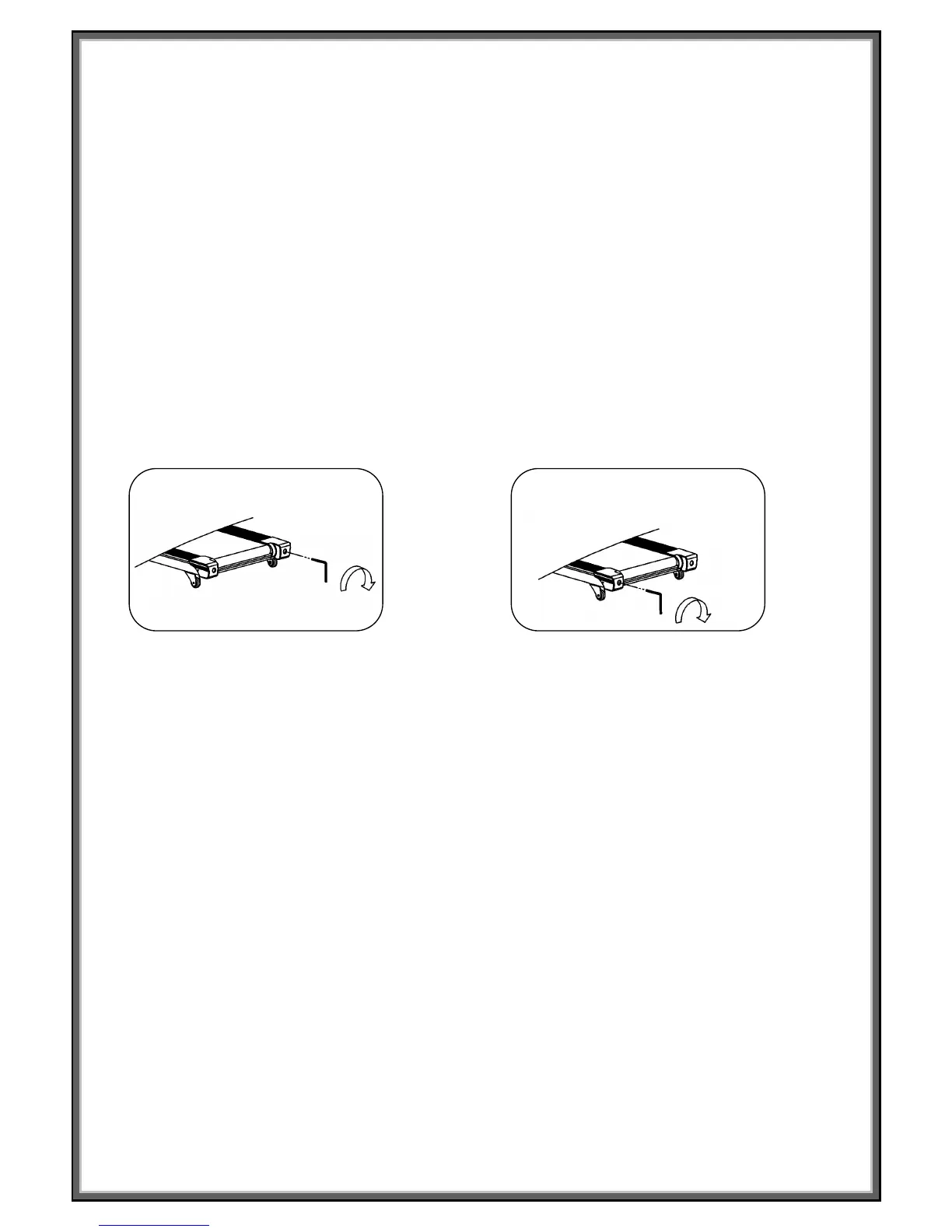
● If the belt has drifted to the right, turn the right adjusting bolt 1/2 turn clockwise and the left adjusting bolt 1/2
a turn counterclockwise.
● If the belt has drifted to the left, turn the left adjusting bolt 1/2 turn clockwise and the right adjusting bolt 1/2
turn clockwise and the right adjusting bolt 1/2 turn counterclockwise.
Picture A If the belts has drifted to the RIGHT Picture B If the belts has drifted to the LEFT
To check for the correct belt tension: Stand on the side rails and set the treadmill running to 4km/h. Holding on
to the handrails plant one foot directly in the centre of the belt. If the belt stops it is too loose. Tighten the bolts
pictured about half a turn clockwise and repeat the test.
If you have repeated this test and done more than 2.5 full turns the problem may be the drive belt please
contact the retailer for more information.


 To Next Page