Transmission Controls
Manual Transmissions
NOTE: See Chapter 13 for complete manual
transmission operating instructions.
If so equipped, the transmission range control and
splitter valves are attached to the gear shift knob.
The range-preselection lever allows the selection of
the low or high range for each transmission ratio. It is
used once during an upshift sequence and once dur-
ing a downshift sequence.
Dependent on the transmission model, some ratios
can be split using the splitter-control button.
Eaton Automated Transmissions
NOTE: See Chapter 14 for complete automated
transmission operating instructions.
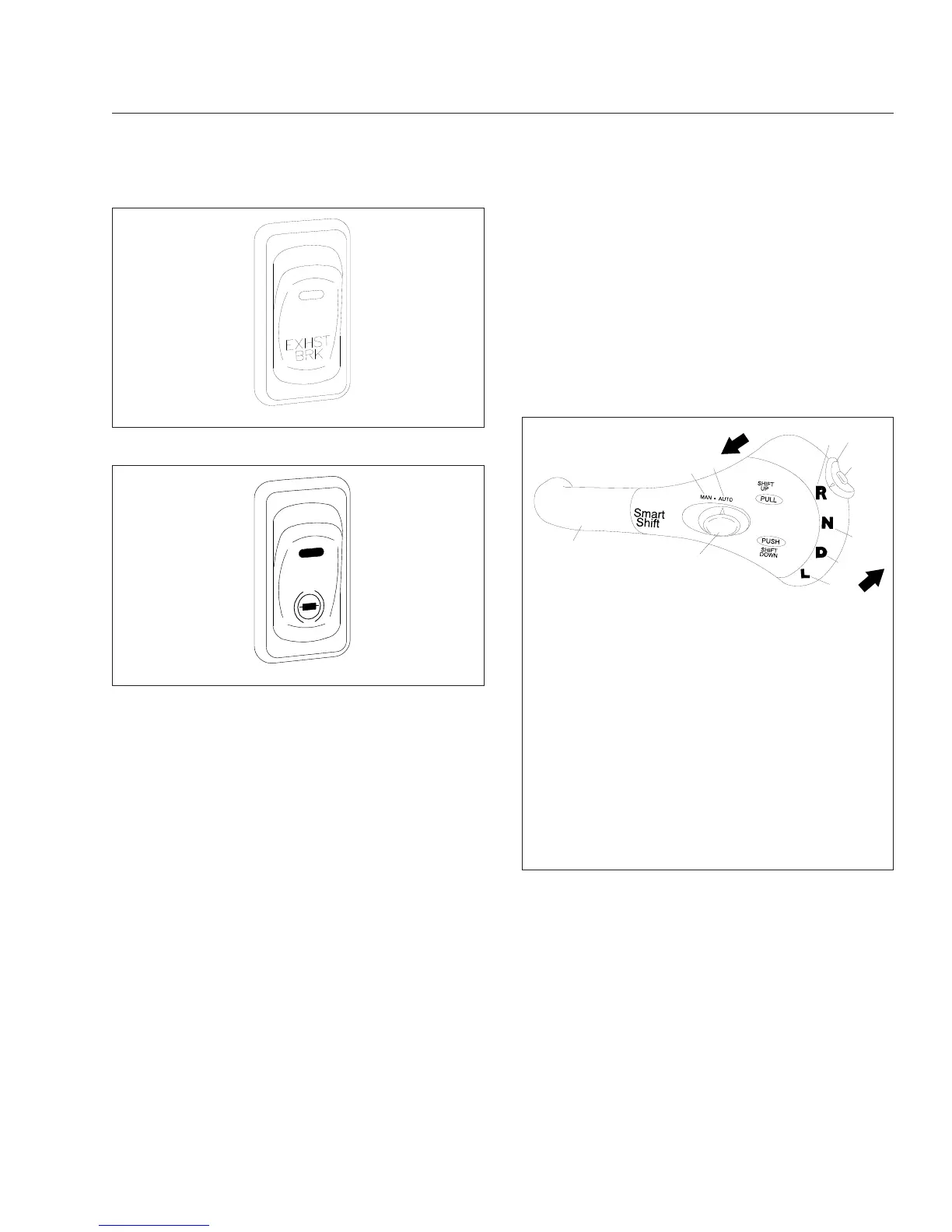
The SmartShift electronic transmission control is in-
stalled with the Eaton® Fuller® UltraShift
™
, UltraShift
PLUS, and AutoShift
™
transmissions. The SmartShift
control is operated by the fingers of the driver’s right
hand, allowing both hands to remain on the steering
wheel.
A two-position driving mode slide switch is mounted
on the body of the control lever just before the
paddle widens out. The slide switch allows the driver
to choose automatic (AUTO) or manual (MAN) mode.
See
Fig. 5.26.
Allison Automatic Transmissions
NOTE: See Chapter 14 for complete automatic
transmission operating instructions.
Automatic transmissions have up to six forward
speeds and one reverse speed. These transmissions
have electronic shift controls that can be pro-
grammed to allow the use of different geared
speeds. See
Fig. 5.27.
f610589
11/28/2001
Fig. 5.24, Exhaust Brake Switch
f610589a
03/31/2009
Fig. 5.25, Exhaust Brake Switch
01/24/2003
1
2
3
4
5
6
8
9
10
11
12
f270120
7
To upshift manually, pull the lever back (towards the
driver). To downshift manually, push the lever forward
(away from the driver).
1. SmartShift Control Lever
2. Slide Switch (forward driving mode switch)
3. MAN Mode (of slide switch)
4. AUTO Mode (of slide switch)
5. Upshift Direction
6. Reverse Position (of selector switch)
7. Selector Switch
8. Neutral Lock Button
9. Neutral Position (of selector switch)
10. Drive Position (of selector switch)
11. Low Position (of selector switch)
12. Downshift Direction
Fig. 5.26, SmartShift Control (Eaton Fuller UltraShift,
UltraShift PLUS, and AutoShift transmissions)
Driver Controls
5.10










 To Next Page