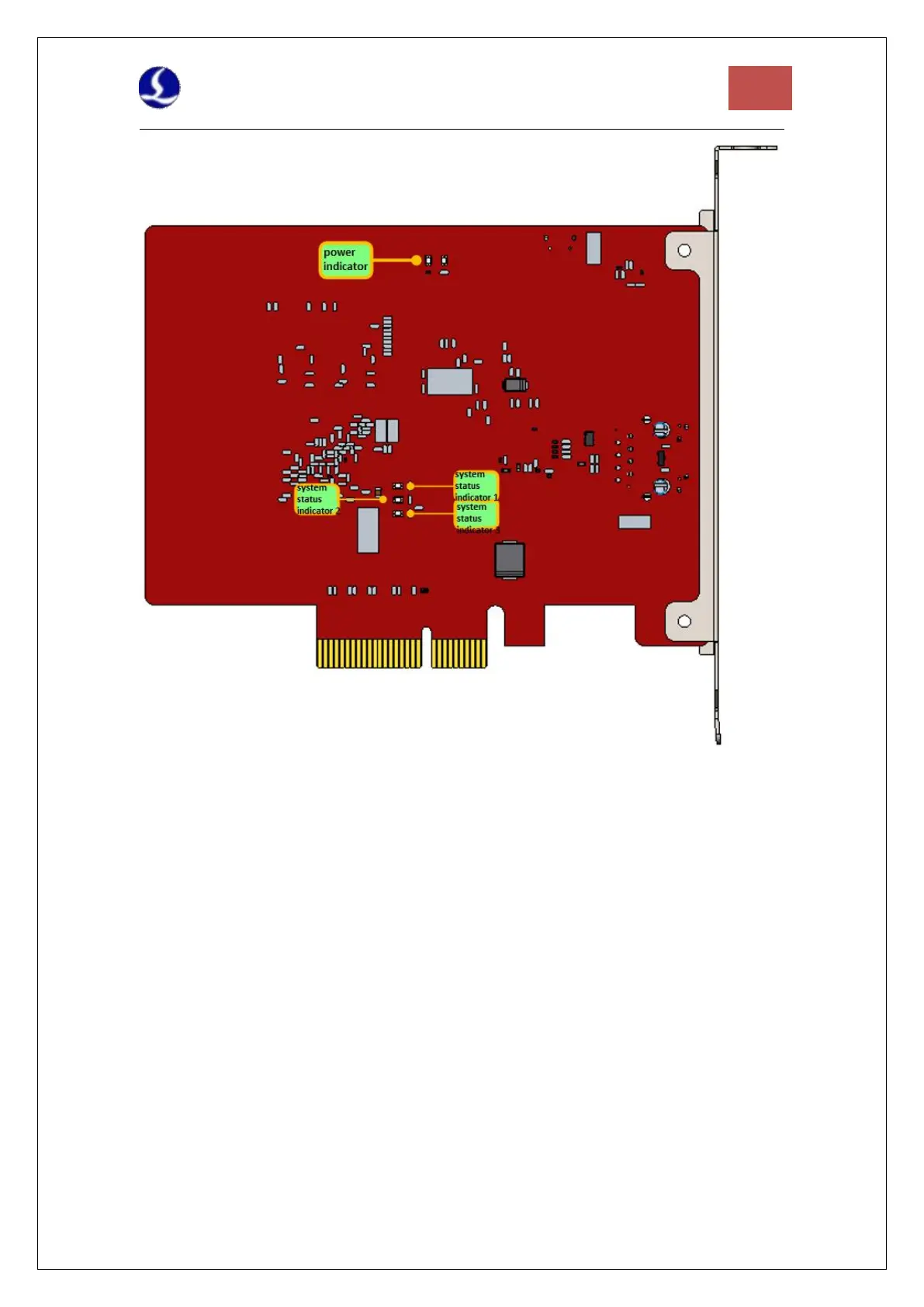
Figure 14 BMC228A Indicators
If it is not in the OP state, the power indicator is always on, both the system status indicator 1
and the system status indicator 2 flash at 1 Hz at the same time, and the system status indicator
3 is always on.
If it is in the OP state, the power indicator is always on, the system status indicator 1 and
system status indicator 2 flash alternately at 1 Hz, and the system status indicator 3 is always
on.
If the BMC228A status indicator is abnormal, change the card and try again.
2. If the BMC228A status indicator is normal, change a card slot or host computer to scan again
3. If the PCIe device still cannot be found, contact our customer service.
4.2.2 Device Manager cannot install driver
If PCIE devices are in the device manager, but the BMC228A driver is not recognized:
1. Please manually install the driver again according to section 3.1.2.
2. If the driver is still not installed, change a card slot or install the driver on the host.
3. If the driver is still not installed, contact our customer service.
4.2.3 Bus Scan failed
If the Cypfig failed to scan the slaves:



 To Next Page