Each cable is marked clearly and accurately.
Cables are in parallel and not crossed, and the harnesses should be straight and leveled.
If using the cables from Friendess, choose the appropriate cable according to the layout
space, and do not pile up and circle it.
All wiring must be firm to prevent sparking.
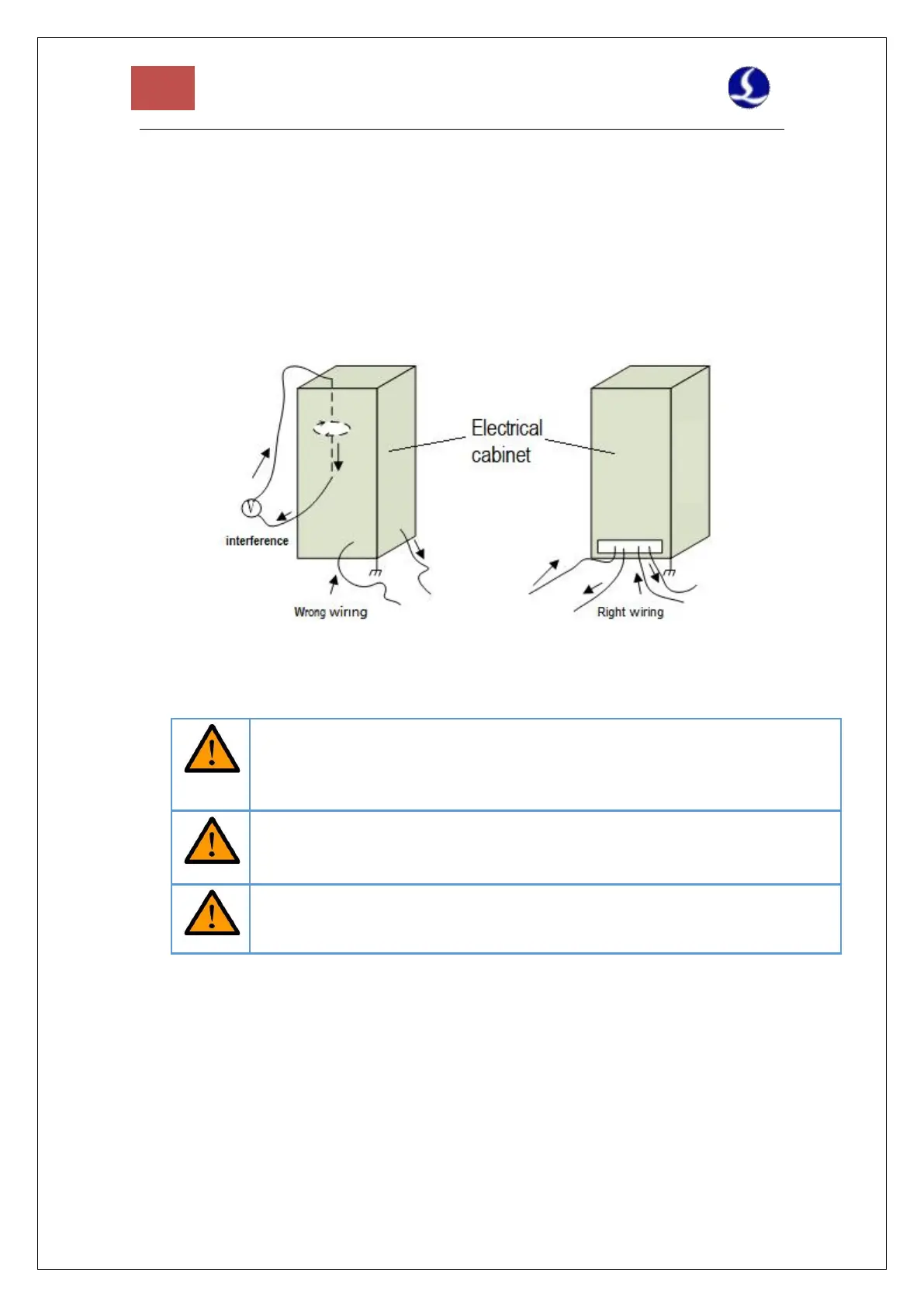
Wiring should avoid loops and antenna effects. The current loop composed of signal
source---transmission line---load is equivalent to a magnetic field antenna. As shown in
the figure below, the wrong connection is on the left, and the correct connection is on
the right.
4.1.3 Assembly Requirements
Handle with care. Please wear anti-static gloves or touch a grounded metal
object to prevent static electricity from damaging the motion control card
before touching the control card circuit or inserting/pulling the control
card.
Except for the USB interface, plugging and unplugging with power is
prohibited for other interfaces, which may cause internal components
damaged.
Handle with care. Do not press the card. Pressing might cause the card to bend
and its function damaged.
4.2 Troubleshooting
4.2.1 Device Manager cannot find PCIe devices
If the device manager cannot find any PCIe devices:
1. Check the status of the indicators on BMC228A. The positions of the power indicator and
system status indicator are shown in Figure 14



 To Next Page