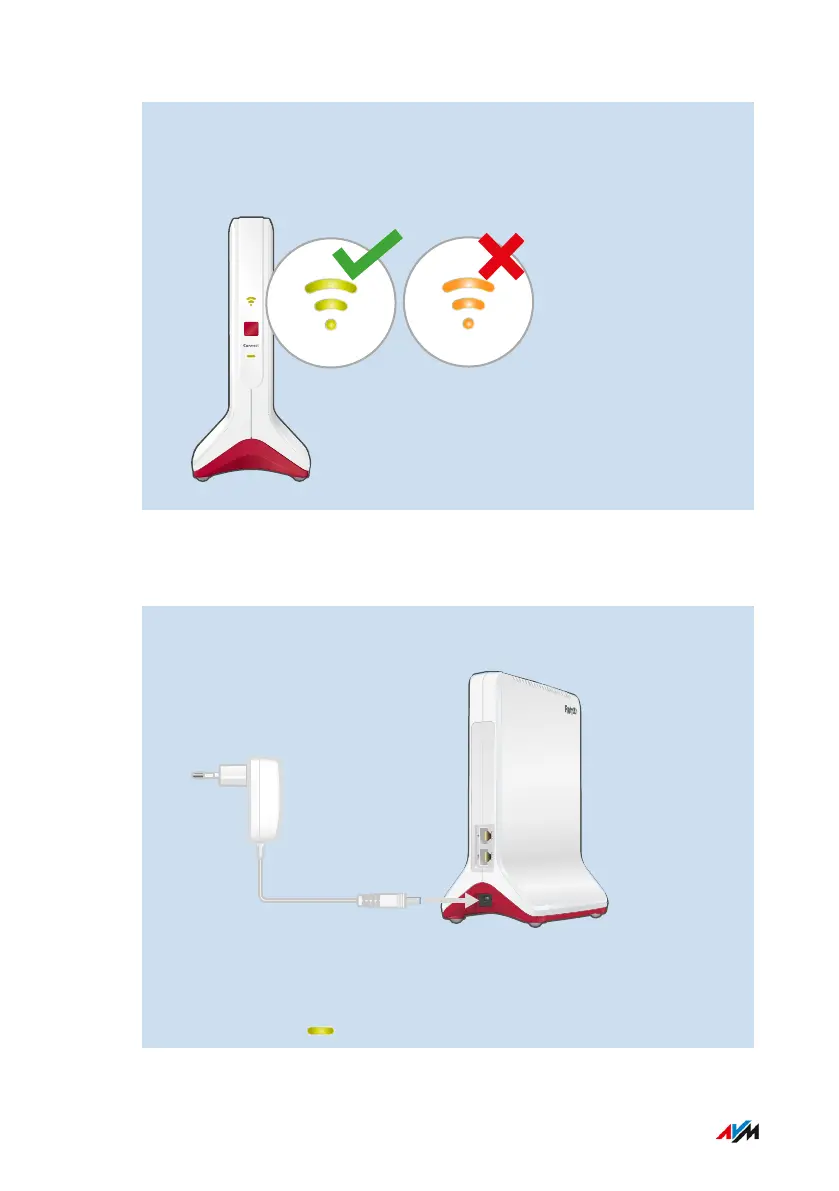
If the LED is orange or flashing orange, then the Wi-Fi connec-
tion to the router (FRITZ!Box) is weak (orange) or could not be es-
tablished (flashing orange). Test outlets at other locations; see
page33.
Instructions: Connecting the FRITZ!Repeater with the Internet Router (FRITZ!
Box) via Wi-Fi using the Wizard
1. Connect the power adapter included with delivery to the “Power”
socket on the FRITZ!Repeater.
2. Insert the power supply into an electrical outlet near the internet
router (FRITZ!Box).
3. Wait until the LED starts flashing slowly.
FRITZ!Repeater 6000 27
Connecting
• • • • • • • • • • • • • • • • • • • • • • • • • • • • • • • • • • • • • • • • • • • • • • • • • • • • • • • • • • • • • • • • • • • • • • • • • • • • • • • • • • • • • • • • • • • • • • • • • • • • • • • •
• • • • • • • • • • • • • • • • • • • • • • • • • • • • • • • • • • • • • • • • • • • • • • • • • • • • • • • • • • • • • • • • • • • • • • • • • • • • • • • • • • • • • • • • • • • • • • • • • • • • • • • •















 To Next Page