LOV
™
Technical Reference
27
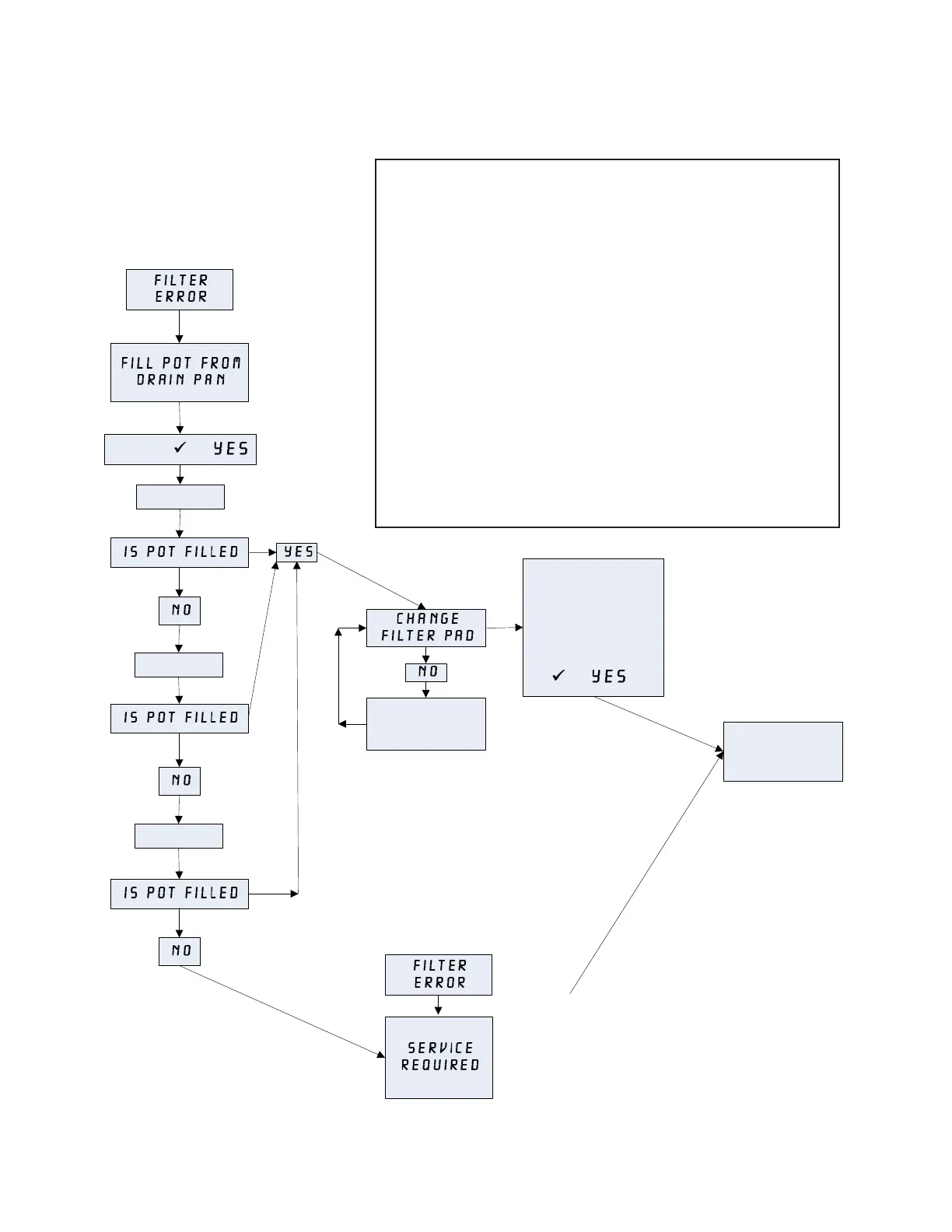
Filter Error Flow Chart
This chart follows the process of clearing a Filter
Error prompt. The prompt is displayed when any of
the following occur:
1. a clogged fi lter pad,
2. a tripped or defective fi lter pump,
3. a leaky O-ring on the pick up tube,
4. a clogged pressure switch (gas fryer),
5. a failed drain valve/actuator, or
6. a failed return valve/actuator.
It is cleared by following the prompts. If the computer
displays Service Required, the fryer is locked
out until reset by a technician. To reset, remove and restore
all power to the fryer after the problem has been fi xed.
Pump Runs
Pump Runs
Pump Runs
Change the filter pad
and ensure the filter
pan is removed from
the cabinet for a
minimum of TWO
minutes, then press
(1 ).
Fryer returns to
cook mode for 15
minutes.
NORMAL
OPERATION
RESUMES
PRESS (1 )
FILTER ERROR twice
in a row after
performing the FILTER
ERROR cycle once.
Call Authorized Repair
Technician to repair
and reset the fryer.
Once fryer is reset,
normal operation
resumes.
First
FILTER ERROR















 To Next Page