© 2021 Flanders Scientic, Inc.
9
Return to Table of Contents
Function Menu
Details on Overscan Function
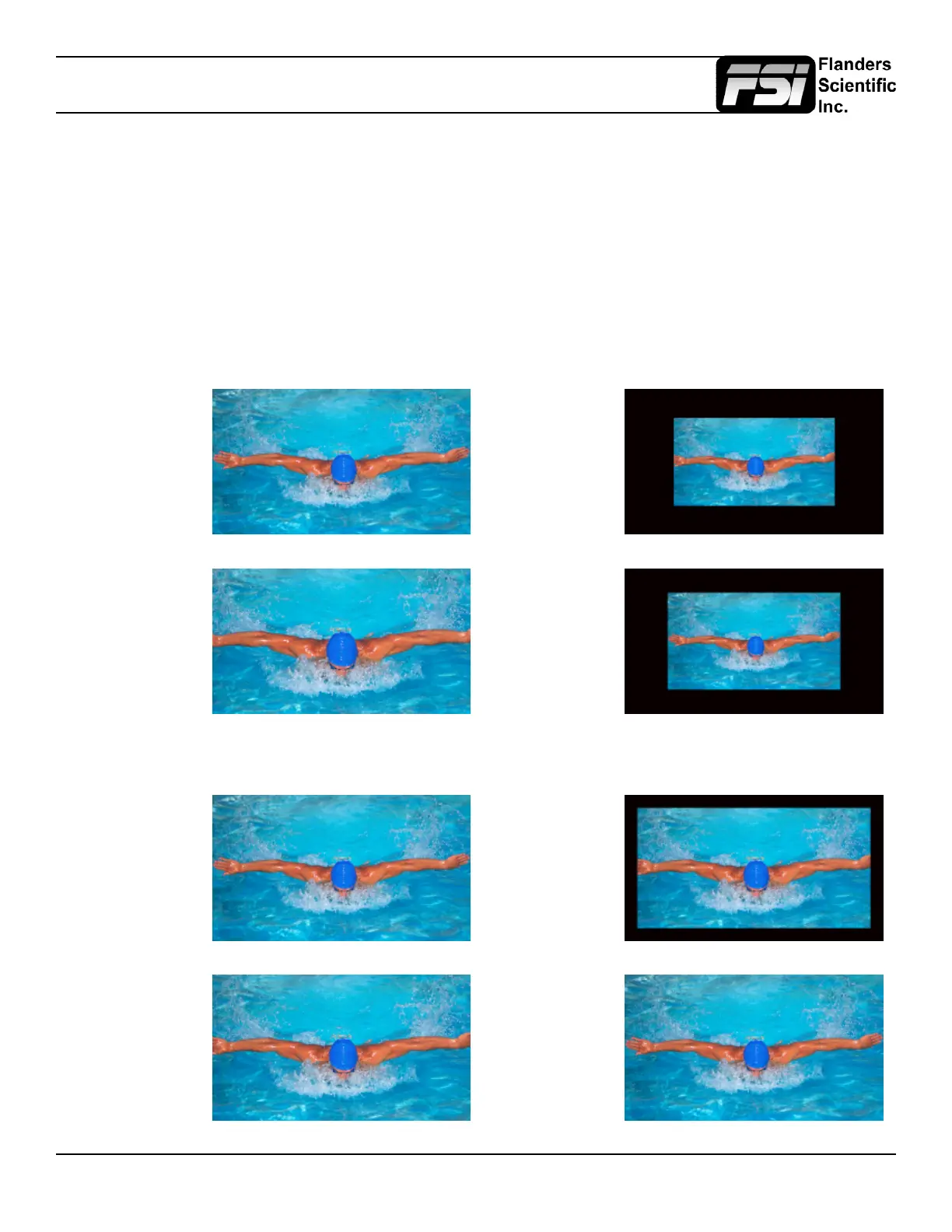
With the overscan function off all active lines of video can be displayed on screen. With overscan on a small percentage
of the outermost active video will not be displayed. Additionally, the monitor can scale the overscanned video full screen
or ‘blackout’ the outlying area while maintaining a pixel to pixel display of the video inside the active scan area. To toggle
between these variations of Overscan use the 1:1 Pixel to Pixel mapping function. With both Pixel to Pixel mapping and
Overscan selected the area outside of the active scan will simply be blacked out, but the active video will not be scaled
outside of the 1:1 pixel scan. With Pixel to Pixel mapping off and overscan on the active scan area will be scaled full screen.
To view all active lines in Pixel to Pixel mapping mode make sure to turn Overscan off.
Pixel to Pixel Off
Overscan Off
Pixel to Pixel On
Overscan On
Pixel to Pixel Off
Overscan On
Pixel to Pixel On
Overscan Off
Pixel to Pixel Off
Overscan Off
Pixel to Pixel On
Overscan On
Pixel to Pixel Off
Overscan On
Pixel to Pixel On
Overscan Off
Overscan Examples
(Images represent 720p source on BM241)
More Overscan Examples
(Images represent 1080i source on BM230)



 To Next Page