10
Lenses
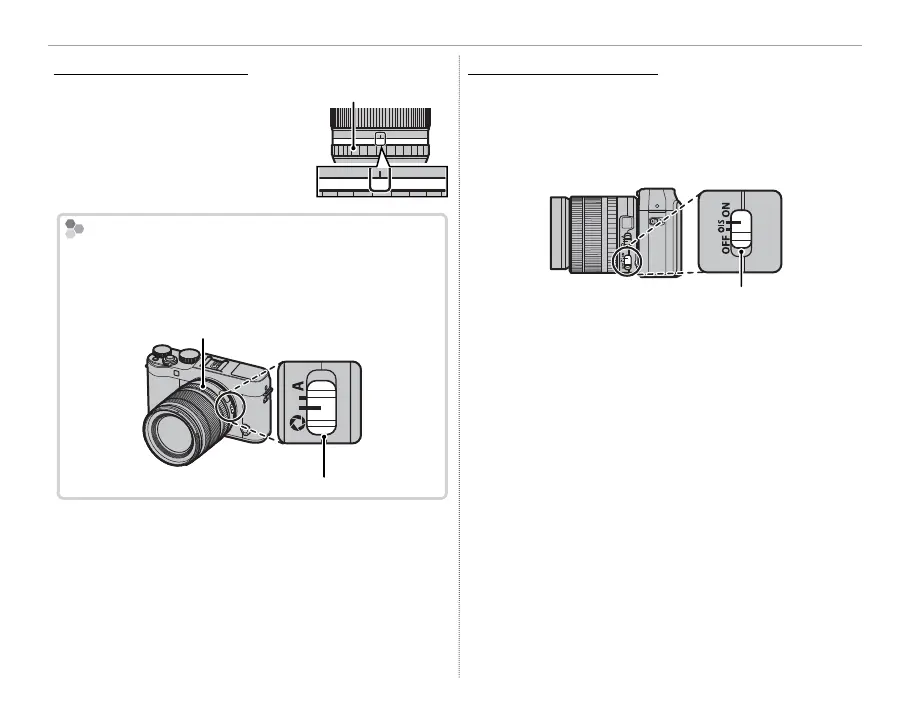
Lenses with Aperture Rings
Lenses with Aperture Rings
At settings other than A, you
can adjust aperture by rotating
the lens aperture ring (expo-
sure modes A and M).
Aperture ring
A161185.64
2.8
The Aperture Mode Switch
If the lens has an aperture mode switch, aperture can
be adjusted manually by sliding the switch to Z and
rotating the aperture ring.
Aperture ring
Aperture mode switch
Q When the aperture ring is set to A, rotate the sub-
command dial to adjust aperture.
R For information on the roles of the main and sub-
command dials, see page 4.
Lenses with O.I.S. Switches
Lenses with O.I.S. Switches
If the lens supports optical image stabilization
(O.I.S.), the image stabilization mode can be cho-
sen in the camera menus. To activate image sta-
bilization, slide the O.I.S. switch to ON.
O.I.S. switch



 To Next Page