59
More on Photography and Playback
Focus Mode
■ Zone AF
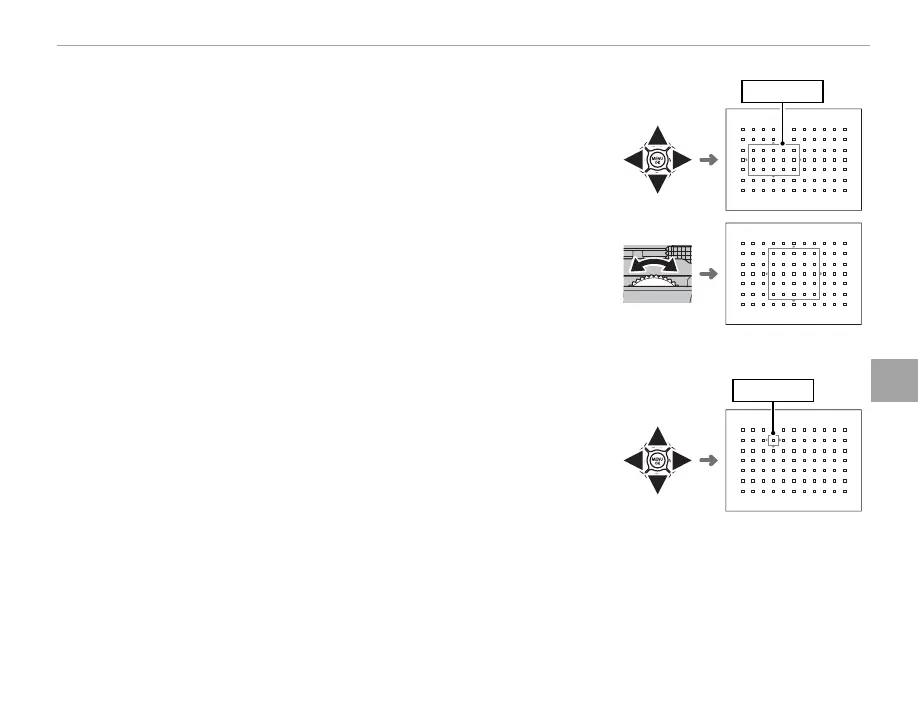
Press the selector up (AF) to display the focus zone. Use the selector to
position the zone or press DISP/BACK to return the zone to the center
of the display.
Focus zone
To choose the number of focus frames in the zone, rotate the sub-
command dial. Rotate the dial right to cycle through zone sizes in the
order 5 × 5, 3 × 3, 5 × 3, 5 × 5…, left to cycle through zone sizes in re-
verse order, or press the center of the dial to select a zone size of 5 × 3.
Press MENU/OK to put your selection into e ect.
■ Tracking (Focus Mode C Only)
Press the selector up (AF) to display the focus frame. Use the selector to
position the focus frame, or press DISP/BACK to return the frame to the
center of the display. Press MENU/OK to put your selection into e ect.
The camera will track focus on the subject while the shutter button is
pressed halfway.
Focus frame
Q Manual focus-frame selection is not available when wide/tracking is selected in focus mode S.



 To Next Page