24
Touch Screen Mode
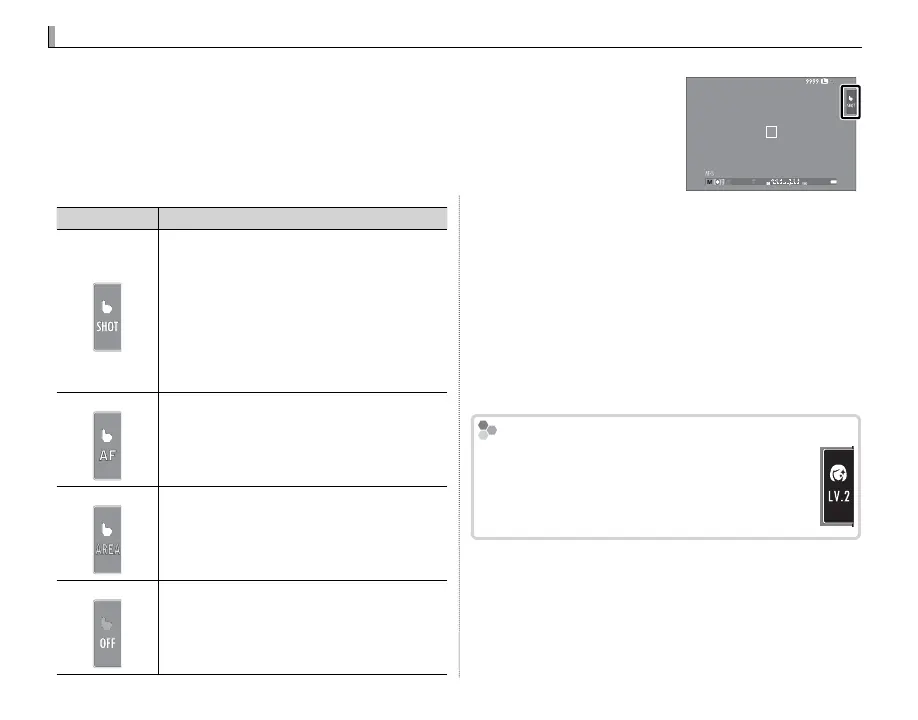
Touch controls can be used for such operations as choosing the focus area and taking
photographs. The operation performed can be selected by tapping the touchscreen
mode indicator in the display to cycle through the following options:
Touchscreen mode indicator
12000
5.6
400
Mode
Description
TOUCH SHOOTING
Tap your subject in the display to focus and
release the shutter.
R If FOCUS is selected for G AUTOFOCUS
SETTING> RELEASE/FOCUS PRIORITY
(P 85), keep your nger on the display un-
til the shutter is released.
R In burst mode, pictures will be taken while
you keep your nger on the display.
AF
Tap to select a focus point and lock focus. The
shutter can be released by pressing the shut-
ter button all the way down.
AREA
Tap to select a point for focus or zoom. The
focus frame will move to the selected point.
OFF
Touch controls o . The display does not re-
spond when tapped.
R Touch control settings can be adjusted using the
K TOUCH SCREEN MODE option in the shooting
menu.
R The touchscreen mode indicator is not displayed
and touch controls can not be used when OFF is
selected for K TOUCH SCREEN SETTING in the
setup menu.
R For information on the touch controls available dur-
ing playback, see page 34.
h
PORTRAIT ENHANCER (
Z
)
In h PORTRAIT ENHANCER (Z) mode, you
can choose the portrait enhancement level
by tapping the portrait enhancer icon.



 To Next Page