55
More on Photography and Playback
Focus Mode
Use the focus mode selector to choose how the camera focuses (note that regardless of the option
selected, manual focus will be used when the lens is in manual focus mode).
• S (single AF): Focus locks while the shutter button is pressed halfway. Choose for stationary subjects.
• C (continuous AF): Focus is continually adjusted to re ect changes in the distance to the subject while
the shutter button is pressed halfway. Use for subjects that are in motion. Eye-detection AF is not
available.
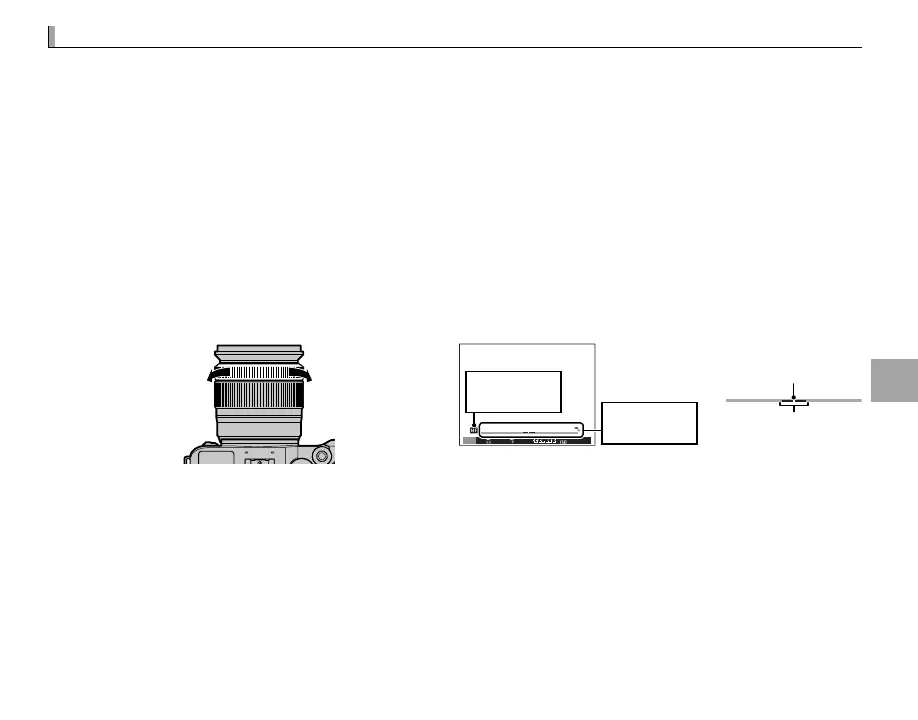
• M (manual): Focus manually using the lens focus ring. Rotate the ring left to reduce the focus distance,
right to increase. The manual focus indicator indicates how closely the focus distance matches the
distance to the subject in the focus brackets (the white line indicates the focus distance, the blue
bar the depth of eld, or in other words the distance in front of and behind the focus point that ap-
pears to be in focus); you can also check focus visually in the view nder or LCD monitor. Choose for
manual control of focus or in situations in which the camera is unable to focus using autofocus (P 61).
Reduce focus
distance
Increase focus
distance
01 0.5 1.0 1.5 2.0 3.0 5.0 10
4000
5.6
400
M
Manual focus
indicator
Manual focus
mode icon
Focus distance
(white line)
1.0 1.5 2.0 3.0 5.0
Depth of eld
(blue bar)
R Use the I FOCUS RING option in the setup menu (P 102) to reverse the direction of rotation of the focus ring.
R INSTANT AF can be assigned to the Fn button, allowing the button to be used to quickly focus on the subject
in the selected focus frame when the camera is in manual focus mode.
R Selecting FOCUS PEAK HIGHLIGHT for c MF ASSIST highlights high-contrast outlines. Rotate the focus ring
until the subject is highlighted. The c MF ASSIST menu can be displayed by pressing and holding the center
of the sub-command dial.



 To Next Page