10
1
Before You Begin
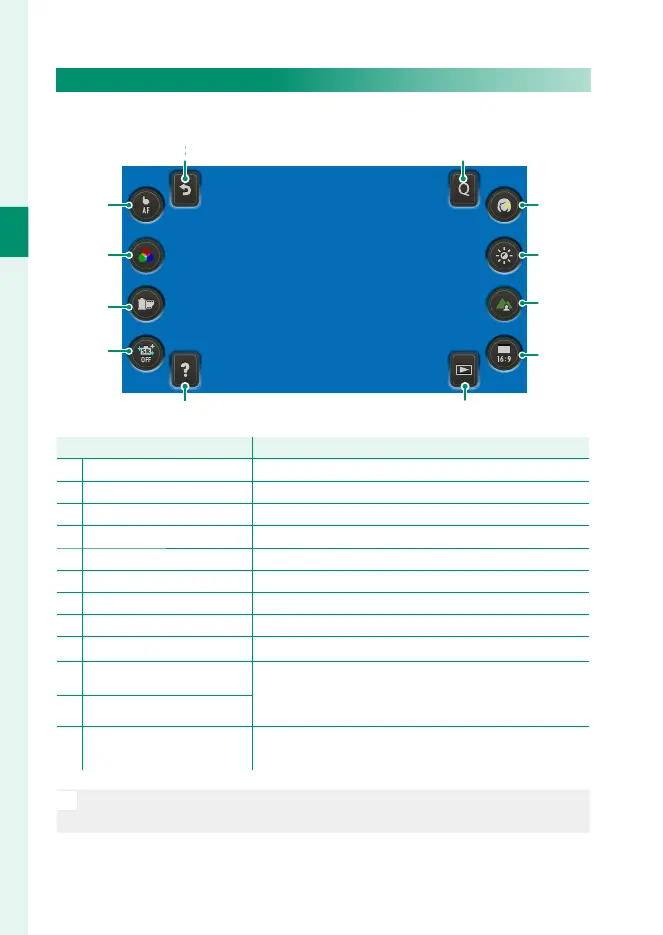
The Touch Menu Display
Select the touch menu display to use touch controls.
A B
C
E
F
D
GH
I
J
K
L
Touch control
Description
A
Back
Return to standard shooting mode (P 8).
B
Q menu
View the options assigned to the Q menu (P 175).
C
Portrait enhancer Lv
Choose the portrait enhancement level (P 95).
D
Exposure compensation
Adjust exposure (P 73).
E
Depth control Adjust depth of fi eld.
F
Image aspect Choose the aspect ratio for new pictures.
G
Playback mode
Switch to playback mode (P 36).
H
Help View function button help.
I
Bright mode Turn bright mode on or off .
J
T.B. Fn2
View the options assigned to the function buttons
using D BUTTON SETTING> FUNCTION (Fn)
SETTING (P 179).
K
T.B. Fn1
L
Touch screen mode
Choose a touch-screen mode from TOUCH
SHOOTING, AF, AREA, and OFF (P 15).
N
Tap the “image aspect” icon (
F
) to choose from aspect ratios of 1 : 1,
3 : 2, 4 : 3, and 16 : 9.



 To Next Page