50
5
Taking Photographs
Aperture-Priority AE (A)
Choose an aperture and let the camera adjust shutter speed for
optimal exposure.
1
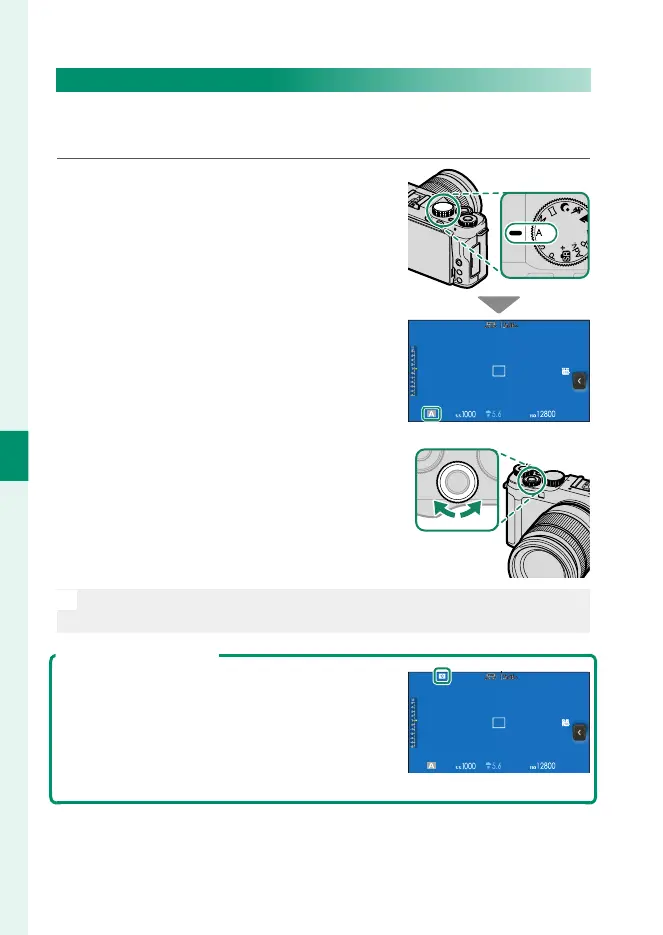
Rotate the mode dial to A.
A will appear in the display.
2
Use the front command dial to
choose an aperture.
O
If the correct exposure cannot be achieved at the selected aperture,
shutter speed will be displayed in red.
Previewing Depth of Field
When PREVIEW DEPTH OF FIELD is assigned
to a function (Fn1) button, pressing the button
displays a L icon and stops aperture down to
the selected setting, allowing depth of eld to
be previewed when the view through the lens
appears in the display.


 To Next Page