49
5
Taking Photographs
Choosing a Shooting Mode
Time (T)
Shutter speeds of 1s or slower are referred to as “long time-ex-
posures”. Use of a tripod is recommended to prevent the camera
moving during the exposure.
N
•
A count-down timer will be displayed while the exposure is in progress.
•
To reduce “noise” (mottling) in long time-exposures, select ON for
H IMAGE QUALITY SETTING> LONG EXPOSURE NR. Note that
this may increase the time needed to record images after shooting.
Using a Remote Release
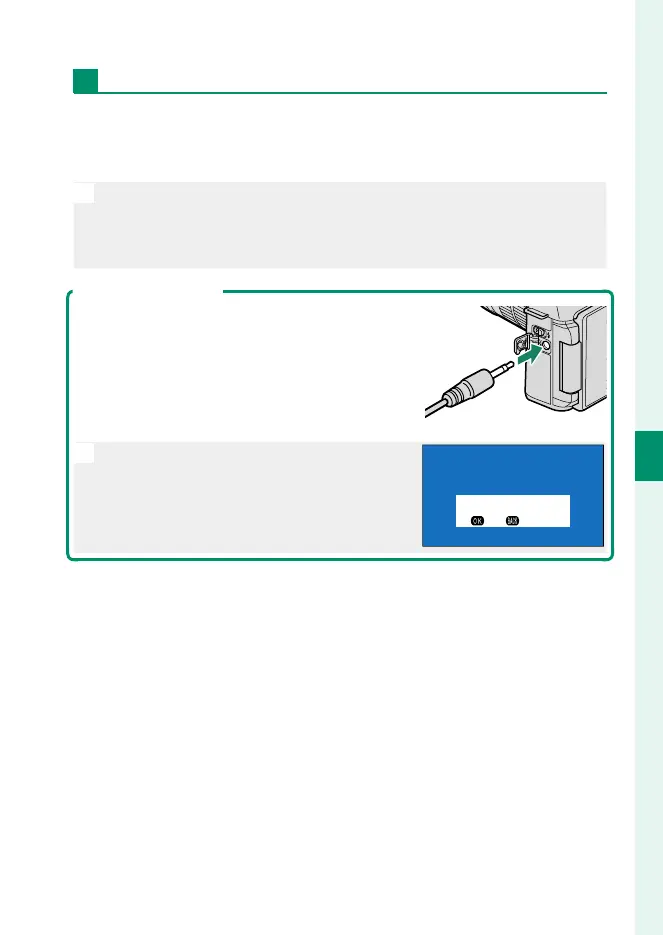
A remote release can be used for long time-ex-
posures. When using an optional RR-100 remote
release or an electronic release from third-party
suppliers, connect it to the camera’s remote re-
lease connector.
N
A con rmation dialog will be displayed
when a remote release is connected; press
MENU/OK and select n REMOTE for MIC/
REMOTE RELEASE.
CHECK MIC/REMOTE RELEASE
SETTING
SKIPSET


 To Next Page