Use of the Quick Mode
20
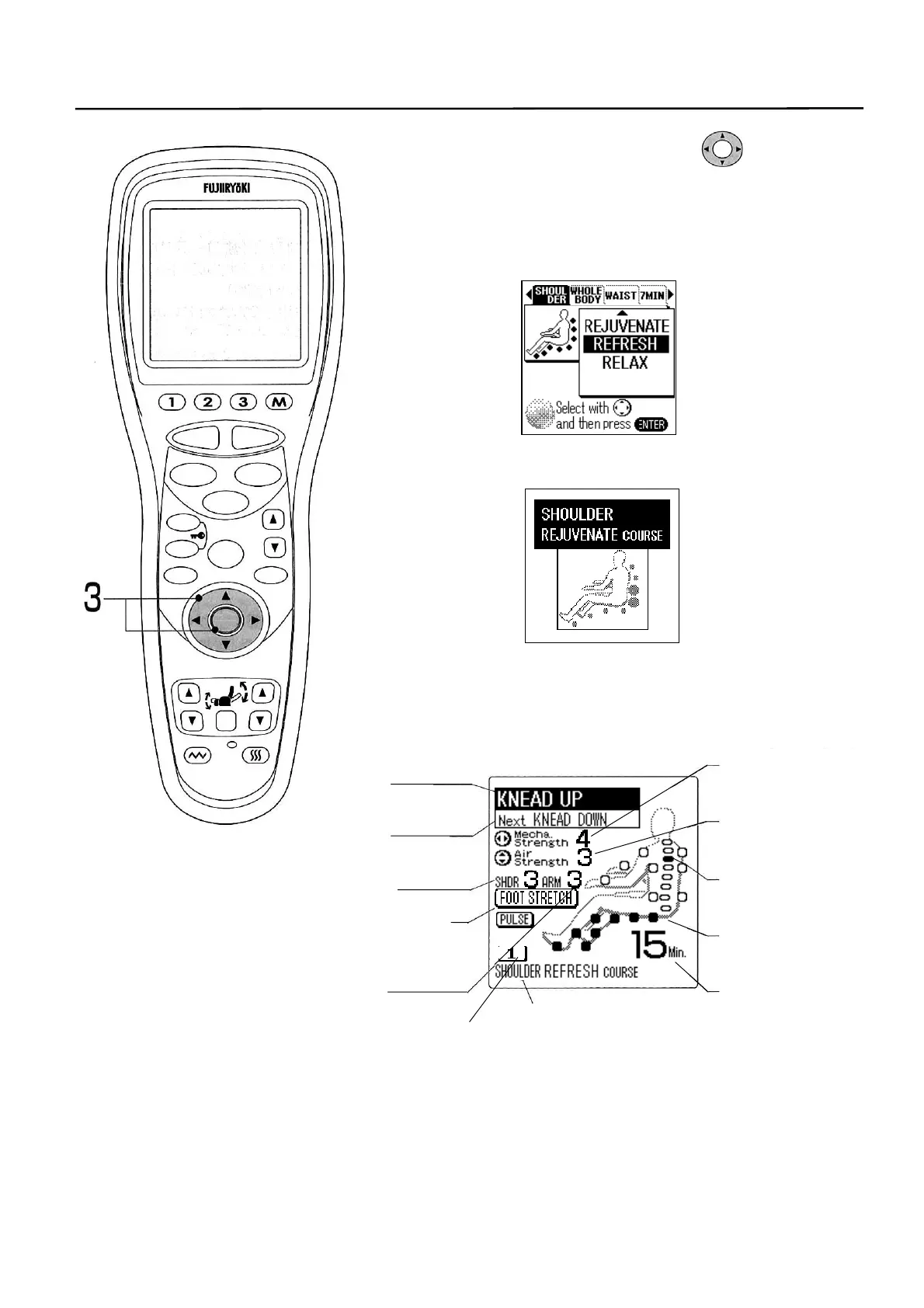
3. Select a desired course with the switch and
press the [ENTER] button.
• Select one of [WHOLE BODY], [SHOULDER], [WAIST]
or [7MIN] course.
• [WHOLE BODY] course has four sub-courses while
[SHOULDER] [WAIST] has three sub-courses.
4. Name of selected course is displayed and the
specified AUTO COURSE starts.
5. Name of the QUICK MODE course presently
selected is displayed on the LCD screen.
▼
STOP
STAR
RESE
AUTO
FUNCTION
AIR
REPEAT
SKIP
SHDR
MENU
ARM
ENTER
FOOTREST RECLINER
RESET
VIBRATION HEATER
HEIGH
ADJUSTMEN
ame of present
massage
ame of next
massage
Intensity of shoulder
air massage
Optional function of
air massage
Intensity of arm air
massage
Mechanical (knead
balls) intensity
Air intensity
Present position of
mechanical (knead
alls
State of air
movement
Remaining time
ame of AUTO COURSE
Quick mode



 To Next Page