Using the air massage functions
36
Introduction
• After turning the power on, the screens as
shown at right are displayed alternately on
the LCD display in the initial state.
• When changing from an air massage to
another air massage or from the AUTO
COURCE/QUICK MODE to an air massage
(See P50.)
• When combining a mechanical massage with
an air massage (See P43.)
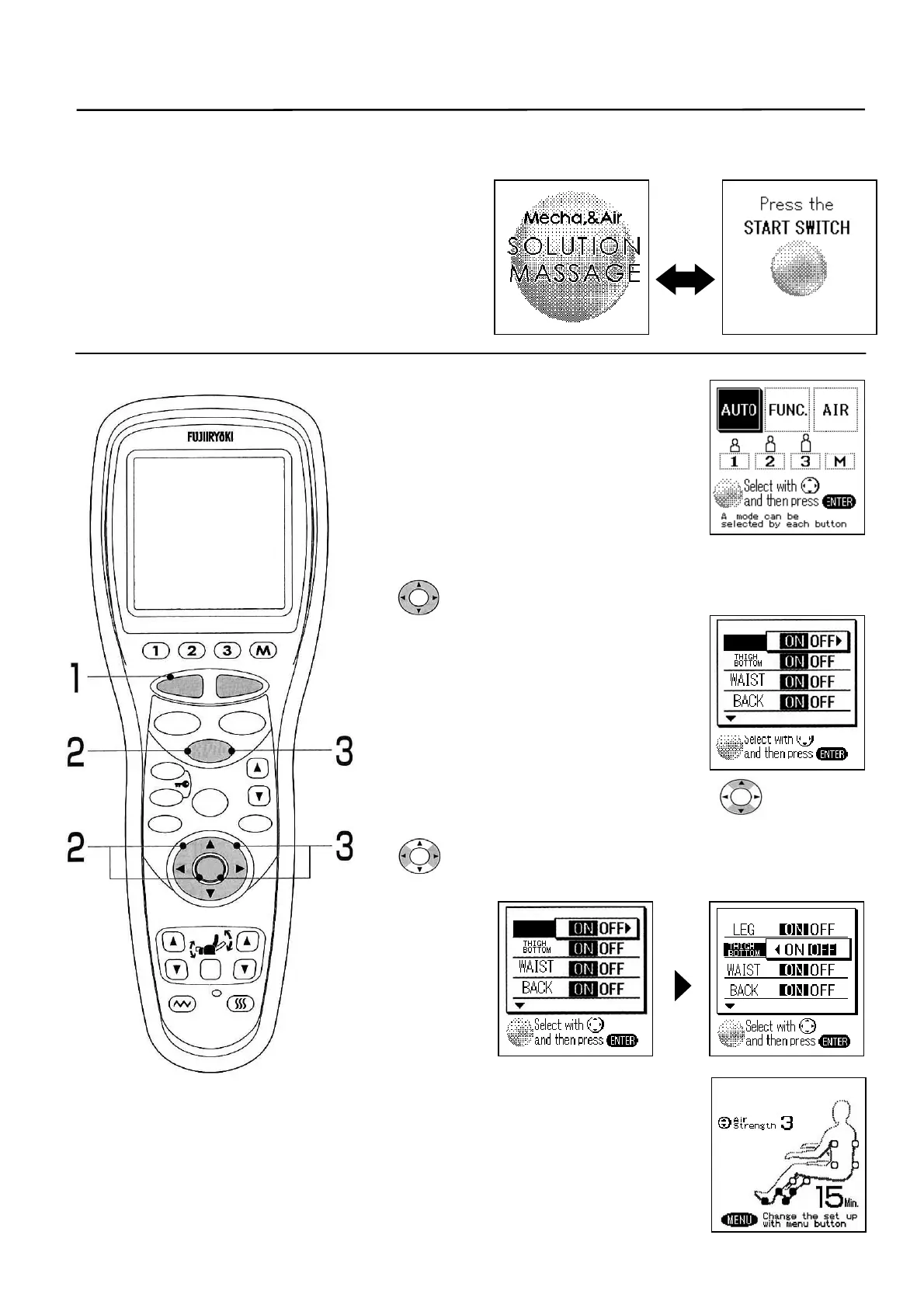
1. Press the [START/RESET]
button.
• Foot rest rises automatically to the
standby position.
(To stop on the way, press the [STOP]
button)
• Standby screen is displayed.
2. Press the [AIR] button. Or select the “Air” with the
switch and press the [ENTER] button.
• List of functions is displayed.
* It will start 5 seconds later without
pressing the [ENTER].
(The same applies also to subsequent
steps.)
3. Select a desirable function with the switch or
the [AIR] button and select the “ON/OFF” with the
switch. Press the [ENTER] button finally.
• “ON” is set for all initially.
4. Selected function will start.
LEG
LEG
S
STOP
STAR
RESE
AUTO
FUNCTION
AIR
REPEAT
SKIP
SHDR
MENU
ARM
ENTER
FOOTREST RECLINER
RESET
VIBRATION HEATER
HEIGH
ADJUSTMEN



 To Next Page