Other functions
51
Introduction
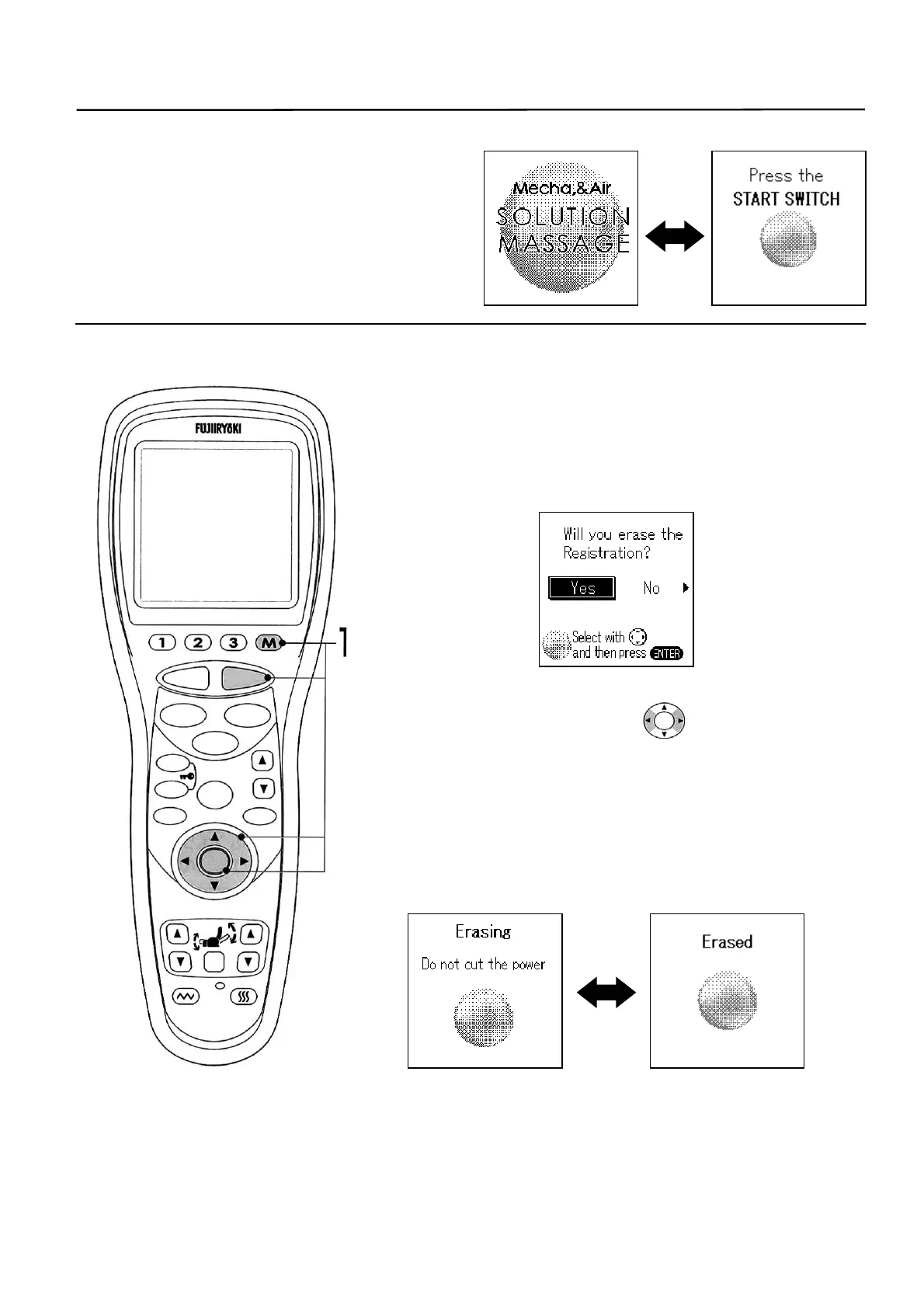
• In the initial state after turning the power on,
the following screens are displayed
alternately on the LCD display.
1. When erasing a registered memory.
① In the initial state, press the [STOP] and (M) buttons
simultaneously about 2 seconds. A screen to
reconfirm the memory erasing is displayed.
② Select “YES/NO” with the switch and then
press the [ENTER] button.
③ A message “Erasing” is displayed and then it
changed to “Erased” as the erasing is completed.
* Do not turn off the power during the memory erasing. The
erasing will not be completed.
STOP
STAR
RESE
AUTO
FUNCTION
AIR
REPEAT
SKIP
SHDR
MENU
ARM
ENTER
FOOTREST RECLINER
RESET
VIBRATION HEATER
HEIGH
ADJUSTMEN



 To Next Page