Other functions
52
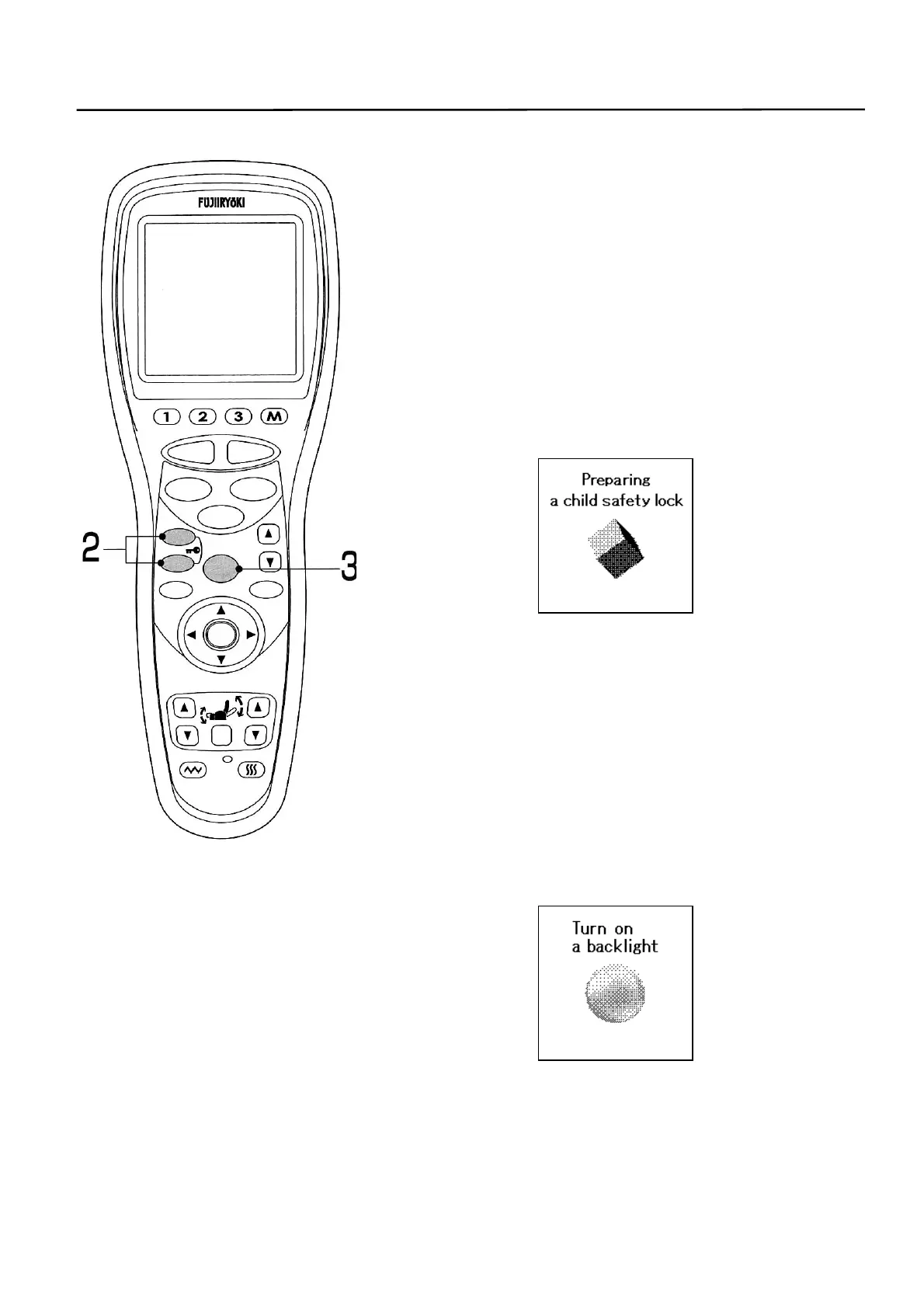
2. To apply the child lock.
• Child lock is a function to disable the button operations to
prevent mischievous operations by children.
① In the initial state, press simultaneously the
[REPEAT] and [SKIP] buttons for 2 seconds.
The buzzer will beep and the child lock screen is
displayed.
• This screen is displayed always when the child lock is
engaged.
• To release the child lock, repeat the same step or turn off the
power switch.
3. To light the backlight.
• “Backlight” function assists for better view by lighting up
the backlight on the LCD when it is so dark the
circumstance that it is difficult to see the screen.
① Press the [MENU] button a little longer or for 2
seconds in the initial state. The buzzer beeps and
the backlight screen is displayed.
• To turn off the backlight, repeat the same step or turn the
power switch off.
STOP
STAR
RESE
AUTO
FUNCTION
AIR
REPEAT
SKIP
SHDR
MENU
ARM
ENTER
FOOTREST RECLINER
RESET
VIBRATION HEATER
HEIGH
ADJUSTMEN



 To Next Page